
Workout Tracker App vs. Wearable: Do You Need Both for Home Fitness?
Confused whether you need a fitness tracker like a Fitbit or Garmin, or a workout logging app like Hevy or Strong? This guide breaks down what each tool does best, when you need one or both, and how to build the right tracking setup for your training style and budget.
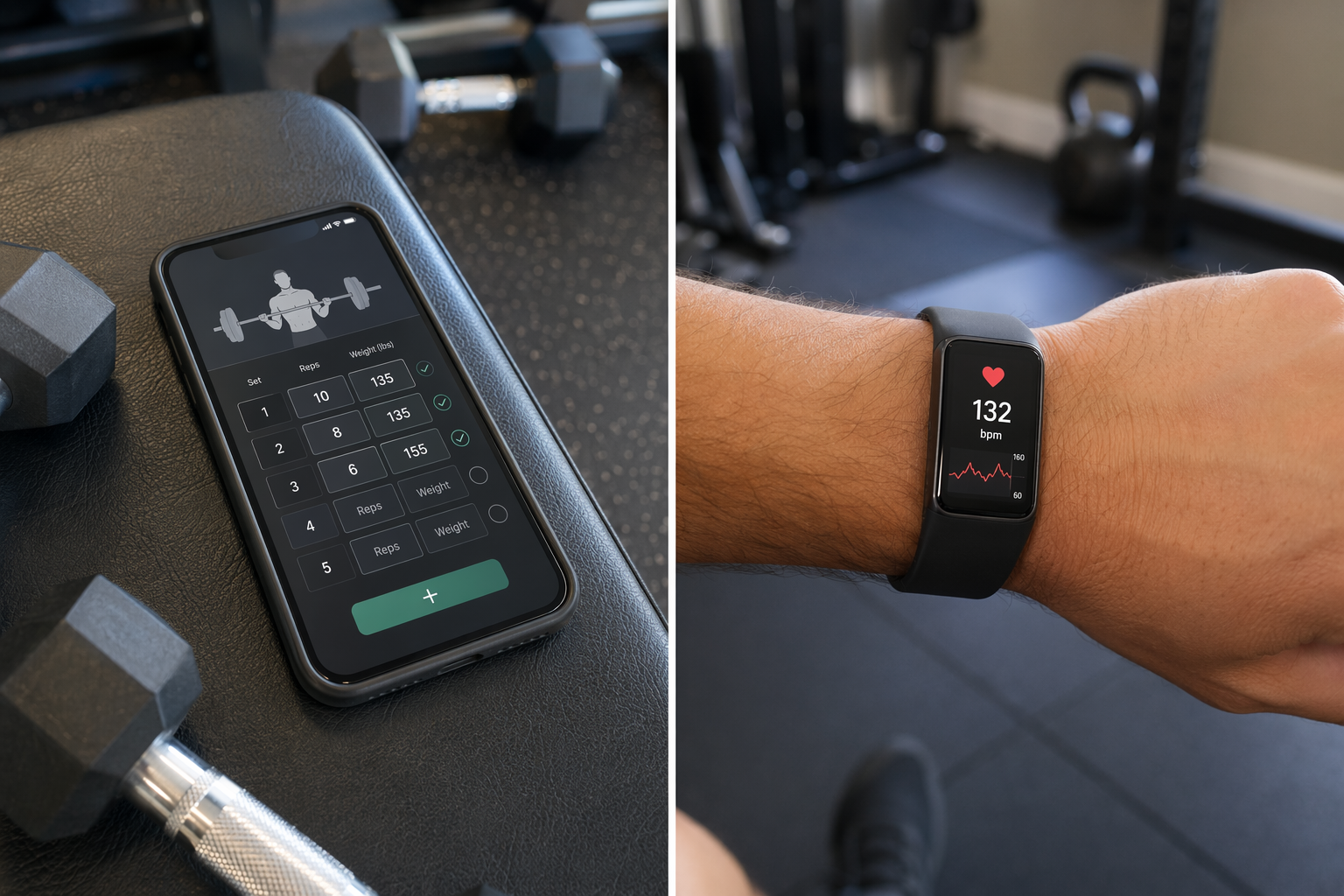
The Two-Track Problem: Why "Best Workout Tracker" Is Actually Two Questions
Search for "best workout tracker" and you will find two entirely different categories of products competing for the same keyword. One set of results points to wrist-worn devices like the Fitbit Charge 6, Garmin Venu 4, or Apple Watch Series 11 — hardware that tracks your steps, heart rate, sleep, and recovery metrics around the clock. The other set points to smartphone apps like Hevy, Strong, or Fitbod — software where you log your sets, reps, and weights during a training session.
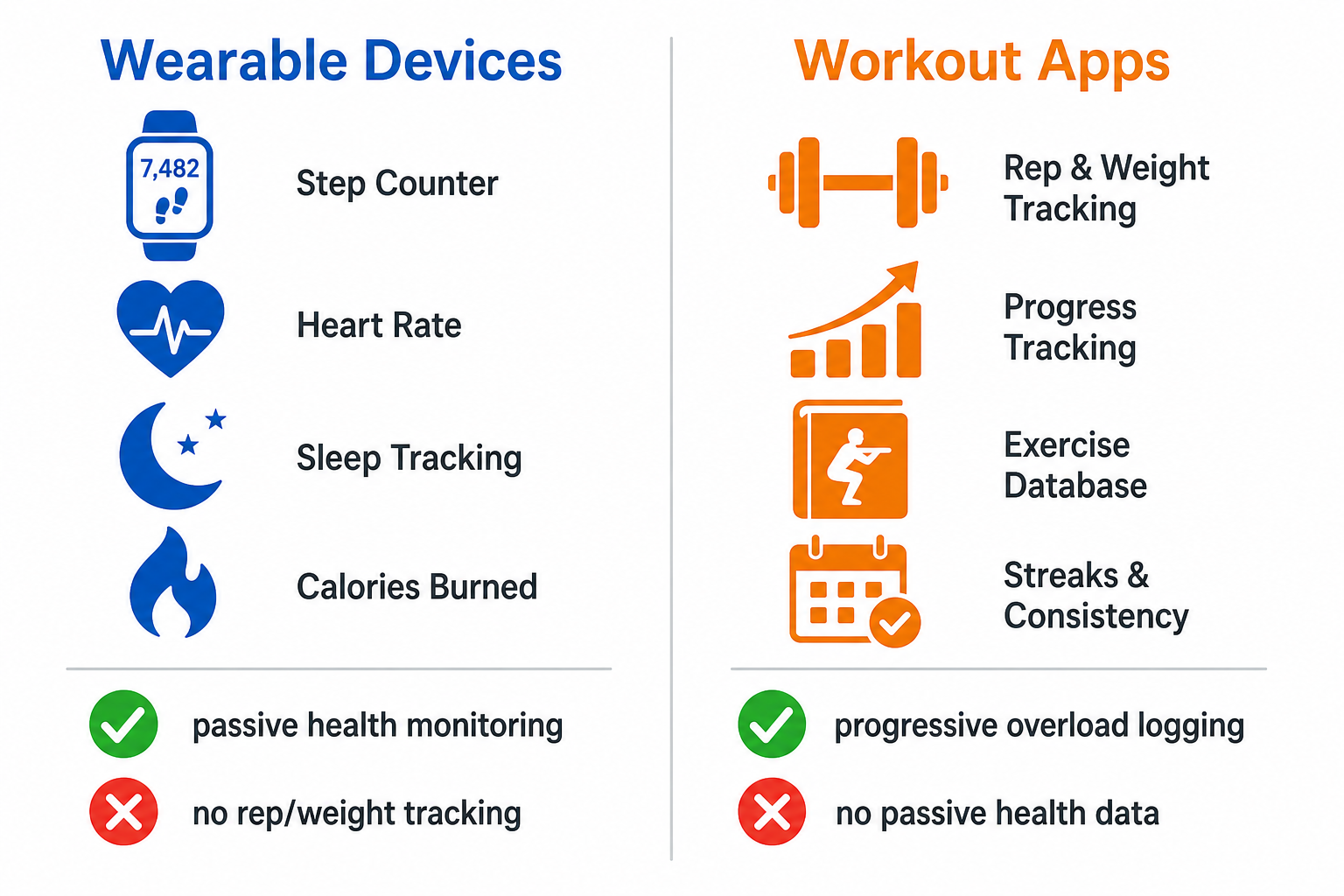
This ambiguity is not a search-engine quirk. It reflects a real gap in how most home fitness users think about tracking. A wearable and a workout app do not compete with each other. They serve different jobs. A Fitbit Inspire 3 can tell you how many steps you took yesterday and how well you slept, but it cannot tell you whether your bench press has gone up 10 pounds over the last month. A strength logging app like Hevy can show you a per-exercise performance graph tracking your squat progression over 12 weeks, but it cannot measure your resting heart rate or HRV while you sleep.
The core thesis of this guide is straightforward: the "best workout tracker" is not a single product. It is a combination of tools. Most home fitness users will get the most value by pairing a wearable for passive health monitoring with a workout app for active training logging. But the optimal combination depends entirely on your primary training style and your budget. This article will walk through what each tool does well, where each falls short, and how to build the right tracking setup for your specific situation.
What Wearables Do Well (and Where They Fall Short)
Wearable fitness trackers excel at one thing that no app can replicate: passive, 24/7 data collection. You put the device on your wrist and it continuously monitors your biometrics without any input from you. This makes wearables uniquely valuable for understanding your overall health and recovery status.
The Strengths: Passive Health Monitoring at Scale
Modern wearables have become remarkably accurate for the metrics they are designed to measure. In Wirecutter's extensive testing of 52 fitness trackers since 2015, the Fitbit Inspire 3 achieved the best step-count accuracy they have ever recorded — it was off from their reference pedometer by just 0.32% over a two-day period. For heart rate, CNET's lab testing, which involved running over 30 miles with multiple devices, found the Apple Watch Series 11 had the lowest average heart rate error at 0.98% (about 1.40 BPM), making it the most accurate wrist-based HR monitor they tested.
Beyond steps and heart rate, wearables provide data that is difficult to capture any other way at home:
- Sleep stage tracking and sleep quality scores
- Heart rate variability (HRV), which is a key indicator of recovery and readiness to train
- Resting heart rate trends over weeks and months
- Automatic workout detection for activities like walking, running, and cycling
- Calorie expenditure estimates (though these have well-documented accuracy limitations)
The Critical Weakness: No Strength Training Tracking
Here is the hard truth that wearable marketing often glosses over: no fitness tracker on the market can track your sets, reps, or the weight you lifted. As Wirecutter explicitly notes in their review, wrist-based trackers "do not track weight, reps, or sets for strength training." A Garmin Venu 4 might detect that you are doing a strength activity and log it as a generic "Strength" session, but it will have no idea whether you did 3 sets of 10 reps at 135 pounds or 5 sets of 5 reps at 185 pounds.
This gap is not a minor omission. For anyone whose training revolves around progressive overload — systematically increasing the weight, reps, or volume over time — the inability to log and track this data is a dealbreaker. A wearable alone cannot tell you whether you are actually getting stronger.
What Workout Apps Do Well (and Where They Fall Short)
Workout logging apps exist to solve the exact problem that wearables ignore: capturing the details of your training session so you can track progress over time. They are purpose-built for strength training, progressive overload, and program management.
The Strengths: Progressive Overload and Program Management
The Garage Gym Reviews (GGR) team tested over 70 workout apps and found that only three apps earned a perfect 5/5 score for progressive overload: Hevy, JuggernautAI, and Boostcamp. This is a telling statistic. Most apps handle basic logging, but very few do it well enough to genuinely support long-term strength progression.
What a good workout app provides that no wearable can:
- Per-exercise performance graphs showing weight and volume trends over weeks and months
- Automatic tonnage calculations (total volume lifted per session)
- Exercise libraries with demonstration videos and form cues — Caliber's free tier alone offers 500+ exercises with video demos
- Pre-built programs and the ability to create custom routines with specific sets, reps, and rest periods
- PR (personal record) tracking for lifts, which is the core mechanism of progressive overload
Hevy, for example, offers a generous free tier that includes unlimited workout logging, progress graphs, a monthly training report, social features, and Strava integration. Its paid tier is just $2.99 per month or $23.99 per year. The app has earned 4.9/5 ratings on both the App Store and Google Play, reflecting strong user satisfaction with its core logging functionality.
The Critical Weakness: No Passive Health Data
Workout apps are session-based tools. They only collect data when you open them and log a workout. They cannot tell you how well you slept last night, what your resting heart rate was this morning, or whether your HRV indicates you are ready for a hard training session. This is not a design flaw — it is a fundamental limitation of the platform. A smartphone app has no access to continuous biometric data unless it is connected to a wearable.
This means that if you rely solely on a workout app, you are flying blind on recovery. You might push hard on a day when your body is under-recovered, increasing your risk of injury or overtraining. Conversely, you might take an unnecessary rest day when your recovery metrics actually support training.
Best Combinations by Training Style and Budget
The most effective tracking setup is not a single device or app — it is a pairing that covers both active training logging and passive health monitoring. The right combination depends on what you primarily do in your home gym. Below are three specific, actionable recommendations for common training profiles.
| Training Profile | Recommended App | Recommended Wearable | Total Monthly Cost | Key Benefit |
|---|---|---|---|---|
| Strength-focused (progressive overload, barbell/dumbbell training) | Hevy (free or $2.99/mo Pro) | Whoop 5.0 ($199–$359/yr subscription) | $16.58–$32.92/mo | App tracks every set, rep, and weight; wearable provides HRV and recovery data to guide training intensity |
| Cardio-focused (running, cycling, swimming) | Strava (free or $5/mo Summit) | Garmin Forerunner or Venu series ($250–$750) | $5–$10/mo (device cost amortized separately) | Wearable provides GPS, pace, and heart rate data; app provides route analysis, segment tracking, and community features |
| General fitness / mixed training on a budget | Caliber (free tier) or Nike Training Club (free) | Fitbit Charge 6 ($160) | $0/mo (one-time device cost) | Free app provides structured workouts and logging; wearable provides step count, heart rate, and sleep tracking without any subscription |
For strength-focused users, the Hevy + Whoop combination is particularly powerful. Hevy handles the granular training data — every set, rep, and weight you lift, with automatic tonnage calculations and per-exercise performance graphs. Whoop provides the recovery context — your HRV, resting heart rate, and sleep quality — so you know whether to push hard or pull back on any given day. If you want to understand how HRV and readiness scores work, our guide to fitness tracker recovery metrics explains what these numbers actually mean for your training.
For cardio-focused users, the wearable takes the lead role. A Garmin watch with built-in GPS provides accurate pace, distance, and heart rate data during runs or rides. Strava then serves as the logging and analysis layer, tracking your routes, personal records, and trends over time. If you are curious about how accurate Garmin's sensors actually are, our deep dive into Garmin fitness tracker accuracy covers the science behind their step, heart rate, and sleep tracking.
For general fitness on a budget, the Caliber free tier combined with a Fitbit Charge 6 is hard to beat. Caliber provides ad-free access to 500+ exercises with demonstration videos, strength logging, and group communities — all at no cost. The Fitbit Charge 6, which Wirecutter and CNET both rate highly, offers built-in GPS, 40+ exercise modes, and up to 7 days of battery life for around $160. This setup covers both training logging and passive health monitoring for a one-time device cost and zero monthly fees.
Cost Analysis: App-Only vs. Wearable-Only vs. Combined
Cost is often the deciding factor for home fitness users, especially those just starting out. The good news is that a combined app + wearable setup does not have to be expensive. Below is a breakdown of what each approach costs, from the most budget-friendly to the premium end of the spectrum.
| Setup Type | Upfront Cost | Monthly Subscription | Total Year 1 Cost | What You Get |
|---|---|---|---|---|
| App-only (free tier) | $0 | $0 | $0 | Full workout logging, progress graphs, exercise libraries. No passive health data. |
| App-only (paid tier) | $0 | $2.99–$15.99/mo | $35.88–$191.88 | Premium features like custom programs, advanced analytics, AI coaching. Still no passive health data. |
| Wearable-only (budget) | $100–$160 | $0 (Fitbit basic features) | $100–$160 | Step count, heart rate, sleep tracking, basic workout detection. No rep or weight logging. |
| Wearable-only (premium) | $400–$750 | $0–$10/mo (Garmin Connect is free) | $400–$870 | GPS, advanced metrics (HRV, VO2 max), training readiness. Still no rep or weight logging. |
| Combined (budget) | $50–$160 | $0 | $50–$160 | Free Hevy or Caliber app + used Fitbit Inspire 3 or new Charge 6. Covers both logging and passive health. |
| Combined (premium) | $400–$800 | $16.58–$32.92/mo | $599–$1,195 | Apple Watch Ultra or Garmin + Fitbod or Hevy Pro + Whoop subscription. Full biometric and training data. |
The key takeaway from this cost analysis is that a combined setup can be remarkably affordable. A used Fitbit Inspire 3 (which Wirecutter found to have the best step-count accuracy they have ever measured) can often be found for $50–$80 on the secondary market. Pair it with the free tier of Hevy or Caliber, and you have a complete tracking system — covering both active training logging and passive health monitoring — for less than the cost of a single premium wearable.
At the other end of the spectrum, a premium combined setup like an Apple Watch Ultra paired with Fitbod and a Whoop subscription can easily exceed $1,000 in the first year. The question is whether the additional data and features translate into better training outcomes for your specific situation. For most home fitness users, the budget combined setup delivers 80% of the value at 10% of the cost.
Decision Flowchart: How to Choose Your Tracking Setup
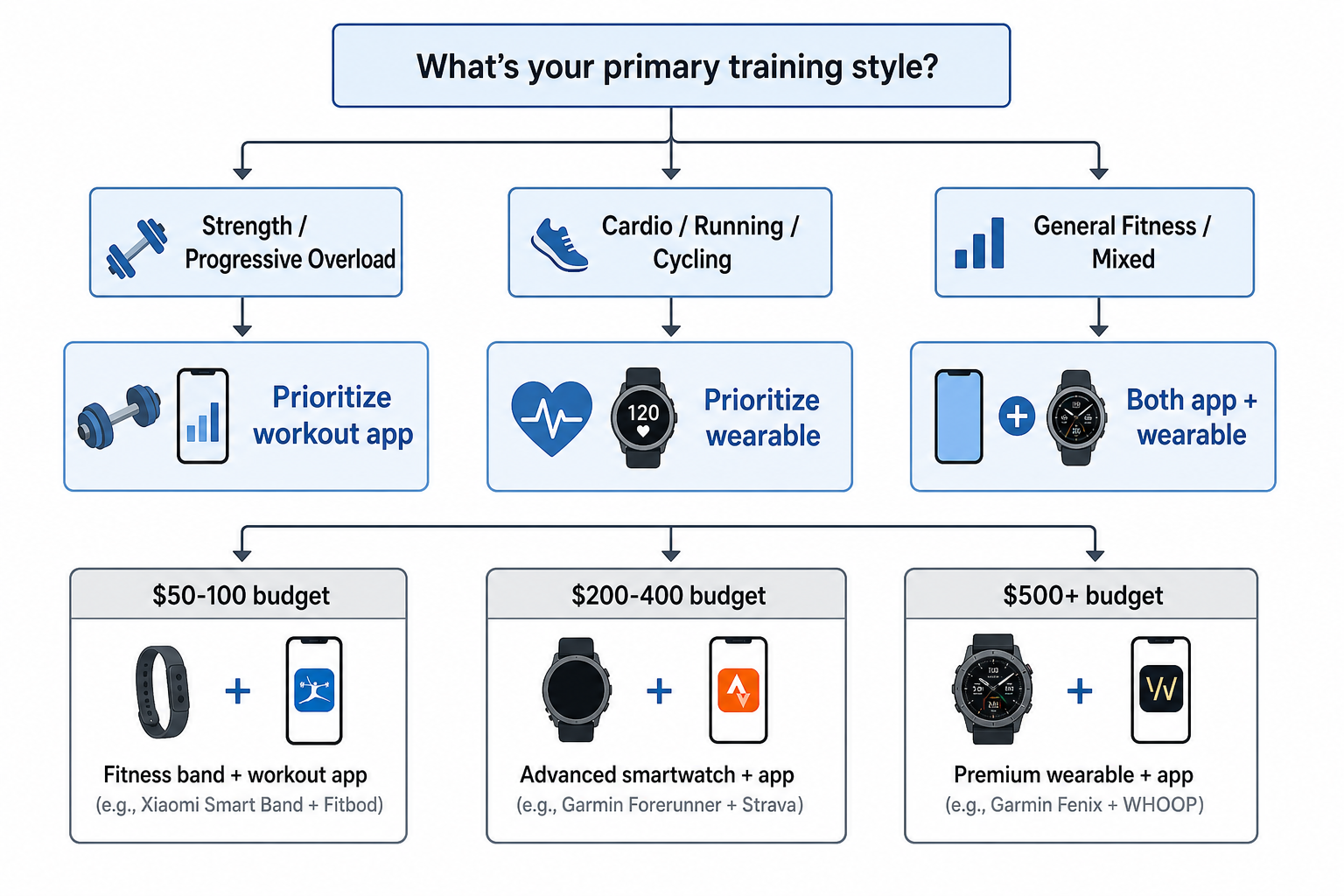
If you are still unsure which path to take, the decision framework below will help you narrow down the options based on your primary training style and budget. The logic is simple: your training style determines which tool should take the lead, and your budget determines how much you can invest in the supporting tool.
Step 1: Identify Your Primary Training Style
- Strength / Progressive Overload (barbell, dumbbell, bodyweight strength training): Prioritize a workout app. Your primary tracking need is logging sets, reps, and weights to drive progressive overload. A wearable is a valuable secondary addition for recovery data, but the app is non-negotiable.
- Cardio / Running / Cycling (outdoor or indoor endurance training): Prioritize a wearable with GPS. Your primary tracking need is pace, distance, heart rate, and route data. An app like Strava is useful for analysis and community, but the wearable is the primary data source.
- General Fitness / Mixed (combination of strength, cardio, and flexibility): Plan for both. You will benefit from a workout app for your strength sessions and a wearable for your cardio and recovery tracking. Start with whichever tool fits your budget and add the second one later.
Step 2: Match Your Budget
Once you know which tool to prioritize, use the budget tiers below to build your setup:
- Under $100 total: Start with a free app (Hevy, Caliber, or Nike Training Club). Add a used Fitbit Inspire 3 or Charge 6 when your budget allows. This covers both logging and passive health monitoring for minimal cost.
- $200–$400 total: Get a mid-range wearable (Fitbit Charge 6 at $160 or Garmin Venu 4 at around $300) and pair it with a free or low-cost app. The wearable becomes your primary device for cardio and recovery, while the app handles strength logging.
- $500+ total: Consider a premium wearable (Apple Watch Series 11 or Garmin Forerunner) and a paid app subscription (Hevy Pro at $2.99/mo or Fitbod at $15.99/mo). Add a Whoop 5.0 if recovery metrics are a priority for your training.
If you are still unsure which strength training app to choose, our guide on how to choose a strength training app when you train at home walks through the seven key questions to ask before downloading. For those with limited equipment, our roundup of the best strength training apps for home gyms with limited equipment provides detailed recommendations for setups where space and gear are constrained.
The Verdict: You Probably Need Both — But Start With One
The "best workout tracker" is not a single product. It is a system. Wearables and workout apps serve complementary roles, and the most effective tracking setup combines both. A wearable gives you the passive health data — steps, sleep, heart rate, HRV — that tells you how your body is responding to training. A workout app gives you the active training data — sets, reps, weights, progression — that tells you whether your training is actually working.
For beginners, the smartest approach is to start with a free workout app. Download Hevy, Caliber, or Nike Training Club and spend a few weeks building the habit of logging your workouts. Once that habit is established, add a budget wearable like a Fitbit Inspire 3 or Charge 6 to start capturing your passive health data. This phased approach keeps your upfront investment low while building the tracking discipline that will serve you for years.
For intermediate users who already have a consistent training routine, the question is not whether to get both, but which combination best serves your specific training style. Strength-focused athletes should invest more in their app and add a wearable for recovery context. Cardio-focused athletes should invest more in their wearable and use an app for analysis and community. General fitness enthusiasts should aim for a balanced, budget-friendly combination that covers both bases without breaking the bank.
The bottom line is simple: stop searching for the one "best workout tracker" and start thinking about what you actually need to track. If you lift weights, you need an app. If you run or cycle, you need a wearable. If you do both — and most home fitness users do — you need both tools working together.
This result comes from one real apartment under the stated conditions — it is a strong signal, not a guarantee your space will measure identically.
Builds this evidence supports
8-Week Compact Home Gym Strength Program: Build Muscle with Adjustable Dumbbells, Bands, and a Cable Tower
If you own a compact home gym setup—adjustable dumbbells, resistance bands, and a cable tower—this eight-week strength program shows how to program each resistance type for progressive overload without unlimited weight stacks.
Spot something off?
If this result didn't match your own space, let us know — floor-damage and noise claims carry real deposit-risk consequences if we get them wrong.