
Which iPhone Fitness App Fits Your Goal? A Decision Framework Based on Workout Type, Apple Watch Ownership, and Budget
Overwhelmed by fitness app choices for your iPhone? This guide presents a three-axis decision framework — Apple Watch ownership, primary workout type, and budget — to help you choose between Apple Fitness+, Nike Training Club, Strava, Hevy, Future, and more.
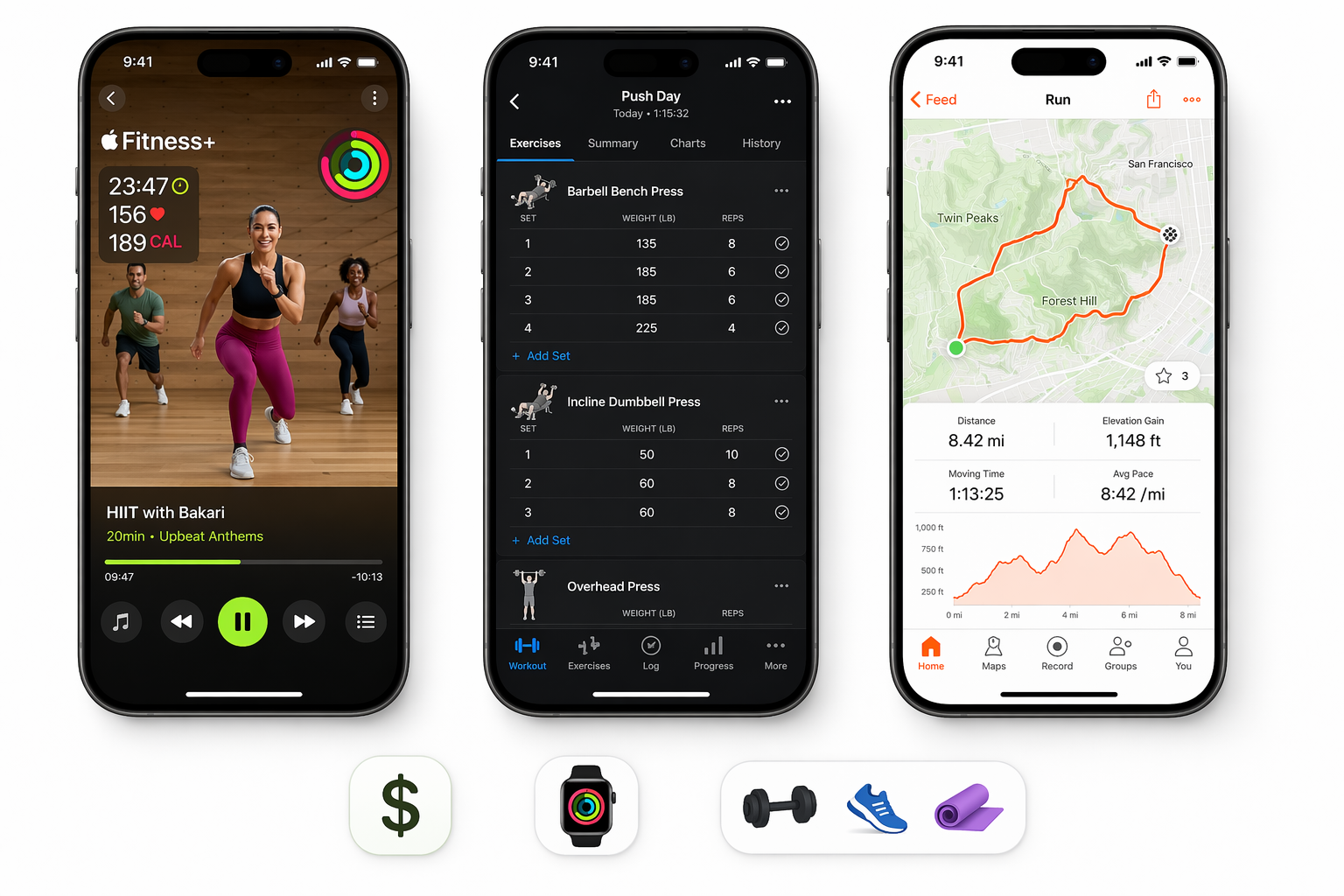
The App Overload Problem: Why Choosing a Fitness App for Your iPhone Is Harder Than It Should Be
Open the App Store and search for "fitness." You will be met with hundreds of options, each promising to transform your workouts, track every metric, or connect you with a world-class trainer. The problem is not a lack of choice — it is that most of these apps are designed for a generic user who does not exist. An app built for a competitive cyclist looks nothing like one built for a beginner doing yoga in their living room, yet they sit side by side in the same search results.
This guide cuts through the noise by giving you a structured decision framework. Instead of a flat ranked list with a single "winner," you will evaluate apps along three axes that actually determine whether an app will serve you well: your device (specifically, whether you own an Apple Watch), your primary workout type, and your budget. By the end, you will know exactly which app to download first — and which ones to skip.
Your Decision Framework: Three Axes That Actually Matter
Most fitness app roundups rank apps by overall score, which is nearly useless because it ignores the context of how you actually train. The three axes below reflect the real constraints iPhone users face when choosing an app.
- Apple Watch ownership: If you own an Apple Watch, Apple Fitness+ offers deep integration that no third-party app can match — real-time heart rate on screen, automatic workout ring syncing, and a unified activity dashboard. Without a Watch, Fitness+ still works for guided classes, but you lose the metrics layer that makes it compelling. This axis alone can narrow your options by half.
- Primary workout type: The app that excels for guided studio-style classes (HIIT, yoga, cycling) is different from the app built for logging sets and reps in a strength program, which is different again from the app designed for GPS route tracking on a run. Trying to use one app for everything usually means compromising on the features that matter most for your main activity.
- Budget: Fitness app pricing spans from completely free to nearly $200 per month. The average workout app costs around $34 per month according to Garage Gym Reviews' testing of over 70 apps, but several top-rated options cost well under $15 per month — and some are entirely free. Knowing your ceiling prevents you from evaluating apps that are outside your range.
If you are brand new to home fitness and unsure what your primary workout type even is, start with our beginner's decision framework first. The guide below extends that framework by adding the Apple Watch ownership axis and covering apps for more specific training goals.
Tier 1: Best for Apple Watch Owners — Apple Fitness+
If you own an Apple Watch, Apple Fitness+ is the most seamless fitness app you can install on your iPhone. The integration goes far beyond what any third-party app can offer: your heart rate appears on screen during workouts, your activity rings close automatically, and your workout data flows into the Health app without any manual syncing or configuration.
The service offers over 5,000 live and on-demand workouts, according to CNET's June 2026 guide, spanning core, HIIT, strength, yoga, rowing, cycling, treadmill, Pilates, and more. Workout lengths range from 10 to 60 minutes, making it easy to fit a session into a tight schedule. PCMag named it "Best Value" in its April 2026 roundup, noting the $9.99 per month price (or $79.99 per year) is shareable with up to five family members via Family Sharing. A free one-month trial is available for new subscribers.
Fitness+ requires an iPhone 8 or newer. It is available in over 28 countries with workouts in multiple languages, per WIRED's January 2026 update. The main limitation for strength-focused users is that Fitness+ offers guided strength classes but no dedicated set-and-rep logging or progressive overload tracking — which is why Tier 4 exists.
Tier 2: Best Free Option — Nike Training Club
Nike Training Club is the only major fitness app that is entirely free with no subscription required. Multiple 2026 sources — including PCMag, CNET, and Garage Gym Reviews — confirm it is 100% free, with over 300 workouts across more than 10 categories including HIIT, strength, yoga, Pilates, cross-training, bodyweight, and core. All workouts are led by certified trainers, and the app includes structured programs that progress over multiple weeks.
PCMag named Nike Training Club "Best Overall" in its April 2026 roundup, specifically calling out its variety — the app includes exercises for late pregnancy, family-friendly activities, hour-long strength sessions, and short yoga flows. Garage Gym Reviews also named it "Best Free Workout App" in its June 2026 guide, noting the workouts span 10+ categories led by certified instructors.
For a deeper look at what the free tiers of major apps actually include, see our free workout apps feature comparison.
Tier 3: Best for Runners and Cyclists — Strava
For outdoor cardio — running, cycling, hiking, or any activity where GPS tracking matters — Strava is the dominant choice. Its free tier is generous: you get GPS route tracking, a social feed where you can follow friends and give kudos, and basic performance stats like pace, distance, and elevation.
The premium subscription, priced at $11.99 per month or $79.99 per year according to PCMag and CNET, adds segment leaderboards (competing against other users on specific route segments), advanced analytics like fitness and freshness scores, and a beacon safety feature that lets selected contacts track your location in real time. CNET also notes a student plan at $40 per year and a family plan for up to four accounts at $140 per year.
Strava integrates strongly with Apple Watch and other major fitness trackers, making it a natural companion for anyone who already tracks outdoor activities on a wearable. PCMag named it "Best for Runners and Cyclists" in its April 2026 roundup, and Garage Gym Reviews called it "Best Free Workout App for Cyclists" in its free apps guide.
Tier 4: Best for Strength Training — Hevy, Strong, and Fitbod
Apple Fitness+ offers guided strength classes, but it does not provide a dedicated set-and-rep logging interface or progressive overload tracking. If your primary training style is strength — following a program where you track weights, sets, and reps over time — you need a purpose-built strength tracking app.
Three apps stand out for different use cases within strength training:
- Hevy (free, with optional paid tiers): Garage Gym Reviews named Hevy "Best Free Workout App for Community" in its June 2026 free apps guide, highlighting its strong social feed, customizable routines, and basic progress charts. Zapier's January 2025 review called Hevy "Best fitness app for busy people," noting its customizable rest trackers, ability to sort by workout location (home vs. gym) or equipment, and solid Apple Watch integration. The free tier is the most generous among strength tracking apps.
- Strong (free with paid plans from $3.99/month): Zapier named Strong "Best fitness app for strength training," citing its comprehensive exercise library with demo videos and the paid subscription's analytics features like best set and PR tracking. At roughly $5 per month, it is a low-cost option for dedicated lifters who want structured logging without a social layer.
- Fitbod ($15.99/month): Garage Gym Reviews named Fitbod "Best AI Workout App" at $15.99 per month. It uses artificial intelligence to adapt workouts based on your available equipment, recent training volume, and recovery state. The trade-off is a limited free trial — only three workouts — and the higher monthly cost. Fitbod is best for users who want automated program generation rather than manual logging.
For a more detailed breakdown of these and other strength training apps, see our complete strength training apps comparison guide.
Tier 5: Best for Personal Coaching — Future
If you want the accountability and customization of a personal trainer without the in-person cost, Future is the premium option. At $199 per month (with a first-month discount to $99, per CNET and WIRED), Future connects you with a real human coach who designs a custom training plan, checks in weekly, and communicates with you directly through the app.
PCMag named Future "Best for Personalized Training" in its April 2026 roundup, noting that supported devices include Apple Watch. WIRED's January 2026 review called it "Best Real Health Coach," with reviewer Billy Brown describing a weightlifting coach who FaceTimed him for form checks. Garage Gym Reviews also named Future "Best Personal Training App" at $199 per month.
Is $199 per month worth it? Compared to in-person personal training, which typically runs $50–$100 per session in most US cities, Future is significantly cheaper if you train three or four times per week. But it is still a major investment compared to any other app on this list. Future is best suited for users who have tried self-guided apps and found they lack the consistency or programming knowledge to make progress on their own.
Quick Comparison: Pricing, Free Tiers, and Key Features at a Glance
| App | Pricing | Free Tier | Primary Workout Type | Apple Watch Support | Key Differentiator |
|---|---|---|---|---|---|
| Apple Fitness+ | $9.99/mo or $79.99/yr | 1-month free trial | Guided classes (HIIT, yoga, strength, cycling, rowing, treadmill, Pilates) | Deep integration (on-screen HR, ring syncing) | Best ecosystem integration for Apple Watch owners |
| Nike Training Club | Free | Full app is free | Guided classes (HIIT, strength, yoga, Pilates, bodyweight) | Basic | Only major app that is 100% free |
| Strava | Free; Premium $11.99/mo or $79.99/yr | GPS tracking, social feed, basic stats | Running, cycling, outdoor cardio | Strong integration | Best for outdoor route tracking and social competition |
| Hevy | Free; optional paid tiers | Generous free tier with social features | Strength training (set/rep logging) | Good | Most generous free strength tracking option |
| Strong | Free; paid from $3.99/mo | Basic logging free; analytics in paid | Strength training (set/rep logging) | Good | Best PR tracking and analytics at low cost |
| Fitbod | $15.99/mo | 3-workout free trial | Strength training (AI program generation) | Good | Best AI-driven adaptive programming |
| Future | $199/mo (first month $99) | None | Personal coaching (custom programming) | Supported | Only app with a real human coach |
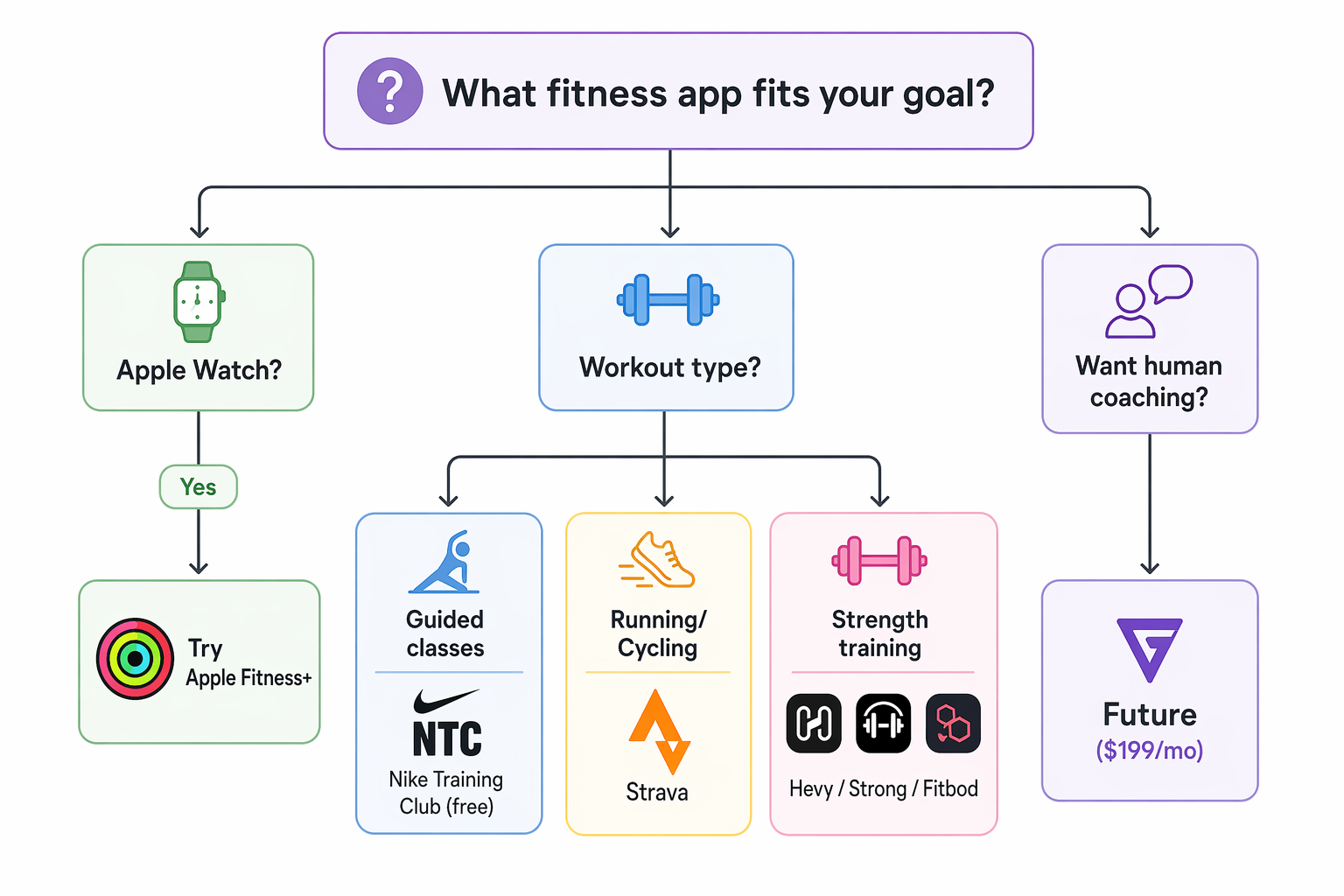
How to Choose Based on Your Goal: A Simple Decision Flow
Here is the decision flow in its simplest form. Start at the top and follow the path that matches your situation:
- You own an Apple Watch and want guided classes: Start with Apple Fitness+. The integration is unmatched, and the library of 5,000+ workouts means you will not run out of variety. Use the one-month free trial to decide if the class style suits you.
- You want a completely free app with variety: Download Nike Training Club. It is the only major app that costs nothing, and the certified trainer-led workouts cover everything from HIIT to prenatal fitness. No credit card required.
- You run or cycle outdoors: Strava's free tier gives you GPS tracking and social features. If you want segment leaderboards and advanced analytics, the $11.99/month premium is worth it for competitive athletes.
- You track strength training: Hevy if you want a generous free tier with community features. Strong if you want low-cost PR tracking and analytics. Fitbod if you want AI to generate your workouts automatically and are willing to pay $15.99/month.
- You want a real human coach: Future at $199/month is the only option that provides personalized programming and direct coach communication. Use the first-month discount to test whether the coaching relationship improves your consistency.
This result comes from one real apartment under the stated conditions — it is a strong signal, not a guarantee your space will measure identically.
Builds this evidence supports
No build currently links to this specific test. Browse all builds with a matching tag.
Spot something off?
If this result didn't match your own space, let us know — floor-damage and noise claims carry real deposit-risk consequences if we get them wrong.