
Best Garmin Fitness Tracker for Home Gym Users: Which Model Works Best for Indoor Training?
Most Garmin buying guides focus on runners, but home gym users need different priorities. This guide compares the best Garmin models for indoor strength, HIIT, treadmill, and cycling workouts, with practical setup tips and recovery metric guidance.
Why Home Gym Users Need Different Tracker Criteria Than Runners
Most Garmin buying guides are written for runners. They obsess over multi-band GPS lock times, route navigation, elevation profiles, and race-prediction algorithms. If you train in a home gym — lifting weights, doing HIIT intervals on a mat, riding a stationary bike, or running on a treadmill — those outdoor-focused features are not just irrelevant; they are costing you money.
Home gym users need a different set of priorities. Your tracker spends most of its time indoors, away from GPS signals. What matters instead is how accurately it reads your heart rate during a heavy set of squats, whether it can count your reps during a dumbbell circuit, how well it tracks your sleep and recovery when you wear it 24/7, and whether it has dedicated activity profiles for the workouts you actually do — strength, HIIT, indoor cycling, treadmill running, and rowing.
The good news is that Garmin makes several models that excel at indoor training. The better news is that by skipping the outdoor-focused Forerunner and Fenix lines, you can save between $200 and $600 while getting a watch that is actually better suited to your home gym setup.
Key Features for Indoor Training: What to Look For in a Garmin Watch
Before comparing specific models, it helps to understand which Garmin features actually serve a home gym routine. Here is what to prioritize — and what to treat as a bonus rather than a requirement.
Strength Training Mode with Rep Counting
Garmin's strength training activity tracks sets, reps, and rest time automatically. During a set, the watch uses its accelerometer to detect movement patterns and count repetitions. After you finish a set and rest, it logs the rep count and moves to the next set. In practice, this works well for large, compound movements like squats and deadlifts but is less reliable for isolation exercises or movements where the watch arm stays relatively still.
The watch cannot distinguish between different strength exercises on its own — it will log a set of 10 reps, but you need to manually enter which exercise you performed after the workout in Garmin Connect. This is a minor inconvenience that becomes routine after a few sessions.
Indoor Activity Profiles
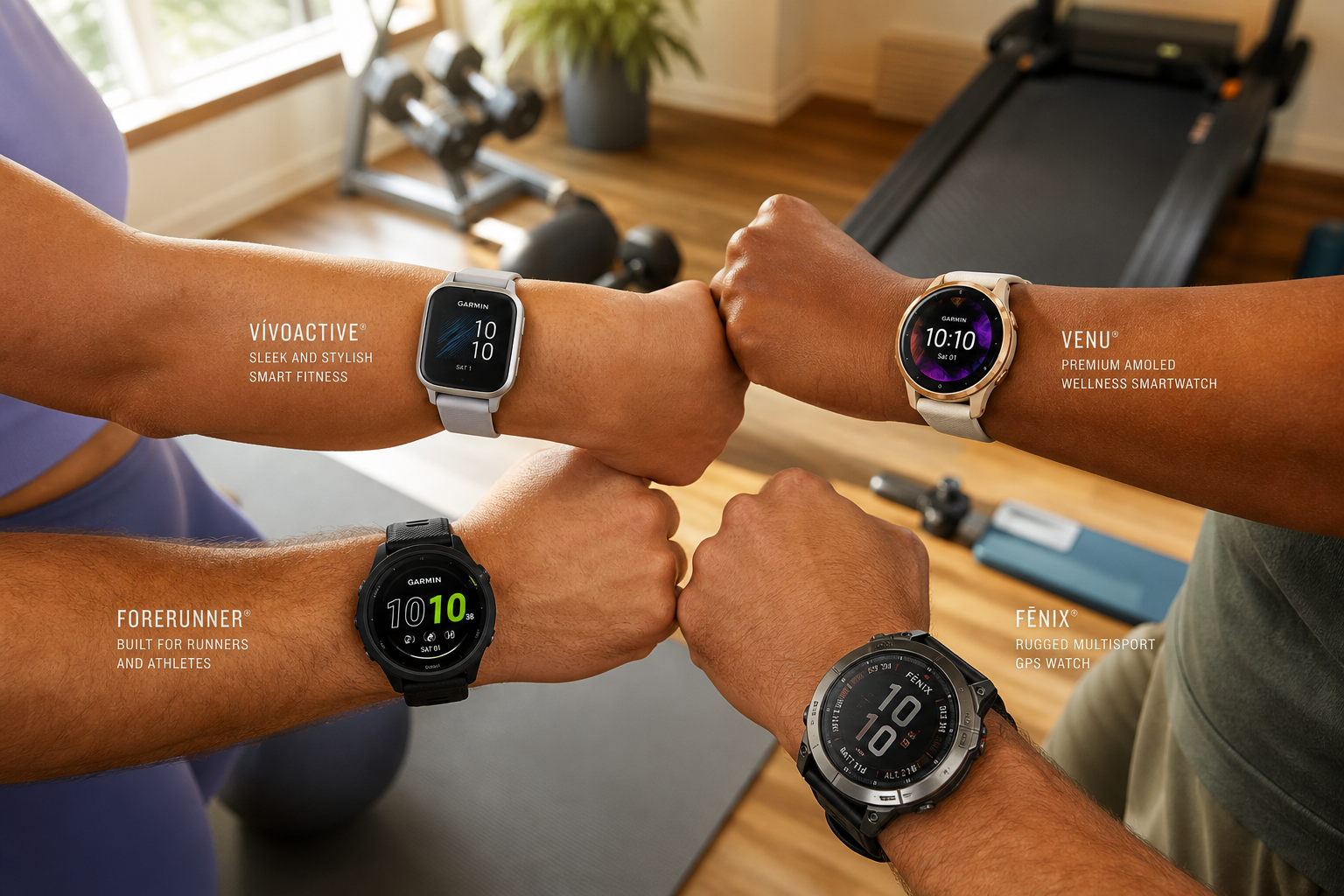
A good home gym tracker needs dedicated profiles for the workouts you actually do. The Vivoactive 6, for example, ships with over 30 sports apps including strength, HIIT, cardio, Pilates, yoga, indoor running, and indoor cycling. The Venu 4 goes further with 80 preloaded workouts. These profiles adjust what data the watch displays and records — indoor run mode uses the accelerometer for distance instead of GPS, while strength mode focuses on rep counting and rest timers.
Body Battery and HRV Status
Body Battery is Garmin's energy reserve metric, calculated from heart rate variability (HRV), stress, and activity data. HRV Status tracks your overnight heart rate variability and compares it to your personal baseline. For home gym users training without a coach, these two metrics provide objective recovery data that helps you decide whether to push hard or take an easy day. WIRED highlights Body Battery, Training Status, and Training Readiness as Garmin's top training features — and they are available on mid-range models like the Vivoactive 6 and Venu 4.
Sleep Tracking and Recovery
Home gym users who train hard need quality sleep for adaptation. Garmin's sleep tracking provides sleep stages (light, deep, REM), a sleep score, and insights into how your sleep affects your recovery. The watch must be worn to bed consistently for this data to be useful, which makes battery life a critical factor — more on that later.
Top Garmin Picks for Home Gym Users
Based on the features above, three Garmin models stand out for home gym use. Each occupies a different price and capability tier, so your choice depends on budget and whether you want premium extras like a built-in flashlight or dual-frequency GPS for more accurate treadmill distance.
| Model | Price | Battery Life | Key Indoor Features | Best For |
|---|---|---|---|---|
| Vivoactive 6 | $299 | 11 days (5 days with always-on display) | 30+ sports apps (strength, HIIT, cardio, Pilates, yoga, indoor run/cycle), Elevate 4 optical sensor, Body Battery, HRV status, sleep tracking, 5ATM water resistance | Best value — covers all essential home gym features without paying for outdoor extras |
| Venu 4 | $549 | 12 days | 80 preloaded workouts, dual-frequency GPS, built-in LED flashlight, 2,000-nit AMOLED display, premium metal design, 45mm and 41mm sizes | Premium all-rounder — the flashlight is genuinely useful for early-morning or late-night gym sessions, and dual-frequency GPS improves treadmill distance accuracy |
| Forerunner 265 | $449 | 15 days | AMOLED display, Multi-Band GPS, strength/HIIT/cardio/indoor run profiles, thorough training analysis, 42mm and 46mm sizes | Best for cardio-focused home users — longer battery life and more advanced running metrics if you split time between treadmill and outdoor running |
Vivoactive 6 ($299) — Best Value for Home Gym Users
The Vivoactive 6 is the sweet spot for most home gym owners. At $299, it includes all the indoor training features you actually need: strength mode, HIIT profiles, indoor running and cycling, Body Battery, HRV status, and sleep tracking. The 11-day battery life means you can wear it 24/7 for recovery tracking without charging every other day. WIRED calls it the best overall Garmin watch, noting its "gorgeous, clear AMOLED touchscreen" and access to all of Garmin's sensors including heart rate, blood oxygen, compass, gyroscope, accelerometer, and thermometer.
What you give up compared to the Venu 4: no dual-frequency GPS (not critical for indoor training), no built-in flashlight, and an Elevate 4 optical sensor rather than the newer Gen 5 sensor found in the Forerunner 970. For strength and HIIT training at home, none of these omissions are dealbreakers.
Venu 4 ($549) — Premium All-Rounder with Practical Extras
The Venu 4 is the upgrade pick. At $549, it adds a dual-frequency GPS that improves distance accuracy on the treadmill (more on calibration below), a built-in LED flashlight that is genuinely handy for early-morning sessions, and 80 preloaded workouts — more than double the Vivoactive 6's count. Trusted Reviews names it the best all-rounder Garmin watch, with a refined design available in 45mm and 41mm sizes.
The 12-day battery life is comparable to the Vivoactive 6, and the 2,000-nit AMOLED display is bright enough to read easily in any home gym lighting. If your budget allows and you want the best indoor training experience with a few genuinely useful extras, the Venu 4 is the pick.
Forerunner 265 ($449) — Best for Cardio-Focused Home Users
The Forerunner 265 sits between the Vivoactive 6 and Venu 4 in price at $449, but it is designed primarily for runners. For home gym users who spend most of their indoor training time on a treadmill or stationary bike, the Forerunner 265 offers the longest battery life of the three at 15 days and more advanced training analysis features. Garage Gym Reviews notes it tracks heart rate, Body Battery, sleep, recovery time, and stress — the same core recovery stack as the other models.
The trade-off is that the Forerunner 265's strength training features are less emphasized than on the Vivoactive or Venu lines. If your home gym routine is 80% cardio and 20% strength, this is a strong choice. If you lift more than you run, the Vivoactive 6 is a better fit at a lower price.
Features Home Gym Users Can Safely Ignore
One of the easiest ways to overspend on a Garmin watch is paying for outdoor features you will never use. Here is what home gym users can safely deprioritize:
- Multi-band GPS and dual-frequency GPS: These improve accuracy in dense urban areas or under tree cover. Indoors, GPS does not work at all — the watch uses accelerometer-based distance estimation for treadmills. The Venu 4's dual-frequency GPS helps with treadmill calibration, but for most home gym users, standard GPS is sufficient for the occasional outdoor run.
- Topographic maps and turn-by-turn navigation: Found on the Fenix and Forerunner 9xx series. Useful for trail runners and hikers. Useless in a home gym.
- Satellite SOS and incident detection: These features require cellular or satellite connectivity and are designed for backcountry safety. Not relevant for training in your living room or garage.
- Dive computer functions: The Descent series is purpose-built for scuba diving. Unless your home gym includes a pool deep enough for decompression stops, skip it.
- Ultra-long battery life in GPS mode: The Enduro 3 offers up to 320 hours in GPS mode. That is designed for multi-day ultramarathons. For home gym use, 11–15 days of smartwatch battery is more than enough.
Battery Life Comparison for 24/7 Wear
Battery life matters more for home gym users than it does for runners who take their watch off after a workout. To get value from Body Battery, HRV status, and sleep tracking, you need to wear the watch continuously — including while you sleep. A watch that needs charging every two days will inevitably spend nights on the charger, creating gaps in your recovery data.
Here is how the three recommended models compare for 24/7 wear:
| Model | Smartwatch Mode | Always-On Display | GPS Mode | Charging Frequency for 24/7 Wear |
|---|---|---|---|---|
| Vivoactive 6 | 11 days | 5 days | Not specified | Once every 10–11 days — charge while showering |
| Venu 4 | 12 days | Not specified | Not specified | Once every 11–12 days |
| Forerunner 265 | 15 days | Not specified | Not specified | Once every 14–15 days |
All three models offer enough battery life for uninterrupted 24/7 wear. The Forerunner 265's 15-day battery is the clear winner if you want maximum time between charges, but the Vivoactive 6's 11 days is more than sufficient for most users — you can charge it during a shower once a week and never miss a night of sleep tracking.
How to Set Up Your Garmin for Indoor Workouts
Buying the right Garmin model is only half the battle. Setting it up correctly for indoor training makes the difference between data you can act on and data that confuses you. Here is a practical setup guide based on how home gym users actually train.
Calibrate Your Treadmill Distance
Garmin watches estimate treadmill distance using arm swing accelerometry, not GPS. This means the distance can be off — sometimes significantly. Runner's World confirms that "treadmill distance estimation is often off" and recommends manual adjustment after each session.
Here is the process:
- Start a treadmill run activity on your watch.
- Run at your normal pace for the full session.
- After the run, open Garmin Connect on your phone.
- Find the treadmill activity and tap "Edit" or the three-dot menu.
- Manually enter the distance shown on the treadmill's display.
- Save the edit. The watch will use this correction to calibrate future treadmill runs.
After two or three calibrations, your watch's treadmill distance should become noticeably more accurate. Repeat the process if you change treadmills or your running form changes significantly.
Create Custom Activities for Strength and HIIT
Garmin watches come with default activity profiles, but you can customize them to match your exact routine. For strength training:
- Select the Strength activity from the activity list.
- The watch will automatically detect sets and rest periods. During a set, it counts reps. During rest, it shows a timer.
- After each set, the watch displays the rep count. You can edit it immediately if the count is wrong.
- After the workout, go to Garmin Connect to assign exercise names to each set. The watch cannot auto-detect which exercise you did — you need to tell it.
For HIIT, use the Cardio or HIIT activity profile. These track heart rate zones and elapsed time rather than reps, which is more useful for interval-based training.
Set Up Your Recovery Metrics
Body Battery and HRV status require no manual setup — they activate automatically when you wear the watch consistently. However, for the most accurate baseline:
- Wear the watch to bed every night. HRV status needs at least three weeks of consistent overnight data to establish your personal baseline.
- Keep the watch snug but not tight on your wrist. Garmin's optical sensor accuracy depends on good skin contact — loose watches produce noisier HRV data.
- Avoid charging during sleep hours. With 11–15 days of battery, you can charge during a morning shower or while sitting at your desk.
Building Your Recovery Stack: Body Battery, HRV, and Sleep Score
One of the strongest arguments for choosing Garmin over other fitness trackers is the depth of its recovery metrics. For home gym users who train without a coach or training partner, these metrics provide an objective check on whether you are recovering adequately between sessions.
How the Three Metrics Work Together
Body Battery, HRV status, and sleep score are not standalone numbers — they form a recovery stack that tells a coherent story about your training readiness.
| Metric | What It Measures | How to Use It |
|---|---|---|
| Body Battery | Energy reserve on a 0–100 scale, calculated from HRV, stress, and activity. Recharges during rest and sleep; drains during training and stress. | Start training when Body Battery is 80–100. Avoid hard sessions when it is below 30. Use the trend over days, not the single number. |
| HRV Status | Overnight heart rate variability compared to your personal baseline. A balanced or high HRV indicates good recovery; low or unbalanced HRV suggests accumulated fatigue or insufficient sleep. | Check HRV status each morning. If it shows "Unbalanced" or "Low" for more than two consecutive days, consider a rest day or light active recovery. |
| Sleep Score | Composite score (0–100) based on sleep duration, sleep stages, and overnight restoration. Includes time spent in deep and REM sleep. | Aim for a sleep score above 80 most nights. If your score drops below 70 consistently, review your sleep hygiene and evening routine. |
A Practical Morning Check-In Routine
Here is a simple two-minute routine that turns Garmin's recovery data into actionable decisions:
- Check your sleep score first. If it is below 70, ask yourself why — late night, poor sleep environment, or something else?
- Look at your HRV status. If it is balanced or high, your nervous system has recovered from yesterday's training.
- Check your Body Battery level. A morning reading of 80–100 means you are ready for a hard session. Below 50 means your body is still recovering.
- Decide your training intensity for the day based on the combination: high sleep + high HRV + high Body Battery = push hard; any two metrics in the red zone = take it easy or rest.
This system is not perfect — Garmin's sleep tracking can occasionally overestimate sleep if you are lying still in bed before falling asleep, as noted by TODAY's testing. But over weeks and months, the trends are reliable enough to guide training decisions for most home gym users.
Which Garmin Should You Buy for Your Home Gym?
The answer depends on your training mix and budget:
- Strength and HIIT focused: Vivoactive 6 at $299. It has the best strength training features for the price, 11-day battery for 24/7 wear, and all the recovery metrics you need.
- Mixed cardio and strength with premium budget: Venu 4 at $549. The dual-frequency GPS improves treadmill accuracy, the flashlight is genuinely useful, and 80 preloaded workouts give you variety.
- Mostly treadmill and indoor cycling: Forerunner 265 at $449. The 15-day battery is the longest of the three, and the advanced training analysis features reward cardio-focused training.
Whichever model you choose, the key is matching the watch to how you actually train — not to the outdoor adventures you might someday take. For home gym users, the best Garmin is the one that stays on your wrist through every set, every interval, and every night's sleep.
This result comes from one real apartment under the stated conditions — it is a strong signal, not a guarantee your space will measure identically.
Builds this evidence supports
No build currently links to this specific test. Browse all builds with a matching tag.
Spot something off?
If this result didn't match your own space, let us know — floor-damage and noise claims carry real deposit-risk consequences if we get them wrong.