
Best Workout Apps for Women Beginners: Which Apps Actually Teach You to Start Strength Training (and Which Ones Just Look Pink)
Most 'best workout apps for women' lists assume you already know what you want. This guide helps you identify your real starting point — budget, equipment, goal, and confidence level — then matches you to the right app. We focus on apps that teach proper form and progressive programming, not just a 'feminine' aesthetic.
The Beginner's Dilemma: Why Most 'Women's Workout Apps' Fail You
Walk into the app store and search for "workout apps for women." You'll see a wall of pink gradients, motivational quotes in script fonts, and promises of a "toned" body in 28 days. What you won't see — not easily, anyway — is a clear signal about whether the app actually knows how to teach a beginner to lift.
The problem isn't that these apps exist. It's that many of them prioritize aesthetic branding over programming fundamentals. As Garage Gym Reviews notes in its 2026 evaluation, female-specific apps often fail to deliver the results users expect, and most gender-neutral apps actually outperform them on programming quality. The core issue: many women-marketed apps lack progressive overload — the systematic increase in training stress that drives strength and body composition change.
This guide takes a different approach. Instead of handing you a ranked list and walking away, we'll start with a self-assessment that maps your actual starting point — budget, equipment, goal, and confidence level — to the app that fits. Along the way, we'll flag the apps that look the part but won't teach you how to train, and we'll point you toward the ones that will.
First, Know Yourself: A 4-Question Self-Assessment
Before you download anything, answer these four questions. Your answers will route you to the right app in the next section.
| Question | Your Options | Why It Matters |
|---|---|---|
| What's your budget for a fitness app? | Free only / Under $10/mo / $10–$20/mo / $20+/mo | The average fitness app user churns within 90 days (FitCraft, 2026). Paying annually for an app you might abandon is the most expensive mistake you can make. |
| What equipment do you have access to? | None (bodyweight only) / A mat and dumbbells / A full home gym / A commercial gym | Many apps assume you have a barbell and rack. If you're working out in a living room with a pair of 10-lb dumbbells, you need an app that meets you there. |
| What's your primary strength goal? | General strength and confidence / Learn to lift heavy / Prenatal or postnatal fitness / I'm not sure yet | An app designed for powerlifting will overwhelm a complete beginner. An app designed for light toning won't help someone who wants to learn to squat heavy. |
| How much guidance do you need? | Full hand-holding (form videos, daily programming) / Some structure but room to explore / I just need a log and I'll figure it out | Apps range from fully programmed (tell you exactly what to do each day) to open-ended (give you an exercise library and let you build your own workout). Know which type you are. |
If you're still unsure about your goals or constraints after answering these, the Home Fitness Decision Guide for Complete Beginners walks through the full process of defining your starting point before you spend a dollar on any app or equipment.
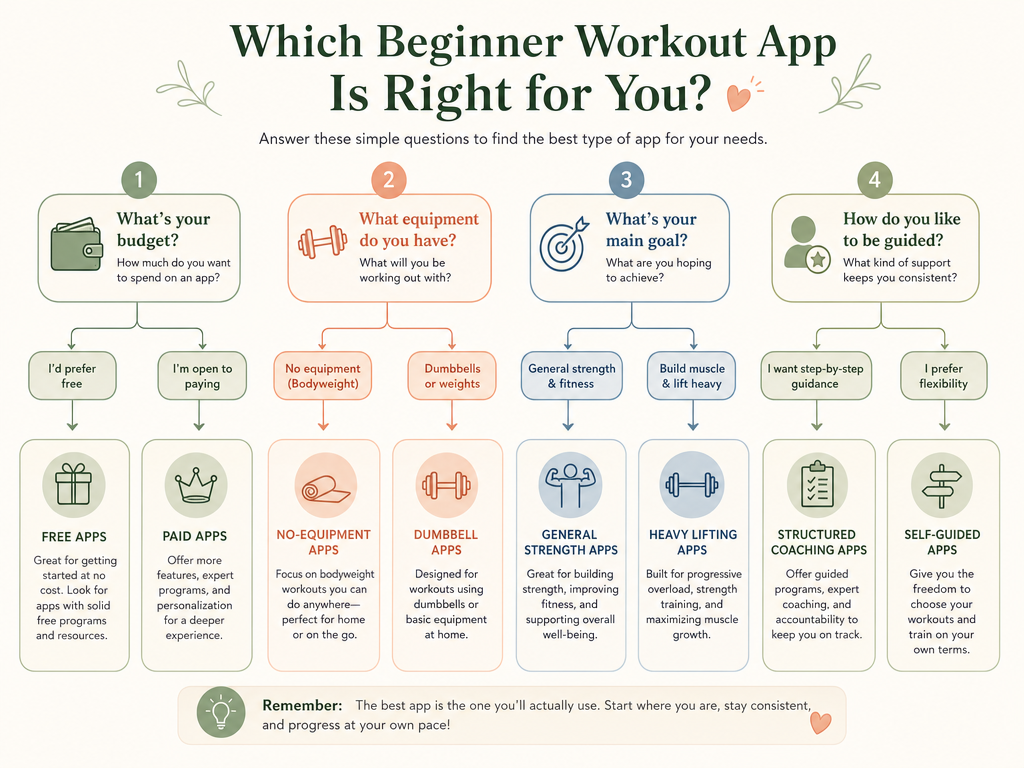
Your Decision Path: If X, Try Y
Use your self-assessment answers to find your path below. Each path leads to a detailed section later in this article.
- If you have zero budget and no equipment: Start with Nike Training Club. It's completely free, requires no equipment for many workouts, and uses certified trainers. You can build a foundation of movement patterns without any financial commitment.
- If you have a small budget ($0–$19/mo) and want to learn proper form: Start with Caliber's free tier. Its exercise library includes 500+ exercises with video demos and step-by-step instructions. If you outgrow the free version, the $19/mo Pro tier adds personalized programming.
- If you want a structured program designed by women for women: Choose Stronger By The Day ($15/mo) if you're ready for science-backed programming with some jargon, or EvolveYou ($22.99/mo) if you want fully customizable routines with beginner-to-expert levels and nutrition guidance.
- If you're pregnant or postpartum: Bloom Method ($29.99/mo) is the standout choice, focusing on pelvic floor exercises and diaphragmatic breathing — areas most general fitness apps ignore entirely.
- If you want AI-powered customization on a tight budget: SHRED app ($9.99/mo paid annually) offers a 7-day free trial and uses AI to adapt workouts to your level and available equipment.
Best Free Beginner Option: Nike Training Club
Nike Training Club (NTC) has been completely free since 2020, according to Forbes Health, CNET, and Garage Gym Reviews. With over 300 workouts led by certified Nike trainers, it's the lowest-risk starting point available. No credit card, no trial period, no expiration.
What makes NTC particularly good for beginners:
- Many workouts require zero equipment — you can do them in a living room, a hotel room, or a small apartment corner.
- Workouts are led by real trainers who demonstrate form and provide verbal cues. You're not just reading instructions; you're watching someone move.
- The app offers a wide variety of training styles (strength, HIIT, yoga, mobility), so you can explore what you enjoy before committing to a specific path.
- It includes both at-home and gym programs, so it grows with you if you eventually join a commercial gym.
Best Budget Option for Learning Form: Caliber (Free Tier)
Caliber's free-forever tier is the strongest option for a beginner who wants to learn proper lifting technique without paying. Garage Gym Reviews rates it 4.6/5 and notes that the free version includes an exercise library with 500+ exercises, demonstration videos, and step-by-step instructions. For a beginner who has never deadlifted or properly squatted, that video library alone is worth more than many paid subscriptions.
Caliber's three-tier structure means you can start free and upgrade only when you need more:
| Tier | Price | What You Get |
|---|---|---|
| Free | $0 | 500+ exercise library with video demos, progress tracking, and basic programming |
| Pro | $19/mo | Personalized programming, coach check-ins, and advanced analytics |
| Premium | $200+/mo | 1-on-1 coaching with a dedicated trainer, custom meal plans, and weekly video calls |
Forbes Health lists Caliber as a featured partner and cites a claim that "members make 34% faster progress than training on their own." It's worth noting that this figure is self-reported by the company, not independently verified — but the free tier's value proposition doesn't depend on that claim. The exercise library alone justifies the download.
Best for Structured Programs: Stronger By The Day and EvolveYou
If you're ready to commit to a paid program — and you've built enough consistency to know you'll use it — two apps stand out for women who want structured, progressive strength programming.
| App | Price | Best For | Key Limitation |
|---|---|---|---|
| Stronger By The Day | $15/mo, $40/quarter, $100/yr | Women who want science-backed programming from a powerlifting coach | Some jargon may confuse new lifters (CNET) |
| EvolveYou | $22.99/mo or $119/yr | Women who want fully customizable routines with beginner-to-expert levels | Higher monthly cost; best value with annual billing |
Stronger By The Day was developed by powerlifting coach Meg Gallagher specifically for women. CNET praises its science-backed approach but warns that "some jargon might be confusing for new lifters." If you're the type of beginner who doesn't mind learning the terminology (what's a 5x5? what's RPE?), this app will take you further, faster. If you want to just open the app and move without thinking about programming theory, EvolveYou is the better fit.
EvolveYou is CNET's best overall pick for women, scoring high for fully customizable routines and included nutrition plans. It works well with minimal equipment, making it a strong choice for home training. For a deeper look at how EvolveYou compares to other home-fitness apps, see our Best Workout Apps for Home Fitness guide.
Specialized Picks: Prenatal/Postnatal and Heavy Lifting
Most fitness apps treat all women as a single audience. If you're pregnant, postpartum, or specifically want to learn to lift heavy, you need an app that addresses those contexts directly.
- Bloom Method ($29.99/mo): Garage Gym Reviews names this the standout for prenatal and postnatal fitness. It focuses on pelvic floor exercises and diaphragmatic breathing — areas that most general fitness apps ignore entirely and that are critical for safe training during and after pregnancy.
- SHRED app ($9.99/mo paid annually, 7-day free trial): Rated 4.28/5 by Garage Gym Reviews and explicitly designed for beginners. Its AI-powered customization adapts workouts to your level and equipment, making it a strong budget option for women who want a personalized program without paying for a human coach.
Apps to Avoid as a Beginner (and Why)
Not every popular app deserves a spot on your home screen. The most important filter: does the app incorporate progressive overload? If it doesn't, it's not a strength training program — it's a collection of exercises with a pretty interface.
- Sweat: Despite having over 1 million monthly users and 30+ programs, CNET notes it's "best for experienced trainers." Garage Gym Reviews adds that it doesn't incorporate progressive overload principles. For a beginner, this means you could follow the workouts for months without systematically increasing your strength — exactly the trap this article is designed to help you avoid.
- Apps that lack form videos: If an app expects you to know how to perform a barbell hip thrust or a dumbbell row from a text description alone, it's not built for beginners. Proper form is the foundation of both safety and results. An app without video demonstrations is asking you to learn from a textbook.
- Apps that sell a "feminine" aesthetic without substance: If the marketing focuses on "toning" (a physiological myth — you can't tone a muscle, you can only grow or shrink it) and the screenshots show models in matching sets rather than actual exercise demonstrations, be skeptical. Garage Gym Reviews found that most gender-neutral apps outperform female-marketed ones on programming quality. The packaging matters less than the program.
What You Actually Need to Get Started
One of the most common reasons beginners don't start strength training is the belief that they need a full home gym or a gym membership. You don't. Here's what you actually need to begin:
- A yoga or exercise mat (for floor work, core exercises, and comfort)
- A pair of dumbbells (start with 5–10 lbs if you've never lifted; you can always go heavier)
- A water bottle
- Enough floor space to lie down and extend your arms overhead
That's it. No barbell, no squat rack, no resistance bands (though bands are a nice addition later). Many of the apps recommended above — Nike Training Club, Caliber's free tier, EvolveYou — have extensive libraries of dumbbell-only and bodyweight workouts. You can build significant strength with just a mat and a pair of dumbbells for the first 3–6 months.
If you're reading this and thinking "but I don't even have dumbbells," start with Nike Training Club's bodyweight workouts. Bodyweight squats, lunges, push-ups (on knees if needed), and glute bridges will build a foundation. Add dumbbells when bodyweight movements start feeling easy — that's progressive overload in action.
Frequently Asked Questions
- How much should I spend on a fitness app as a beginner? Zero, at first. Start with Nike Training Club or Caliber's free tier. The FitCraft pricing analysis notes that "the most expensive mistake in fitness apps isn't overpaying for a subscription. It's paying for any subscription you stop using after 6 weeks." Build the habit first, then pay.
- Can I get real strength results with just bodyweight? Yes, for the first 2–3 months. Bodyweight squats, lunges, push-ups, and glute bridges will build a foundation. But to continue making strength gains, you'll eventually need external resistance (dumbbells, bands, or a gym membership). Progressive overload requires increasing tension over time, and bodyweight alone has a ceiling.
- How do I know if an app has good programming? Look for three things: (1) progressive overload — does the app tell you to increase weight or reps over time? (2) exercise variety — does it include compound movements (squats, deadlifts, presses) or just isolation exercises? (3) form guidance — are there video demonstrations and verbal cues? If an app scores yes on all three, the programming is likely solid.
- What about data privacy? Fitness apps collect a surprising amount of personal data — location, health metrics, menstrual cycle data, and more. Our Workout Tracker App Data Privacy in 2026 guide breaks down what each major app collects and how to protect yourself.
- I'm still overwhelmed. Where do I actually start? Download Nike Training Club. Do three bodyweight workouts this week — 20 minutes each. Don't worry about which program, don't worry about perfect form, just move. Next week, pick one of the structured apps from this guide and start the free trial. The hardest part is the first workout, and you can do that one right now with zero equipment and zero cost.
This is general fitness education, not medical advice. For diagnosis or treatment of pain or injury, consult a qualified clinician.
Pick your next session
Browse all routines to find an appropriately-spaced next session.
Spot something off?
This content sits adjacent to health guidance — tell us if a citation or figure needs a correction.