
Workout Tracker App Data Privacy in 2026: What Your Fitness Apps Collect, Share, and How to Protect Yourself
A data-driven privacy audit of popular workout tracker apps. We analyze the Surfshark January 2026 study to reveal which apps collect the most data, which share it with third parties, and how you can minimize your exposure without giving up your fitness tracking.
The Hidden Cost of Your Workout App: A Privacy Overview
You download a workout tracker app to log your sets, track your runs, or follow a guided session. You grant it access to your location, your camera, your health data, and maybe your contacts. A few taps later, you are ready to train. What you likely did not consider is that the app you just installed may be collecting up to 24 different types of personal data — and sharing much of it with third parties you have never heard of.
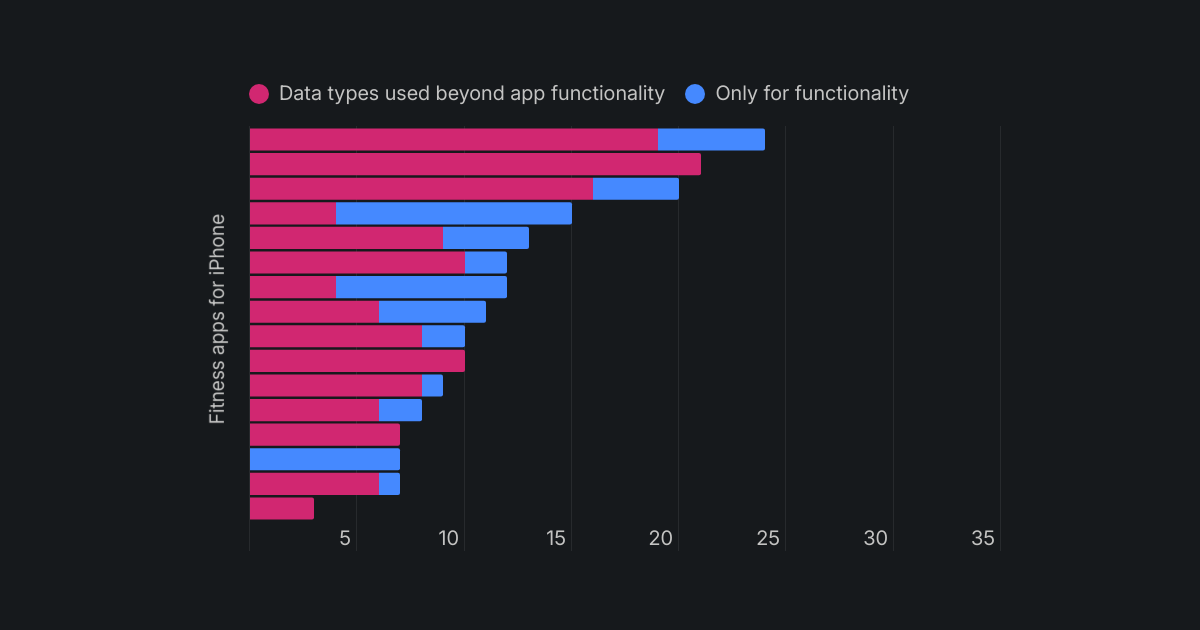
This is not a hypothetical risk. A January 2026 study by Surfshark analyzed the Apple App Store privacy labels of 16 top fitness apps and found that the average app collects 12 different data types — more than one-third of the 35 categories Apple defines. Three out of every four apps share that data with third parties. Over 90% use the data for purposes beyond the app's core functionality. If you use a workout tracker app, your data is almost certainly being collected, analyzed, and sold.
This article is a privacy audit. We will walk through exactly what data these apps collect, which ones are the worst offenders, how your location and sensitive information are at risk, and — most importantly — what you can do about it without giving up your fitness tracking entirely.
The Data Landscape: What Fitness Apps Actually Collect
Before we name names, it helps to understand what "data types" actually means in the context of a workout app. Apple's privacy labels break user data into 35 categories. Fitness apps, on average, tap into 12 of them. Here is what that typically includes:
- Location data: Precise GPS coordinates (for mapping runs or rides) or coarse location (city-level, often used for ad targeting).
- Biometric and health data: Heart rate, steps, calories burned, sleep patterns, and in some cases, more sensitive health metrics pulled from wearable devices.
- Device identifiers: Unique IDs tied to your phone, which can be used to track you across different apps and services.
- Usage data: How often you open the app, which features you use, how long you spend in each section.
- Contact and personal info: Name, email address, phone number, and sometimes social media handles.
- Sensitive information: A smaller subset of apps may collect data on racial or ethnic background, sexual orientation, pregnancy status, disability, or biometric identifiers.
The problem is not just that this data is collected. It is that the vast majority of it is used for purposes that have nothing to do with helping you get fit. The Surfshark study found that over 90% of the analyzed apps use data beyond what is necessary for core app functionality — meaning your workout history, location patterns, and even sensitive health data are being fed into analytics engines, advertising networks, and data brokers.
This matters because fitness data is uniquely revealing. Your running route tells someone where you live and work. Your heart rate data at specific times of day can reveal your schedule. Your workout consistency can be used to infer your habits, stress levels, and even major life changes. When an app collects 12 or more data types, it is building a detailed profile of you — one that extends far beyond the gym.
The Worst Offenders: Which Apps Collect the Most Data?
The Surfshark study ranked 16 fitness apps by the total number of data types they report collecting. The results reveal a wide gulf between the most and least invasive apps.
| App | Data Types Collected | Notable Finding |
|---|---|---|
| Fitbit | 24 | Collects the most data of any analyzed app — more than two-thirds of all 35 Apple data categories. |
| Strava | 21 | Leads in data exploitation beyond app functionality; uses 21 data types for purposes beyond core features. |
| Nike Training Club | 16 | Shares 4 data types with third parties, including sensitive information used for targeted advertising. |
| Peloton | 14 | Collects precise location and shares coarse location with third parties. |
| Runna | 13 | Collects precise location for run tracking; shares data with third parties. |
| Average (all 16 apps) | 12 | The baseline: more than one-third of all possible data categories. |
| Hevy | 6 | Collects significantly less than average; primarily usage and device data. |
| Stronger | 5 | Minimal data collection relative to the market leader. |
| PUSH | 3 | Collects data without linking it to users; strictly for app functionality. |
| Centr | 3 | Collects only user ID, product interaction, and crash data — the least invasive of all 16 apps. |
The gap between Fitbit (24 data types) and Centr (3 data types) is staggering. Fitbit collects more than eight times the data of the least invasive app. And Fitbit is not alone at the top: Strava's 21 data types mean that every run you log is feeding a data machine that extends well beyond your personal performance metrics.
Who's Sharing Your Data? Third-Party Sharing and Sensitive Information
Collection is only half the story. The Surfshark study found that 75% of the 16 analyzed apps share user data with third parties. This means your workout data is not just sitting on a server somewhere — it is being transmitted to advertising networks, analytics companies, and data brokers.
Nike Training Club (NTC) stands out as the leader in third-party sharing. The study found that NTC collects and shares four data types with third parties: coarse location, sensitive information, device ID, and product interaction. Critically, the sensitive information it collects — which may include racial or ethnic background, sexual orientation, pregnancy status, disability, and biometric data — is shared with third parties and potentially used for targeted advertising.
| App | Data Types Shared with Third Parties | Sensitive Data Collected? | Sensitive Data Shared? |
|---|---|---|---|
| Nike Training Club | 4 (coarse location, sensitive info, device ID, product interaction) | Yes | Yes — potentially used for targeted advertising |
| Peloton | 2 (coarse location, device ID) | No | N/A |
| Strava | 2 (device ID, product interaction) | No | N/A |
| Fitbit | 2 (device ID, product interaction) | Yes | No |
| Runna | 1 (device ID) | No | N/A |
| Hevy | 0 | No | N/A |
| PUSH | 0 | No | N/A |
| Centr | 0 | No | N/A |
The study identified four apps that may collect sensitive information: Fitbit, Nike Training Club, and two others. Of these, only Nike Training Club both collects and shares sensitive data with third parties. This is a significant privacy risk because sensitive data categories — race, sexual orientation, pregnancy — are precisely the kinds of information that can lead to discrimination, price targeting, or unwanted profiling when they leave the app's control.
Location Tracking: GPS Privacy Risks in Running and Cycling Apps
For runners and cyclists, GPS tracking is a core feature. You want the app to map your route, measure your distance, and show your pace. But precise location data is one of the most sensitive data types an app can collect. It reveals where you live, where you work, the routes you take regularly, and the times you are away from home.
The Surfshark study found that four apps collect precise location: Strava, Runna, Peloton, and Nike Training Club. Six apps collect coarse location (city-level). Critically, Nike Training Club and Peloton share coarse location data with third parties.
- Strava: Collects precise location. The app is famous for its heat maps, which have historically revealed military base locations and user home addresses. Strava uses 21 data types beyond core functionality.
- Runna: Collects precise location for run tracking. Shares device ID with third parties.
- Peloton: Collects precise location and shares coarse location with third parties. If you use Peloton's outdoor content, your location data is being shared.
- Nike Training Club: Collects precise location and shares coarse location with third parties — along with sensitive information.
The real-world risks of location data exposure go beyond advertising. A pattern of running routes can reveal your home address, your workplace, and your regular schedule. In the wrong hands, this information can enable stalking, burglary (knowing when you are away for a run), or corporate espionage (knowing where employees of a specific company tend to live and commute).
The Free App Trade-Off: Why 'Free' Often Means Your Data Is the Product
There is a reason the most data-hungry apps tend to be free or freemium. When you are not paying with money, you are paying with data. The economic model of free fitness apps relies on monetizing user information through advertising, analytics, and data brokerage. The Surfshark study's finding that over 90% of apps use data beyond core functionality is a direct reflection of this business model.
This does not mean all free apps are privacy nightmares, but it does mean you should be skeptical of any app that offers robust features at no cost. The apps that collect the least data — Centr (3 data types) and PUSH (3 data types) — are either paid apps or niche tools with limited feature sets.
PUSH is particularly notable. The Surfshark study describes it as the least invasive app: it collects data without linking it to individual users, and it uses that data strictly for app functionality. No third-party sharing, no advertising, no data exploitation. This proves that it is possible to build a functional workout tracker without treating user data as a revenue stream.
If you are weighing whether a free app is sufficient for your needs, consider the privacy cost alongside the feature cost. A free app that collects 16 data types and shares sensitive information with advertisers may end up costing you more in privacy than a paid app that collects 3 data types and keeps your data local.
How to Protect Your Privacy Without Ditching Your Workout Tracker
You do not have to stop tracking your workouts to protect your privacy. A few deliberate choices can dramatically reduce your data exposure. Here are the most effective steps you can take, starting with the highest impact.
- Audit your app permissions. Go into your phone's settings and review what each fitness app can access. Does a strength-training app really need your precise location? Does a guided workout app need access to your contacts? Revoke any permission that is not strictly necessary for the app's core function. For GPS-based apps like Strava, consider setting location access to "While Using" instead of "Always."
- Use guest logins or sign up with a burner email. Many apps allow you to use basic features without creating a full account. When you do need to register, avoid using your primary email address or signing in with Google or Facebook — those connections give the app access to your social graph and cross-app tracking data.
- Check App Store privacy labels before downloading. Apple requires all apps to display a privacy label summarizing what data they collect and whether they share it. Before you install a new workout app, scroll down to the "App Privacy" section in the App Store listing. If you see a long list of data types linked to you, consider an alternative.
- Consider paid apps with better privacy practices. Apps that charge a subscription or one-time fee are less reliant on data monetization. Centr (3 data types, no third-party sharing) and PUSH (3 data types, data not linked to users) are strong examples. The upfront cost is often worth the privacy peace of mind.
- Use offline mode when possible. Some workout apps allow you to log sets, follow routines, or play downloaded workout videos without an internet connection. When you are offline, the app cannot transmit your data to its servers. Use this mode for your actual workouts and only connect when you need to sync or update.
- Review the app's privacy policy — specifically the third-party sharing section. Most users skip this step, but it is where apps disclose whether they share data with advertisers, analytics companies, or data brokers. If the policy is vague or uses broad language like "we may share data with trusted partners," treat that as a red flag.
If you are looking for a new app and want to start with options that balance features with privacy, check out our roundup of best workout apps for home fitness and our guide to the best free workout apps by fitness goal. Use the privacy checklist above to evaluate each option before you install.
App-by-App Privacy Summary: At-a-Glance Comparison
The following table summarizes all 16 apps from the Surfshark study across the key privacy dimensions. Use it as a quick reference to evaluate your current apps or to compare options before downloading.
| App | Total Data Types Collected | Data Shared with Third Parties? | Sensitive Data Collected? | Precise Location Collected? | Data Used Beyond Functionality? |
|---|---|---|---|---|---|
| Fitbit | 24 | Yes (2 types) | Yes | No | Yes |
| Strava | 21 | Yes (2 types) | No | Yes | Yes — 21 types used beyond core features |
| Nike Training Club | 16 | Yes (4 types, including sensitive info) | Yes | Yes | Yes |
| Peloton | 14 | Yes (2 types) | No | Yes | Yes |
| Runna | 13 | Yes (1 type) | No | Yes | Yes |
| Average (all 16) | 12 | 75% share data | 4 apps may collect | 4 apps collect precise | Over 90% |
| Hevy | 6 | No | No | No | Yes |
| Stronger | 5 | No | No | No | Yes |
| PUSH | 3 | No | No | No | No — strictly for functionality |
| Centr | 3 | No | No | No | No |
The pattern is clear: the apps that collect the most data also tend to share it with third parties and use it beyond their core functionality. The apps at the bottom of the list — PUSH, Centr, Stronger, Hevy — demonstrate that it is possible to build a useful workout tracker without treating user data as a commodity.
If you use a wearable device like a Fitbit or an Apple Watch, remember that the data collected by the wearable's companion app may be even more extensive than what a standalone workout app collects. For guidance on choosing a device that aligns with your privacy preferences, see our wearable fitness tracker buyer's guide.
This result comes from one real apartment under the stated conditions — it is a strong signal, not a guarantee your space will measure identically.
Builds this evidence supports
No build currently links to this specific test. Browse all builds with a matching tag.
Spot something off?
If this result didn't match your own space, let us know — floor-damage and noise claims carry real deposit-risk consequences if we get them wrong.