
All-in-One Exercise Machine vs. Building a Custom Home Gym: The Real Cost-Benefit Analysis
Torn between buying one all-in-one machine and assembling separate equipment? This analysis compares upfront cost, floor space, upgrade pathways, and ecosystem lock-in to help you decide which approach fits your budget, space, and long-term goals.
Introduction: The Constraint-Based Decision
If you are shopping for a home gym with a budget between $1,500 and $5,000, you have likely run into a fork in the road: buy one all-in-one exercise machine that claims to do everything, or assemble a collection of separate equipment — a rack, barbell, plates, bench, and maybe a cable attachment. Neither option is inherently superior for building muscle. A 2020 study in the Journal of Strength and Conditioning Research found no significant difference in strength gains between machine-based and free-weight training. The real question is not which builds more muscle, but which solves your specific constraints.
This article focuses specifically on the trade-off between a single all-in-one machine and a custom separate-equipment build. It adds an analysis of ecosystem lock-in — a hidden cost that rarely appears in upfront price tags — and uses the JSCR study on strength equivalence to keep the debate grounded in evidence. For a broader look at home gym systems, see our related comparison: Home Gym System vs. Building Your Own: A Total Cost of Ownership Comparison for 2026.
Upfront Cost Comparison: All-in-One vs. Separate Build
The first thing most buyers want to know is which option costs less. The honest answer is that the price ranges overlap so heavily that cost alone rarely decides the choice. A mid-range all-in-one machine typically runs between $2,500 and $4,000, though high-end models can reach $10,000. A complete separate-equipment home gym — rack, barbell, plates, bench, and cable attachment — falls in a similar band of $1,800 to $4,200.
| Component | All-in-One Machine | Separate Equipment Build |
|---|---|---|
| Core unit | $2,500–$4,000 (single machine) | Rack: $500–$1,000 |
| Barbell | Included | $200–$400 |
| Weight plates | Included (usually 150–210 lbs) | $400–$800 |
| Adjustable bench | Included or integrated | $200–$500 |
| Cable attachment | Integrated | $500–$1,500 (standalone or lat pulldown) |
| Total range | $2,500–$4,000 | $1,800–$4,200 |
| Mean cost (survey) | N/A | $3,141 |
The ranges overlap significantly. A budget all-in-one like the Body-Solid EXM2500 sits around $2,500, while a premium separate build with a Rogue Monster Lite rack, Ohio Bar, and calibrated plates can push past $4,000. Conversely, a bare-bones separate setup with a budget rack and cap barbell can come in under $2,000, while a top-tier all-in-one like the Force USA G20 costs closer to $4,000. The takeaway: if you are deciding purely on price, you need to look at the specific models and brands in your budget tier, not the category averages.
Floor Space: How Much Room Does Each Setup Really Need?
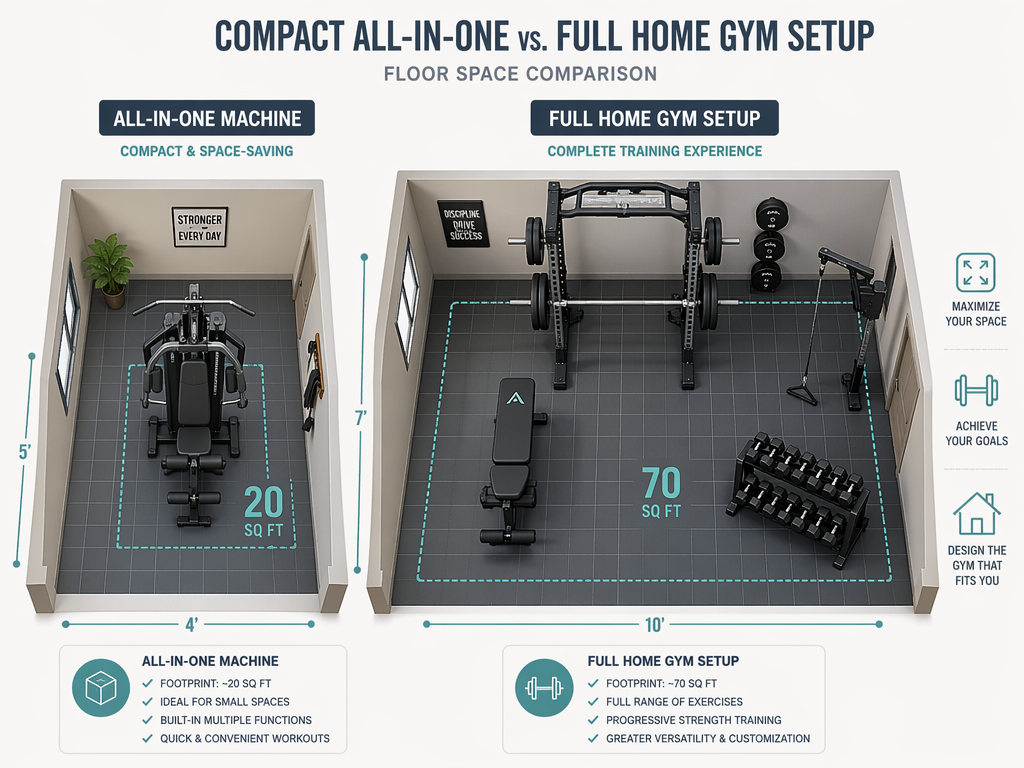
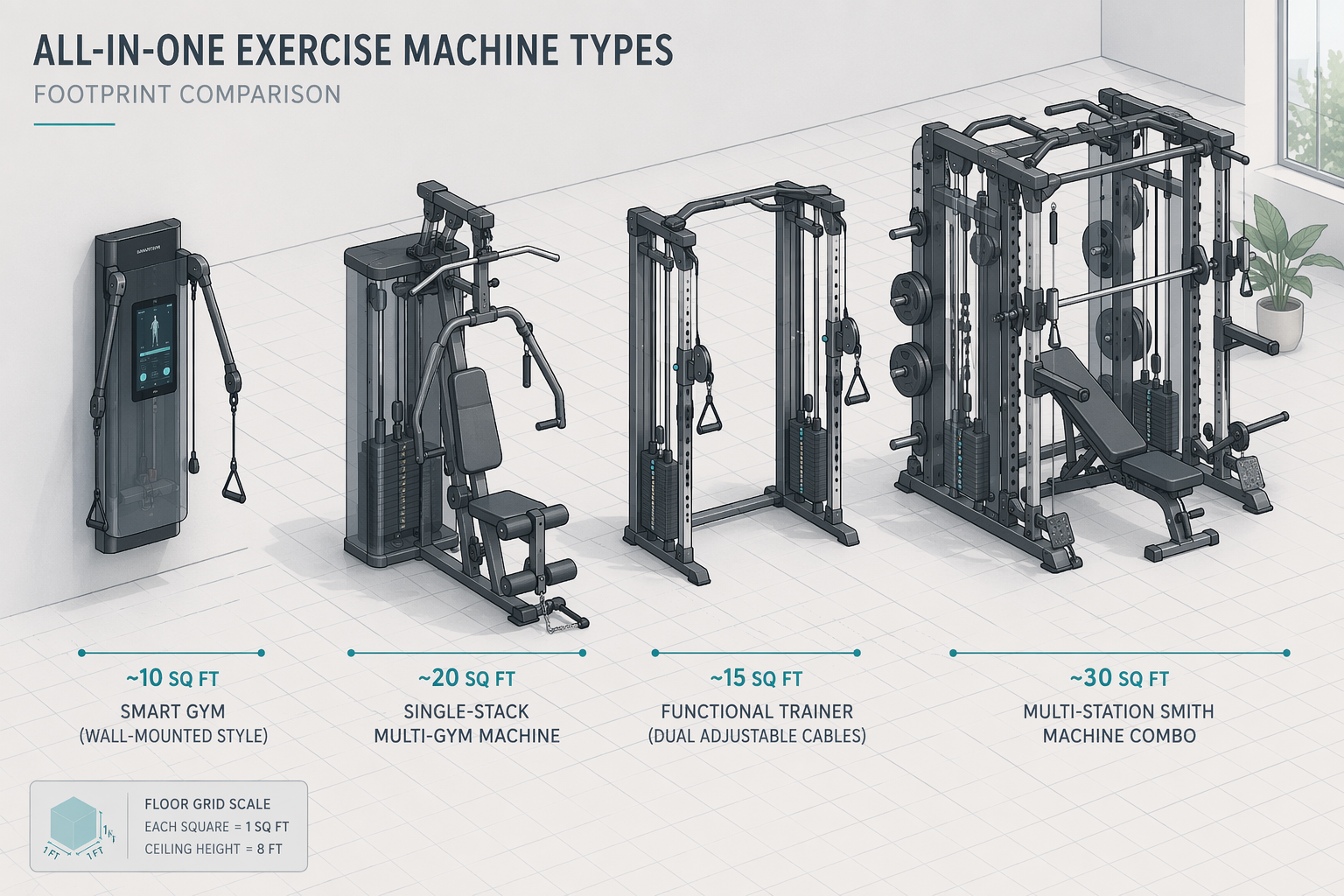
Floor space is where the two approaches diverge most sharply. An all-in-one machine is designed to consolidate multiple exercise stations into a single footprint. A single-stack gym like the Body-Solid EXM2500 occupies roughly 20 square feet. A compact functional trainer may take as little as 10 square feet. Even a larger multi-station machine rarely exceeds 35 square feet.
A separate-equipment build tells a different story. A power rack alone needs about 8x8 feet (64 sq ft) of floor space when you include the footprint of the rack plus clearance for loading plates and performing squats. Add a bench, a barbell, weight plate storage, and a cable attachment or lat pulldown, and you are looking at 50 to 100+ square feet total. The RitFit home gym size guide notes that a 10x10 foot room is ideal for most home gyms, but a 6x8 foot space can support compact training — though that compact training likely means an all-in-one machine, not a full separate setup.
| Setup Type | Equipment Footprint | Recommended Working Space | Ceiling Height |
|---|---|---|---|
| Compact all-in-one (e.g., functional trainer) | 10–15 sq ft | 6x6 ft | 8 ft minimum |
| Standard all-in-one (e.g., single-stack gym) | ~20 sq ft | 6x8 ft | 8 ft minimum |
| Large all-in-one (e.g., multi-station) | 25–35 sq ft | 8x8 ft | 8.5 ft recommended |
| Separate build (rack + bench + plates + cable) | 50–100+ sq ft | 10x10 ft or larger | 8.5–9 ft recommended |
The space advantage of all-in-ones is not just about the equipment footprint. It is also about the working clearance. A power rack requires room to walk around, load plates from both sides, and perform exercises like barbell rows or overhead presses outside the rack. An all-in-one machine, by contrast, keeps the user in a fixed position relative to the weight stack, so the working space is more predictable and often smaller. For apartment dwellers or anyone with a spare room under 80 square feet, this difference can be the deciding factor.
For a more detailed guide on matching equipment to your available space, see our Small-Space Home Gym Buyer's Decision Guide.
User Experience: Setup, Safety, and Solo Training
Beyond cost and space, the daily experience of using each setup differs in ways that matter for long-term adherence. Here is how the two approaches compare across key user experience dimensions.
- Setup and assembly: All-in-one machines arrive in a large box and require a few hours of assembly — typically bolting the frame together, attaching the weight stack, and routing the cables. Separate equipment arrives in multiple boxes and requires assembling the rack, bench, and any attachments. The total assembly time is comparable, but the all-in-one is a single project rather than a series of projects.
- Learning curve: All-in-one machines have a simpler learning curve. The movement path is guided by the machine's design, so beginners can focus on effort rather than form. Free weights require learning proper bracing, bar path, and stabilization. This is not a disadvantage of free weights — it is simply a steeper initial curve.
- Solo training safety: This is one of the strongest arguments for all-in-one machines. As the Garage Gym Reviews team explicitly flags in their testing methodology, all-in-ones offer safer solo training because the movements are guided and there is no need for a spotter when training to failure. With a barbell and rack, failing a heavy squat or bench press requires either safety pins (which must be set correctly) or a spotter. With an all-in-one, you simply let go of the handles.
- Exercise variety: Separate builds win here. A rack, barbell, plates, and bench give you access to the full spectrum of compound lifts — squats, deadlifts, bench press, overhead press, rows — plus endless variations. An all-in-one machine typically offers 20 to 50 exercises, but the movement patterns are constrained by the machine's design. You cannot do a barbell deadlift on a cable machine.
- Progressive overload: Both approaches support progressive overload, but through different mechanisms. All-in-ones use weight stacks with small increments (typically 5–10 lbs per pin). Free weights use plates, which allow micro-loading with fractional plates. The difference is marginal for most trainees.
The Upgrade Pathway: Ecosystem Lock-In vs. Modular Freedom
The biggest hidden cost of all-in-one machines is not the subscription fee or the shipping charge — it is the attachment ecosystem lock-in. When you buy an all-in-one machine, you are committing to that manufacturer's accessory ecosystem. If the machine uses proprietary upright dimensions, you cannot add a third-party landmine attachment, dip station, or monolift.
The Force USA G20 is a clear example. It is rated the #1 overall all-in-one machine by Strong Home Gym with a 90/100 score, but it uses 2x2-inch chrome uprights. Those uprights will not accept accessories from Rogue, REP, or Titan, all of which use 3x3-inch or 2x3-inch steel uprights. If you want to add a landmine attachment or a dip bar to your G20, you must buy Force USA's proprietary versions — assuming they make one.
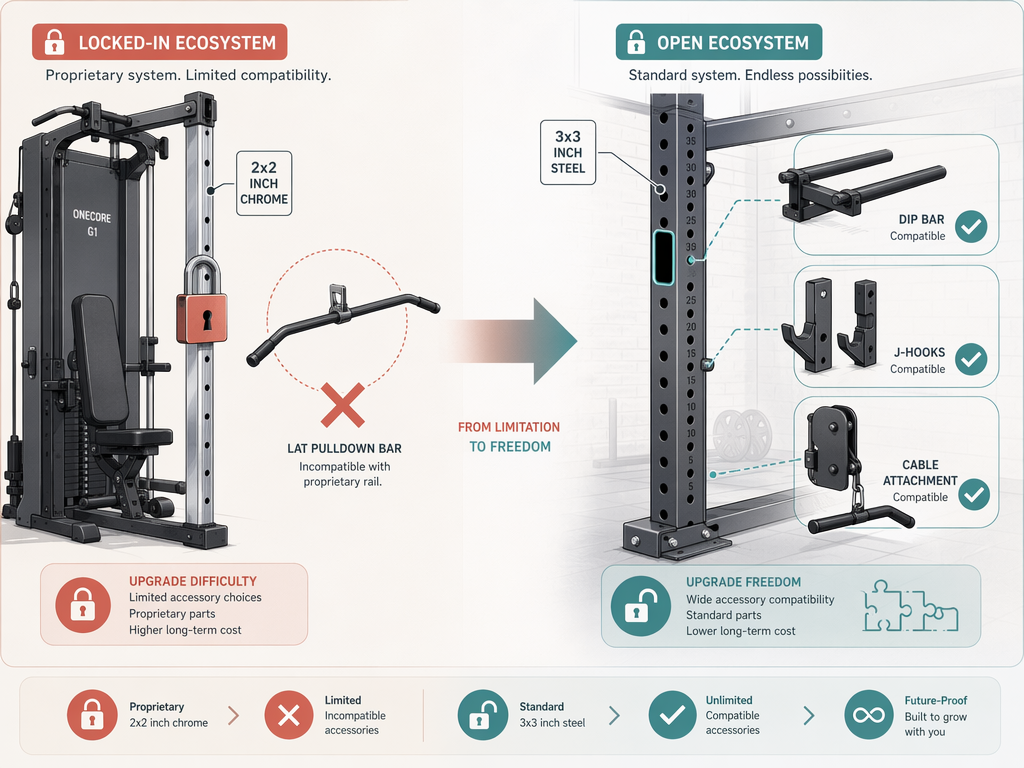
Separate builds offer the opposite experience. A standard 3x3-inch power rack with 1-inch hardware spacing accepts accessories from Rogue, REP, Titan, Bells of Steel, and dozens of other brands. You can start with a bare rack and add a dip attachment, a landmine, a monolift, or a pulley system over time — all from different manufacturers, all compatible. If you decide to upgrade your barbell from a budget option to a high-end model, you just buy a new barbell. You do not replace the entire system.
This modularity has a real financial impact. With a separate build, you can spread the cost over months or years. Buy the rack and barbell first, add plates as your strength increases, add a cable attachment later. With an all-in-one, you pay for everything upfront — and if you outgrow the machine, you sell the whole unit and start over. For a deeper look at these long-term costs, see The Hidden Costs of Home Gym Equipment: A 5-Year Total Cost of Ownership Guide.
Real-World Decision Scenarios
To make this analysis concrete, here are four common scenarios with specific recommendations. These are not the only paths, but they represent the most frequent situations our readers face.
- Apartment dweller with $2,500 budget and 20 sq ft: Choose an all-in-one machine. The Body-Solid EXM2500 or a compact functional trainer like the REP FT-3000 fits in a corner of a living room or spare bedroom, provides 20+ exercises, and eliminates the need for a spotter. You cannot fit a power rack, barbell, and plate storage in 20 square feet and still have room to train.
- Garage gym builder with $3,000 budget and 80 sq ft: Choose a separate build. A Rogue Monster Lite rack ($700), REP stainless steel barbell ($300), 255 lbs of bumper plates ($500), an adjustable bench ($300), and a lat pulldown attachment ($500) totals $2,300 — leaving room for a landmine attachment, dip bar, or additional plates. You get full barbell training, modular upgradability, and no ecosystem lock-in.
- Beginner who values safety and simplicity: Choose an all-in-one machine. The guided movement paths reduce the learning curve, and the ability to train to failure without a spotter is a genuine safety advantage for someone new to resistance training. The Force USA G20 or Body-Solid EXM2500 are strong options in the $2,500–$4,000 range.
- Intermediate lifter who wants to upgrade over time: Choose a separate build. Start with a quality rack and barbell, add plates as needed, and add accessories over months or years. This approach lets you invest in high-quality components gradually rather than spending $3,000+ upfront on a machine you may outgrow. For a detailed breakdown of budget separate builds, see our guide on Compact Home Gym Budget Builds: Complete Setups at $500, $1,500, and $3,000.
Verdict: Which Should You Choose?
The decision between an all-in-one exercise machine and a separate-equipment build comes down to your primary constraint. Both approaches produce comparable strength gains — the JSCR 2020 study confirms that machine and free-weight training are equally effective for building muscle. The choice is about space, upgradability, and daily experience.
| Constraint | Choose All-in-One | Choose Separate Build |
|---|---|---|
| Primary constraint | Limited floor space (under 50 sq ft) | Available space (50+ sq ft) |
| Budget | $2,500–$4,000 (single purchase) | $1,800–$4,200 (can be spread over time) |
| Experience level | Beginner or intermediate | Intermediate or advanced |
| Solo training priority | High (guided movements, no spotter needed) | Moderate (requires safety pins or spotter) |
| Upgrade plans | Low (buy once, use as-is) | High (add components over years) |
| Exercise variety | 20–50 exercises (machine-constrained) | Unlimited (barbell, dumbbell, cable, bodyweight) |
| Ecosystem lock-in risk | High (proprietary uprights and attachments) | Low (standard 3x3 or 2x3 rack compatibility) |
The all-in-one vs. separate-equipment debate is not about which is better. It is about which fits your life. If space is your primary constraint and you value simplicity and safety, an all-in-one machine is the right call. If you have the room and want the freedom to upgrade piece by piece over the next decade, a separate build will serve you better. Both paths lead to the same destination: a home gym that works for you.
This result comes from one real apartment under the stated conditions — it is a strong signal, not a guarantee your space will measure identically.
Builds this evidence supports
Cable Machine Alternatives That Save Space and Money
Compare the best cable machine alternatives for home gyms – from resistance bands and pulley systems to suspension trainers and compact digital units – and find the right option for your space and budget.
How to Choose a Compact Home Gym That Works for Your Space, Budget, and Noise Tolerance
This article provides a structured decision framework for apartment dwellers and small-space residents to match their specific floor footprint, noise sensitivity, and budget to the most suitable compact home gym strategy — whether that's an all-in-one machine, modular build, smart digital system, or band/bodyweight setup.
The Garage Gym Reality Check: What Equipment Actually Fits in a Single-Car Garage
Most garage gym guides assume a two-car space. This article uses real dimensions, real equipment footprints, and three layout templates to show what fits—and what doesn't—in a single-car garage (10x20 to 12x20 ft).
Spot something off?
If this result didn't match your own space, let us know — floor-damage and noise claims carry real deposit-risk consequences if we get them wrong.