
Best Home Exercise Bike by Price Tier: What You Actually Get for Under $500, $500–$1,500, and $1,500+
A buyer's guide for budget-conscious home fitness buyers that breaks exercise bike pricing into three clear tiers, compares features and subscription costs, and reveals why the total cost of ownership over three years often exceeds the bike's price difference.
Why Exercise Bike Pricing Follows Three Clear Tiers
Walk into the exercise bike market with a budget between $200 and $2,800, and you will quickly notice that the options cluster around three distinct price thresholds. Below $500, you get a functional machine that will raise your heart rate but offers no digital features. Between $500 and $1,500, magnetic resistance and Bluetooth connectivity become standard, letting you use your own tablet with apps like Peloton or Zwift. Above $1,500, integrated touchscreens, auto-follow resistance, and premium programming arrive — but so do monthly subscription fees that can reshape the total cost equation.
This is not an accident. The industry has settled on these tiers because each price point unlocks a fundamentally different experience. The goal of this guide is to show you exactly what you gain — and what you sacrifice — at each level, and to make the math behind subscription costs transparent. According to Garage Gym Reviews, which has tested over 50 exercise bikes, the average price across the entire market is roughly $1,409. That number sits squarely in the middle tier, which is also where the best value lives for most buyers.
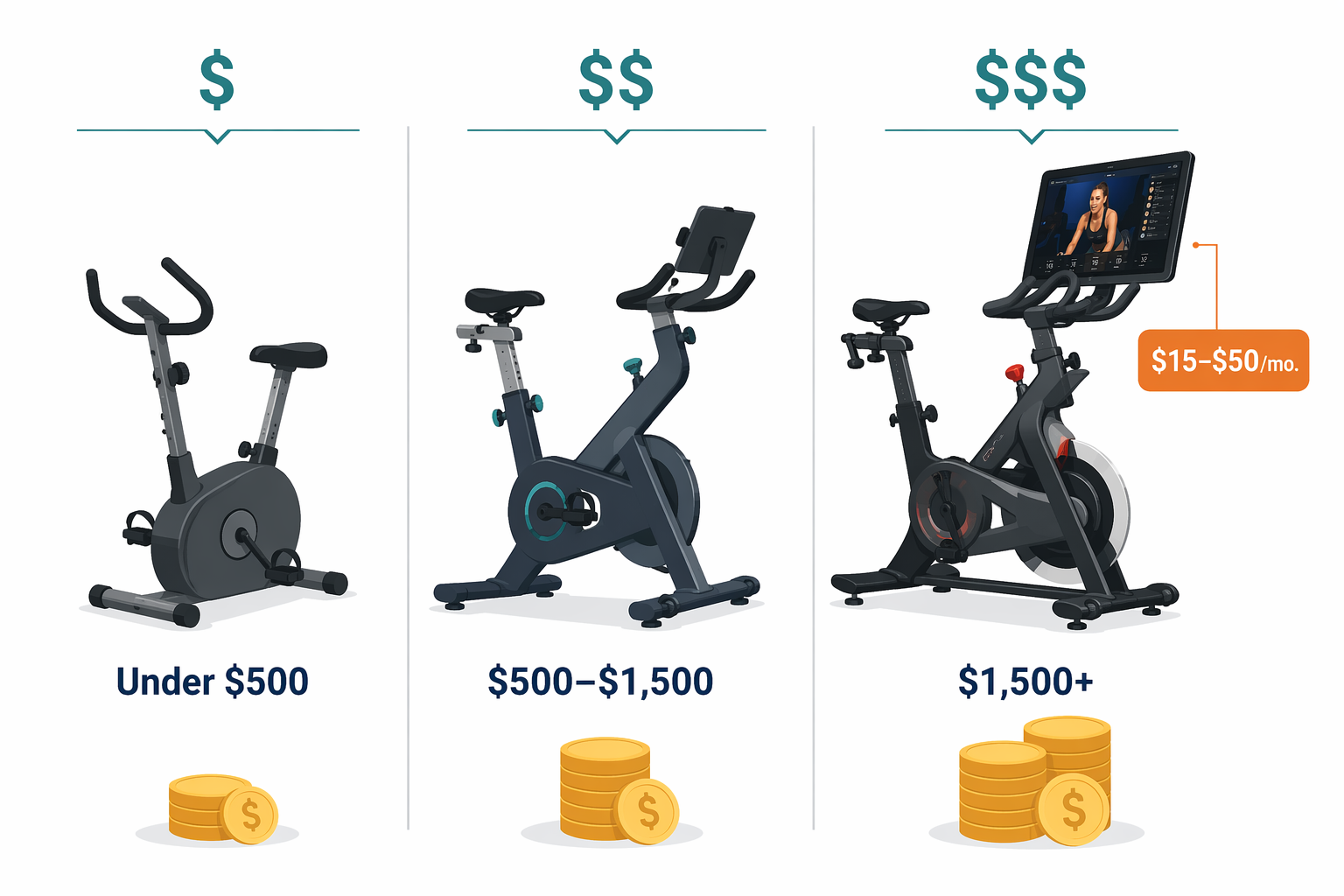
Tier 1: Under $500 — Functional Basics, No Connectivity
At the entry level, you are buying a mechanical device, not a smart fitness machine. These bikes use friction resistance — a felt pad pressed against the flywheel — which is simple, durable, and requires no power cord. The trade-off is that friction resistance is noisier than magnetic systems, and the resistance levels are adjusted manually with a knob rather than through software.
Three models dominate this tier in terms of reviews and owner satisfaction:
- Sunny Health and Fitness SF-B1002 (~$268) — This bike stands out for its 49-lb flywheel, which provides a smooth, momentum-driven ride. It uses a belt drive and friction resistance, and it operates at a measured 47.4 dB — quieter than many competitors at this price. The frame supports up to 275 lbs, and the warranty covers three years on the frame. There is no display beyond a basic speedometer, and no Bluetooth. It is a pure, no-frills machine.
- Yosuda Indoor Cycling Bike (~$340) — Yosuda uses a 35-lb flywheel with friction resistance and a compact footprint of 40.5 x 20.5 inches. It weighs 68.8 lbs, making it relatively easy to move. The bike includes a basic LCD that tracks time, speed, distance, and calories, but it has no connectivity or app integration. Outdoor Gear Lab named it the Best Stationary Bike for the Money in their 2026 tests.
- Domyos Basic Exercise Bike 100 (~$250) — This model uses a 12-kg (26.5-lb) flywheel with mechanical resistance. It has no connectivity and weighs 63.9 lbs. Cycling Weekly recommends it as the best budget option for riders who simply want a reliable machine for casual use and do not need digital features.
What you sacrifice at this tier is not just screens and apps. Weight capacities are lower (typically 250–275 lbs), warranties are shorter (1–3 years on parts, rarely more than 3 years on the frame), and the ride quality is less refined than magnetic systems. The flywheel weight recommendation from Garage Gym Reviews is at least 30 lbs for stability, and both the Sunny and Yosuda exceed that threshold. If your primary goal is to pedal while watching Netflix on a separate device, and you do not need structured classes or performance tracking, a Tier 1 bike will serve you well for years.
Tier 2: $500–$1,500 — The Value Sweet Spot with Magnetic Resistance and App Connectivity
This is where the home exercise bike market gets interesting. For roughly $900 to $1,500, you move from friction to magnetic resistance, which is smoother, quieter, and requires no maintenance. You also gain Bluetooth connectivity, allowing the bike to transmit cadence, power, and heart rate data to third-party apps running on your own tablet or phone. No subscription is required to use the bike itself — you only pay if you choose to subscribe to an app.
The consensus value pick: Schwinn IC4 / BowFlex C6 (~$999)
The Schwinn IC4 — sold under the BowFlex C6 name as the identical bike — is the most consistently recommended model across major review outlets. Wirecutter has called it the best magnetic-resistance indoor-cycling bike for those who want versatility and the option to add their own touchscreen. Outdoor Gear Lab named it the Best Connected Spin Bike Without a Screen. Garage Gym Reviews includes it in its top recommendations. The specs tell you why: 100 levels of magnetic resistance, Bluetooth connectivity to eight or more cycling apps, a 330-lb weight capacity, a 10-year frame warranty, and a three-year parts warranty. The LCD console displays time, distance, speed, RPM, calories, heart rate, and power. It does not have a built-in screen — you supply your own tablet — which is exactly why it avoids the subscription trap.
Other strong contenders in this tier:
- Horizon 7.0 IC (~$899) — Offers 100 levels of magnetic resistance, a 300-lb weight capacity, and a lifetime frame warranty. It includes a Bluetooth heart rate monitor and a USB charger for your device. Cycling Weekly recommends it as the best Peloton alternative for riders who want a robust bike without a built-in screen.
- Echelon EX-5 (~$1,500) — This model sits at the top of the tier with 32 levels of magnetic resistance, a 300-lb weight capacity, and a 21.5-inch HD touchscreen. It requires an Echelon Premier subscription ($40/month) for full access to classes. The EX-5 is a hybrid: it has the screen of a premium bike but the resistance range of a mid-tier model.
- Concept2 BikeErg ($1,100) — This is the outlier in the tier. It uses air resistance rather than magnetic, meaning the harder you push, the more resistance you feel. It has no screen, no subscription, and no classes. What it does have is a PM5 monitor that tracks all standard metrics via Bluetooth and ANT+, a 350-lb weight capacity, a 48 x 24-inch footprint, and a 5-year frame warranty. Garage Gym Reviews calls it the best subscription-free option at any price. The trade-off is noise: air bikes operate at 76–83 dB, comparable to a vacuum cleaner.
Tier 3: $1,500+ — Immersive Experiences with Ongoing Subscription Costs
Above $1,500, the bike becomes a complete entertainment and coaching system. Integrated HD touchscreens (21.5 to 24 inches), auto-follow resistance that adjusts the difficulty to match the instructor's cues, and premium programming are the hallmarks of this tier. The ride quality is excellent, the content libraries are vast, and the experience is genuinely immersive. But the subscription costs are significant and ongoing.
The major players:
- Peloton Bike ($1,695) — The original connected bike that defined the category. It features 100 levels of magnetic resistance, a 21.5-inch HD touchscreen, and a 297-lb weight capacity. The Peloton All-Access membership costs $50/month. The bike is also available refurbished directly from Peloton with a $95 used equipment activation fee.
- Peloton Bike+ ($2,695) — Adds a 23.8-inch rotating HD touchscreen, Auto-Follow resistance (the bike automatically adjusts to the instructor's callouts), a movement-tracking camera, and a 360-degree rotating screen. The same $50/month All-Access membership applies. Outdoor Gear Lab rated it Best for Spin Classes in 2026.
- NordicTrack X24 ($2,299–$2,800) — The most feature-packed bike in this comparison. It has a 24-inch pivoting touchscreen, 24 levels of magnetic resistance, a 350-lb weight capacity, and an incline range of -10% to 20% that simulates real hills. It requires an iFIT subscription ($39/month for family, $15/month for individual). The bike weighs nearly 200 lbs and has a footprint of 59.5 x 22.2 x 64.7 inches. Garage Gym Reviews named it Best Overall in their 2026 testing.
All three bikes deliver a premium experience. The question is not whether they are good — they are. The question is whether the subscription cost is worth it for your usage pattern. If you ride five times a week and value structured coaching, the $50/month for Peloton or $39/month for iFIT may feel like a bargain. If you ride twice a week and mostly want background entertainment, that same $50/month adds up fast.
Total Cost of Ownership: Bike Price + 3-Year Subscription
The most important number when comparing exercise bikes is not the purchase price — it is the total cost over the period you expect to own the bike. For most buyers, that is three to five years. The table below shows the true three-year cost for each featured model, including the subscription fees required to access its full feature set.
| Model | Purchase Price | Monthly Subscription | 3-Year Subscription Cost | 3-Year Total Cost |
|---|---|---|---|---|
| Sunny SF-B1002 | $268 | $0 | $0 | $268 |
| Yosuda Indoor Cycling | $340 | $0 | $0 | $340 |
| Domyos Basic 100 | $250 | $0 | $0 | $250 |
| Schwinn IC4 / BowFlex C6 | $999 | $0 | $0 | $999 |
| Horizon 7.0 IC | $899 | $0 | $0 | $899 |
| Concept2 BikeErg | $1,100 | $0 | $0 | $1,100 |
| Echelon EX-5 | $1,500 | $40 (Premier) | $1,440 | $2,940 |
| Peloton Bike | $1,695 | $50 (All-Access) | $1,800 | $3,495 |
| Peloton Bike+ | $2,695 | $50 (All-Access) | $1,800 | $4,495 |
| NordicTrack X24 | $2,299 | $39 (iFIT Family) | $1,404 | $3,703 |
The pattern is clear. A Schwinn IC4 at $999 costs less over three years than an Echelon EX-5 at $1,500, even though the Schwinn is $501 cheaper upfront. The Peloton Bike+ costs more than four times as much as the Schwinn over three years, despite being only 2.7 times the purchase price. The subscription fees compound the gap.
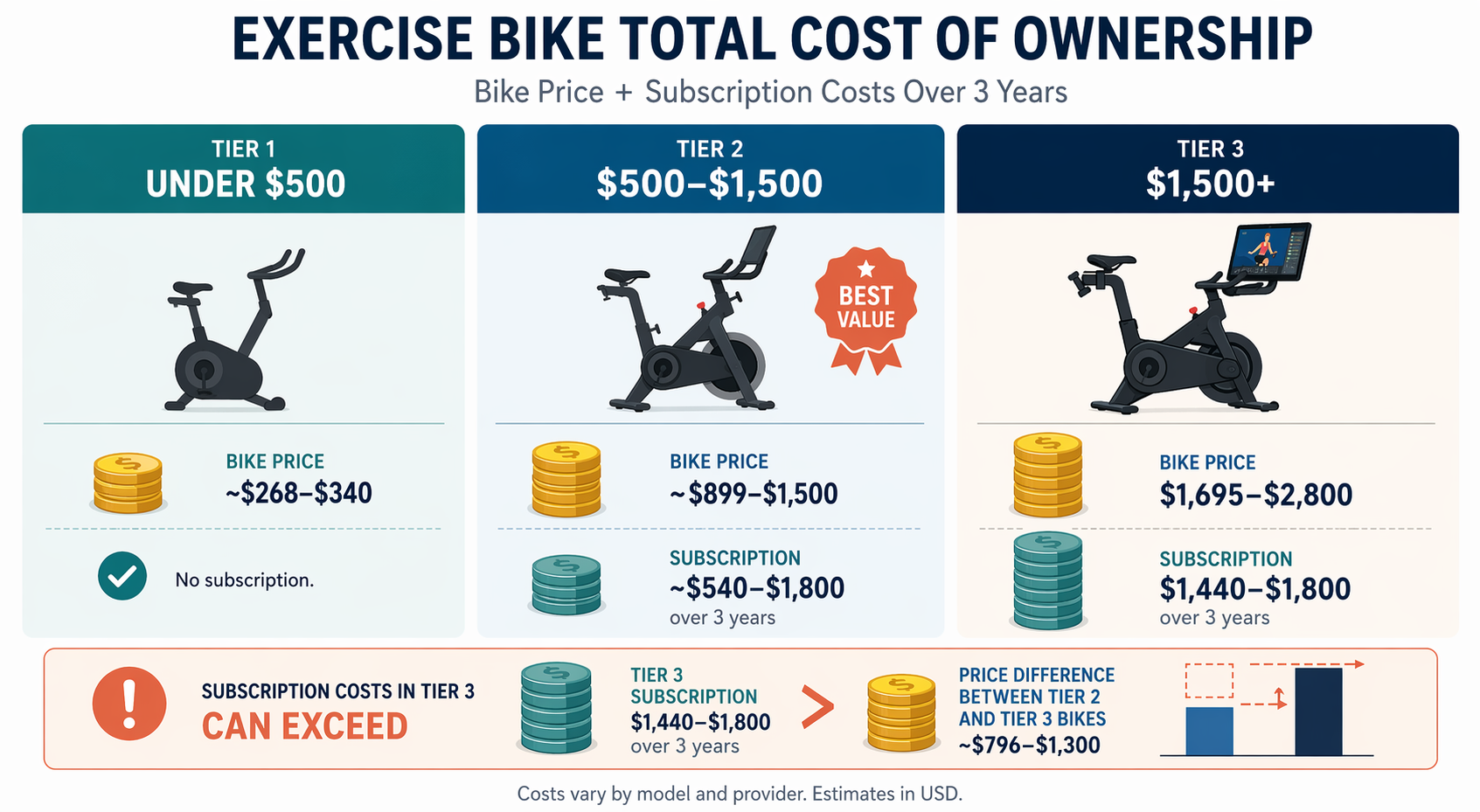
Feature Threshold Comparison: What Each Tier Unlocks
The table below maps the key features across the three tiers, using representative models from each. This is designed to help you see at a glance what you gain — and what you lose — as you move up the price ladder.
| Feature | Under $500 (Sunny SF-B1002) | $500–$1,500 (Schwinn IC4) | $1,500+ (Peloton Bike+) |
|---|---|---|---|
| Resistance Type | Friction | Magnetic | Magnetic |
| Resistance Levels | Manual (infinite via knob) | 100 | 100 |
| Connectivity | None | Bluetooth (8+ apps) | Bluetooth + WiFi |
| Display | Basic LCD (speed/time) | LCD console (full metrics) | 23.8" HD touchscreen |
| Subscription Required | No | No (optional apps) | Yes ($50/month) |
| Weight Capacity | 275 lbs | 330 lbs | 297 lbs |
| Frame Warranty | 3 years | 10 years | 1 year |
| Noise Level | 47.4 dB | Near-silent | Near-silent |
| Auto-Follow Resistance | No | No | Yes |
| Footprint (L x W) | ~48" x 20" | 48.75" x 21.25" | 54" x 22" |
The most striking jump is between Tier 1 and Tier 2: magnetic resistance, Bluetooth connectivity, and a 10-year frame warranty appear at the $999 price point. The jump from Tier 2 to Tier 3 is primarily about the integrated screen and auto-follow features — the core ride quality (magnetic resistance, 100 levels) is already present in the Schwinn IC4.
Which Tier Is Right for You?
The right tier depends on your budget, your tolerance for subscription costs, and how you plan to use the bike. Use the scenarios below as a starting point, then cross-reference with our Best Home Exercise Machine: A Constraint-Based Guide to Finding the Right Fit for a broader decision framework.
- I just want to pedal while watching Netflix or reading. Buy a Tier 1 bike (Sunny SF-B1002 or Yosuda) or a Tier 2 bike without a screen (Schwinn IC4). You do not need connectivity, and you will never pay a subscription. The Schwinn gives you a smoother ride and better resale value.
- I want structured classes and performance tracking, but I want to avoid a monthly fee. Buy a Tier 2 bike with Bluetooth (Schwinn IC4 or Horizon 7.0 IC) and use free or low-cost apps. Many apps offer free tiers with limited content, and you can pay for a month of Peloton Digital ($12.99/month) only when you want it.
- I want live classes, leaderboards, and a fully integrated experience. Buy a Tier 3 bike (Peloton Bike or Bike+) and budget for the $50/month All-Access membership. If you ride 5+ times per week, the cost per ride drops to about $2.50 — comparable to a coffee.
- I want the best possible hardware with no subscription. Buy the Concept2 BikeErg ($1,100). It is built like a tank, has a 5-year frame warranty, and the PM5 monitor works with any Bluetooth app. You lose the immersive screen experience, but you gain zero ongoing costs and a machine that will outlast most connected bikes.
- I want incline/decline simulation and the most advanced programming. Buy the NordicTrack X24. The -10% to 20% incline range is unique in this category, and iFIT's programming adjusts resistance and incline automatically. Just be prepared for the $39/month subscription and the 200-lb weight of the machine.
Frequently Asked Questions
Are refurbished Peloton bikes worth it?
Yes, if you are comfortable with the refurbishment process. Peloton sells refurbished original Bikes directly, and they include the same warranty as new units. The catch is a $95 used equipment activation fee that applies when you buy secondhand. The refurbished price is typically several hundred dollars below the new price, making the entry point closer to $1,200–$1,400. The same $50/month All-Access membership applies.
What is the difference between friction and magnetic resistance?
Friction resistance uses a felt pad pressed against the flywheel. It is simple, inexpensive, and requires occasional pad replacement. It is also noisier and less smooth than magnetic resistance. Magnetic resistance uses magnets that move closer to or farther from the flywheel, creating resistance without contact. It is near-silent, requires no maintenance, and provides a smoother, more consistent feel. Magnetic resistance is standard on all bikes above $500.
How loud are air bikes compared to magnetic bikes?
Air bikes (like the Concept2 BikeErg and Rogue Echo Bike) use a fan for resistance, and the noise level scales with effort. At maximum output, air bikes measure 76–83 dB — comparable to a vacuum cleaner or a busy restaurant. Magnetic bikes are near-silent; the only sound is the chain or belt drive. If noise is a concern for your household or neighbors, magnetic resistance is the clear choice.
Do I need a subscription to use a smart bike?
No. A "smart bike" with Bluetooth connectivity can be used without any subscription. You can ride in manual mode, use free apps, or connect to a paid app on a month-by-month basis. The subscription is required only for the bike's proprietary content library (Peloton classes, iFIT programming, Echelon Premier). The Schwinn IC4, Horizon 7.0 IC, and Concept2 BikeErg all work perfectly with no subscription.
Can I use my own tablet instead of a built-in screen?
Yes, and this is one of the key differentiators between Tier 2 and Tier 3 bikes. Tier 2 bikes like the Schwinn IC4 and Horizon 7.0 IC have a tablet holder mounted on the handlebars. You place your own iPad or Android tablet in the holder and stream classes from any app. This gives you the same content library as a Tier 3 bike (Peloton app, Zwift, etc.) without paying for a built-in screen you may not need. The trade-off is that you lose auto-follow resistance and the seamless integration of a dedicated system.
This result comes from one real apartment under the stated conditions — it is a strong signal, not a guarantee your space will measure identically.
Builds this evidence supports
Small Treadmill Buying Guide: 7 Critical Specs to Check Before You Buy
A cross-category spec primer for apartment and small-space dwellers comparing walking pads, ultra-compact folding treadmills, and full-size folding treadmills. Learn the concrete thresholds for motor HP, deck length, noise, warranty, and subscription lock-in so you can compare apples to apples.
Where to Spend vs. Save on Affordable Home Gym Equipment: A Quality Tradeoff Guide
A practical guide for budget-conscious buyers (under $1,000) that reveals which equipment categories demand a higher investment for safety and durability, and where cutting costs is a smart move.
Spot something off?
If this result didn't match your own space, let us know — floor-damage and noise claims carry real deposit-risk consequences if we get them wrong.