
How to Choose Your First Workout App: A Beginner's Decision Guide Based on Goal, Space, Budget, and Comfort Level
Feeling overwhelmed by the app store? This decision guide helps absolute beginners pick their first workout app by matching it to who you are right now — your goal, available space, budget, and comfort level — so you actually stick with it.
Why Most Beginners Pick the Wrong App (and How to Avoid That)
Open the app store on any given day and you are staring at hundreds of options, each promising to transform your body in 30 days or less. It is tempting to grab the one with the highest rating or the flashiest ad, but that is exactly where most beginners go wrong. The number one reason new exercisers quit within the first few weeks is not a lack of motivation — it is that they picked a program designed for someone else. A program that assumes you already know what a Romanian deadlift is, or one that jumps straight into 45-minute HIIT sessions when you have not moved your body in years.
The solution is not to find the single "best" app. The solution is to find the app that matches who you are right now — your primary goal, the space you have to work out in, your budget, and the type of coaching that actually keeps you accountable. This guide walks you through each of those four decision axes and ends with a decision tree that routes you to a specific app recommendation based on your unique combination. By the time you finish reading, you will know exactly which app to download and why.
Step 1: Start With Your Goal
Before you look at a single app, get clear on what you actually want to achieve. Your goal determines the kind of programming you need, and not all apps are built to deliver every goal well. The five most common beginner goals are:
- Build strength and muscle tone
- Lose weight and improve body composition
- Improve cardiovascular endurance
- Increase flexibility and mobility
- General fitness — feel better, move more, no specific target
Each goal demands a different type of programming. For strength, you need an app that provides structured multi-week programs with clear progressive overload — meaning the exercises get harder over time in a logical way. For weight loss, you need a mix of steady-state cardio and interval training, plus the ability to track your activity over weeks. For flexibility, you need guided sessions with long holds and clear form cues. For general fitness, you need variety without complexity.
The critical distinction for beginners is between apps that offer structured programs and apps that offer a random library of classes. A library of 10,000 individual workouts is useless if you do not know which one to do on day one, day two, and day three. A structured program — even a short one — tells you exactly what to do each session and builds on the previous workout. According to Garage Gym Reviews' testing of over 70 apps, apps that lack a structured beginner program score low on progressive overload, which is the mechanism that drives adaptation and keeps you from plateauing after two weeks.
Step 2: Assess Your Equipment Reality
One of the most common mental blocks for beginners is the belief that you need equipment to start. That is false. Bodyweight-only training is sufficient for the first two to three months of consistent exercise, according to the Daily Burn 2026 beginner guide. You can build strength, improve cardiovascular fitness, and lose weight using nothing but your own body weight and a small patch of floor.
That said, your equipment situation will narrow down which apps are a good fit. Most apps fall into one of three equipment scenarios:
- Bodyweight only: You have no equipment and do not plan to buy any. You need an app that offers a robust library of bodyweight exercises with clear modifications for every movement.
- Minimal home gear: You have a pair of dumbbells, resistance bands, or a yoga mat. You want an app that can incorporate these without requiring a full home gym.
- Commercial gym access: You have a gym membership and access to barbells, machines, and cables. You need an app that can handle gym-based programming.
Do not let the lack of equipment stop you from starting. Apps like Nike Training Club and Caliber have extensive bodyweight-only programs. The free version of Caliber alone offers over 500 exercises with video demonstrations and step-by-step instructions, all doable without a single piece of equipment. If you have a set of dumbbells, your options expand significantly, but you do not need to buy anything to get through your first two months.
Step 3: Set Your Budget
The average workout app costs $34 per month, according to Garage Gym Reviews' 2026 testing. That is roughly the price of a mid-tier gym membership, and for many beginners, it is a significant recurring expense. But the market is not binary — it spans three clear tiers, each with a different value proposition.
| Budget Tier | Monthly Cost | What You Get | Best For |
|---|---|---|---|
| Free | $0 | Access to a library of workouts, basic tracking, and sometimes limited programming. No personalized coaching. | Beginners who want to try multiple styles without commitment, or who are unsure if they will stick with it. |
| Mid-tier Paid | $10–$20/mo | Structured programs, trainer-led classes, better instruction quality, and often a free trial period. | Beginners who want guided programming and accountability but are not ready for a personal trainer. |
| Premium Coaching | $199+/mo | 1:1 human coach, fully customized programs, daily check-ins, and high accountability. | Beginners who need maximum accountability and have the budget for a personal trainer experience at home. |
Free apps like Nike Training Club (completely free since 2020, no premium tier) and FitOn (free tier with thousands of classes) are excellent starting points. The free version of Caliber is ad-free and includes 500+ exercises with video demos — no paywall for the core experience. Mid-tier apps like Aaptiv ($14.99/mo) and Peloton App ($12.99/mo app-only) offer more structured programming and higher production quality. Premium coaching apps like Future ($199/mo) pair you with a real human coach who designs your workouts and checks in daily.
For a deeper breakdown of when free is enough and when you should pay, read our full comparison: Workout Apps for Beginners: Free vs. Paid — When You Actually Need to Spend Money and When Free Is Enough.
Step 4: Decide Your Coaching Preference
Not everyone needs the same type of coaching. Some beginners want to be told exactly what to do and watch a trainer demonstrate every rep. Others prefer an algorithm that generates workouts based on their logged data. And a smaller group wants a real human being on the other end of the phone. These three coaching styles map to different app types:
- Follow-along video (trainer-led classes): You watch a trainer on screen and follow along in real time. Best for beginners who need visual cues and motivation from an instructor. Examples: Peloton App, Apple Fitness+, Daily Burn.
- AI-planned (algorithm-generated workouts): The app creates workouts based on your logged data, available equipment, and stated goals. Best for beginners who want structure without a live instructor. Examples: Fitbod ($15.99/mo), Shred App ($9.99/mo), TR[Ai]NER by Element 26.
- Human coach (1:1 remote coaching): A real certified personal trainer designs your program, checks your form via video, and communicates with you daily. Best for beginners who need maximum accountability and are willing to pay a premium. Example: Future ($199/mo).
Your comfort level with technology and self-direction matters here. If you have never followed a workout video before, a follow-along app with a friendly trainer might be the least intimidating entry point. If you prefer to move at your own pace and do not want to watch a video every session, an AI-planned app that gives you a list of exercises might feel more natural. For a detailed comparison of these two models, see our article: AI vs. Human Coaching in Workout Apps: Which Model Actually Delivers Better Results in 2026?.
Your Personal Decision Tree: Which App Should You Try First?
Now that you have identified your goal, equipment, budget, and coaching preference, it is time to put it all together. Use the decision tree below to find your recommended starting app. Follow the branch that matches your combination of constraints.
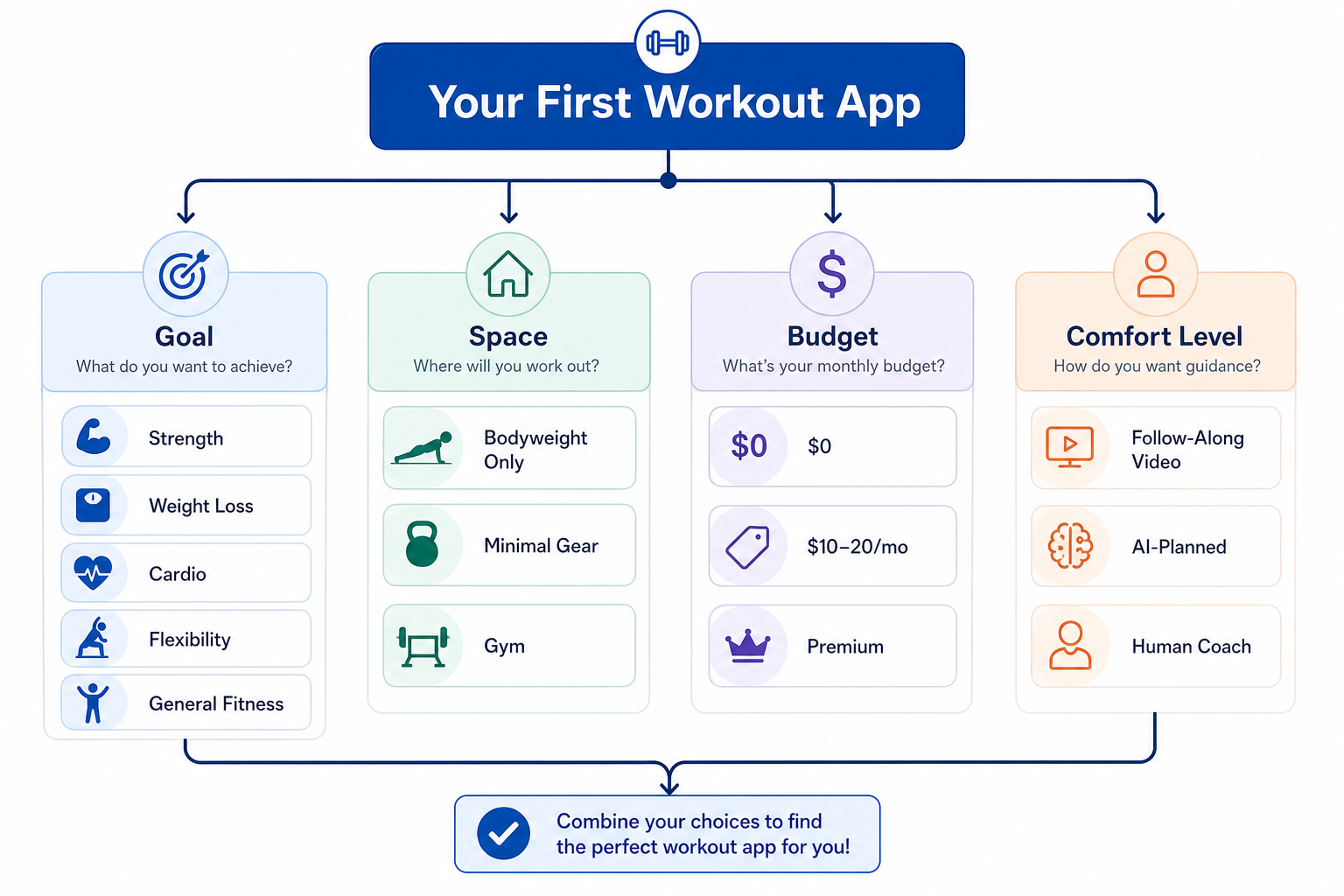
Here are the most common beginner combinations and the apps that fit them best:
- Bodyweight + Free + General Fitness → Nike Training Club. Completely free, hundreds of workouts across 10+ categories, periodized programming available, and rated 5/5 for value and ease of use by Garage Gym Reviews.
- Bodyweight + Free + Strength → Caliber (free version). Ad-free, 500+ exercises with video demos, muscle maps, and progress tracking. Rated 4.6/5 overall.
- Minimal Gear + $10–20/mo + Follow-Along → Aaptiv ($14.99/mo). 8,000+ workouts, audio-based coaching, rated 4/5 for accountability.
- Bodyweight + Free + Weight Loss → FitOn (free tier). Thousands of free classes, celebrity trainers, modifications shown on screen. Rated 4/5 overall and the best free app for beginners according to Garage Gym Reviews.
- Minimal Gear + $10–20/mo + Structured Program → Daily Burn ($19.95/mo). The True Beginner program is an 8-week, day-by-day program designed specifically for people who have never worked out before, with no jumping or floor work required.
- Gym Access + $10–20/mo + AI-Planned → Shred App ($9.99/mo). AI-assisted, customizable to gym equipment, rated 5/5 for ease of use. Best overall pick in Garage Gym Reviews' 2026 testing.
- Any Equipment + Premium + Human Coach → Future ($199/mo). 1:1 real human coach, fully customized programs, 5/5 for accountability and progressive overload. 30-day risk-free trial available.
If you landed on the free-app branch and want to narrow down your options further by goal, read our dedicated guide: The Beginner's Decision Guide to Free Workout Apps — Which One Actually Fits Your Goal?.
What to Expect Your First Month: A Week-by-Week Guide
Once you have downloaded your app, the next question is: what does the first month actually look like? The answer is simpler than you might think. Multiple expert sources, including Garage Gym Reviews and Daily Burn, agree that three days per week for 15 to 25 minutes per session is the optimal starting volume for the first month. More than that and you risk burnout or injury. Less than that and you may not build enough momentum to form a habit.
| Week | Sessions | Duration | Focus |
|---|---|---|---|
| Week 1 | 3 days | 15–25 min | Learn the movements. Focus on form, not intensity. Expect to feel sore. |
| Week 2 | 3 days | 15–25 min | Repeat the same workouts. Your body is adapting. Soreness should decrease. |
| Week 3 | 4 days | 15–25 min | Add a fourth day. You may start to feel the movements becoming more natural. |
| Week 4 | 3–4 days | 15–30 min | Movement feels more natural. You can start to increase intensity slightly. |
The most important variable in the first month is not the specific exercises or the app you chose — it is consistency. Missing a day is fine. Missing two in a row is where the habit starts to slip. If you feel too sore or tired on a scheduled day, do a 10-minute mobility session or a gentle walk instead of skipping entirely. The goal is to keep the streak alive, not to crush every workout.
Red Flags to Avoid in Beginner Workout Apps
Not every app that claims to be beginner-friendly actually is. Some are designed for intermediate exercisers who already know how to modify exercises and structure their own training. Here are the warning signs that an app is not suitable for a true beginner:
- No visible exercise modifications. If the app shows a single version of each exercise with no low-impact, seated, or no-jumping alternative, it is not designed for beginners. Every movement should have at least one regression.
- No structured beginner program. If the app only offers a library of random stand-alone workouts with no suggested order or progression, you will have no idea what to do on day one. Look for a dedicated "Beginner Program" that lasts at least 21 days.
- No form coaching or video demonstrations. Text descriptions of exercises are not enough. You need to see the movement performed correctly, especially for compound exercises like squats, lunges, and push-ups.
- No progressive overload logic. If the workouts do not get harder over time in a structured way, you will plateau within weeks. The app should have a clear system for increasing difficulty.
- No free trial or money-back guarantee. If an app asks you to commit to a subscription without letting you test it first, that is a red flag. Most reputable apps offer at least a 7-day trial.
Apps that score poorly on these criteria are likely to set you up for frustration, injury, or both. If you download an app and notice any of these red flags within the first session, delete it and try one of the recommendations from the decision tree above. Your first workout app should make you feel capable, not overwhelmed.
This result comes from one real apartment under the stated conditions — it is a strong signal, not a guarantee your space will measure identically.
Builds this evidence supports
No build currently links to this specific test. Browse all builds with a matching tag.
Spot something off?
If this result didn't match your own space, let us know — floor-damage and noise claims carry real deposit-risk consequences if we get them wrong.