
Choosing an exercise tracking watch in 2026 starts badly if the first question is “Which one is best?” A screenless recovery band, a $53 fitness band, a daily-charge smartwatch, and a GPS sports watch are all sold as fitness wearables, but they are not solving the same problem. Current options stretch from roughly $50 to $1,200, while recurring memberships can run from $0 to $359 per year, depending on the device and feature tier.[1][2][3]
A better first question is: what constraint removes the most wrong choices? For most buyers, the useful order is form factor, phone ecosystem, primary workout, subscription tolerance, then data depth. That order keeps you from falling in love with a watch that will not pair with your phone, a band that cannot track your run without your phone, or a cheap device whose best features become expensive after the first year.
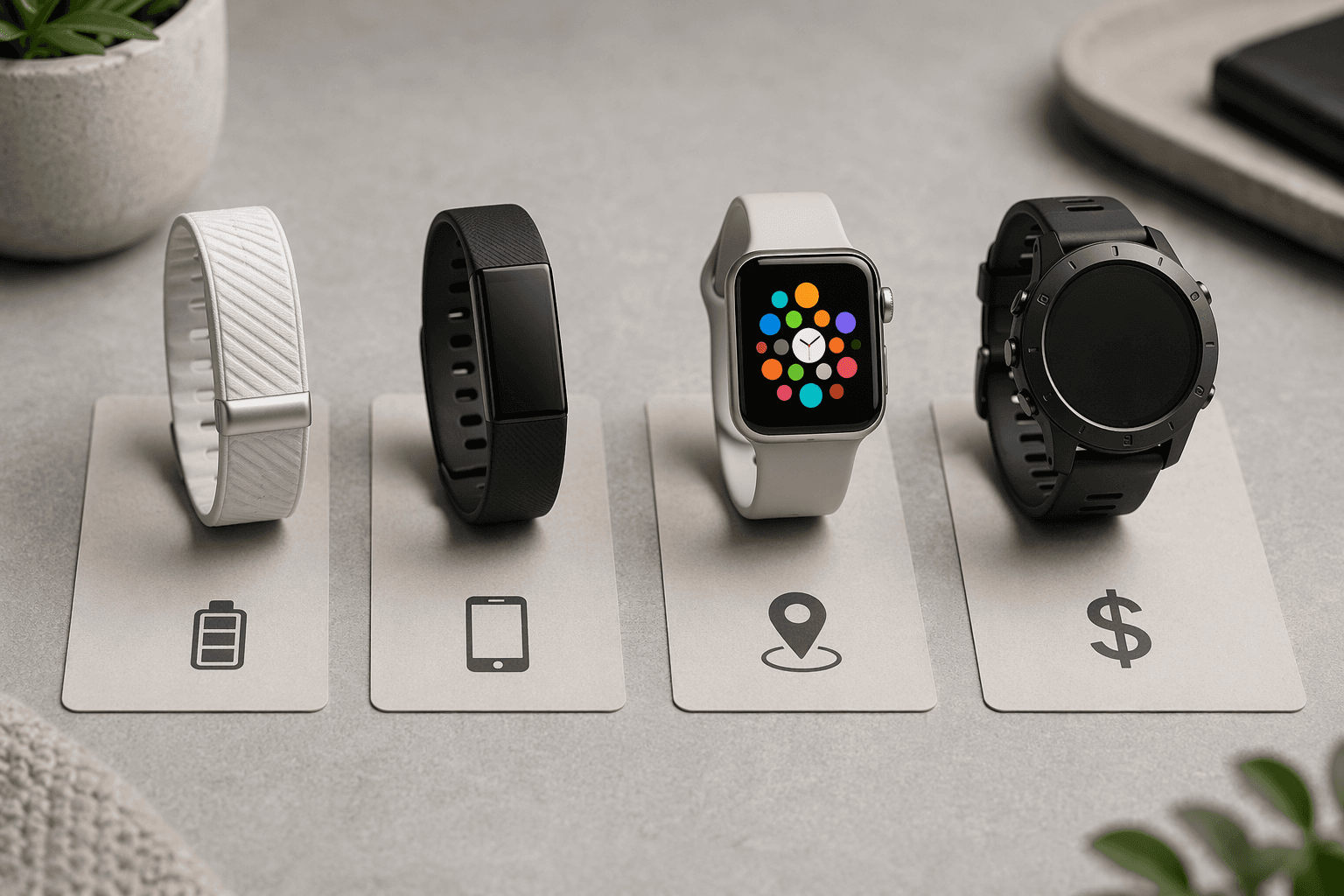
Start With The Shape Of The Device
Form factor is not cosmetic here. It decides whether you get on-wrist workout stats, whether you can leave your phone at home, how often you charge, and whether the device feels like a tiny phone or a quiet health sensor.
| Device type | Typical examples | What it does best | Main compromise |
|---|---|---|---|
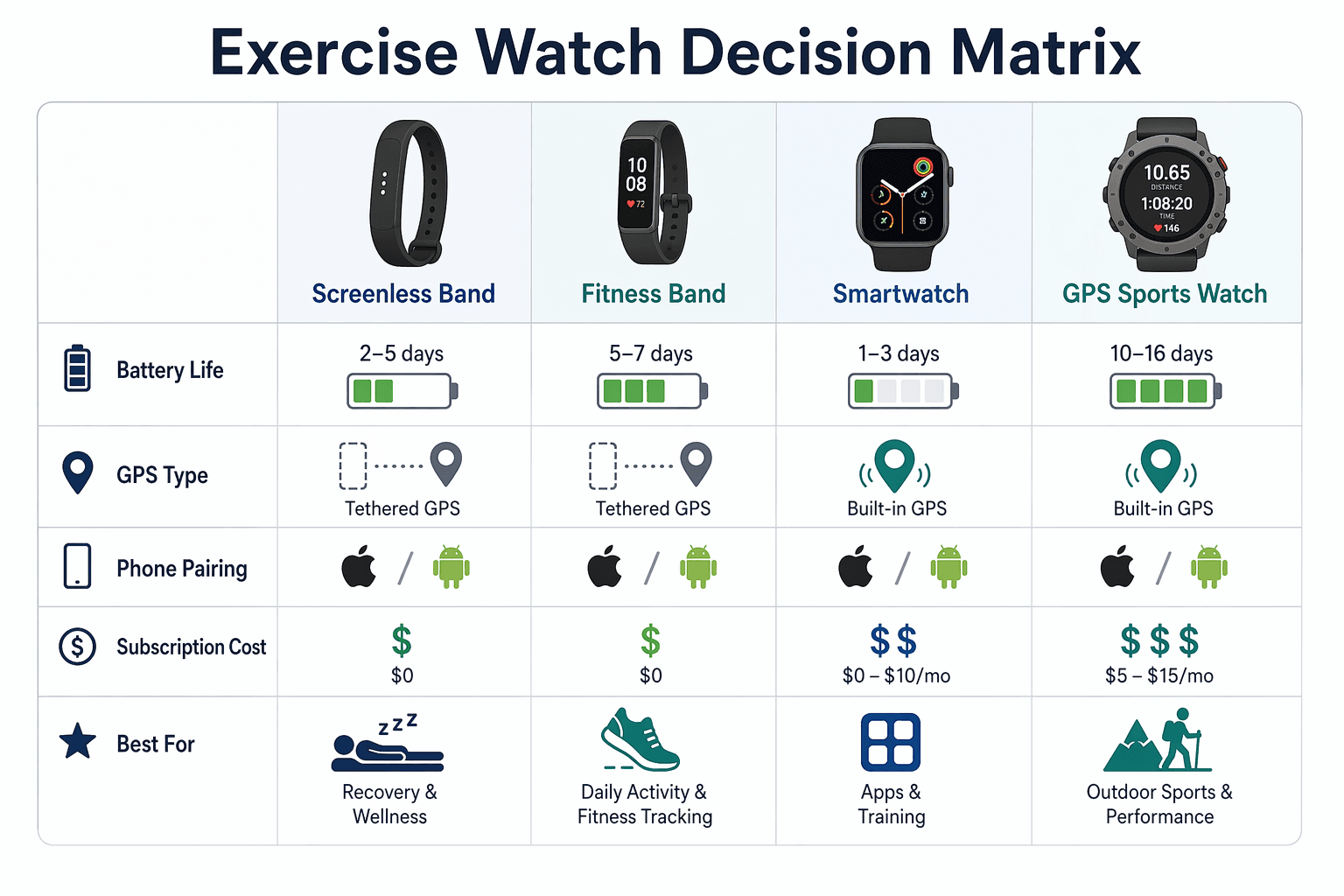
| Screenless band | Fitbit Air, Whoop 5.0 | Recovery, sleep, continuous wear, long battery life | No useful workout screen; GPS is absent or not the point |
| Fitness band with screen | Fitbit Charge 6, Xiaomi Smart Band 10 | Basic stats, compact size, multi-day battery, lower price | Route tracking may require carrying a phone |
| Smartwatch | Apple Watch SE 3, Samsung Galaxy Watch 8 | Apps, notifications, payments, calls, general health features | Daily or near-daily charging |
| GPS sports watch | Garmin Forerunner 570, COROS Pace 4 | Phone-free GPS, training load, running and outdoor metrics | Less polished app ecosystem than a full smartwatch |
Screenless bands are easiest to misunderstand. Fitbit Air and Whoop 5.0 are not miniature sports watches without screens; they are recovery-first trackers. The appeal is low-friction wear and long battery life, with reported ranges in the 7-to-16-day zone depending on model and testing. The trade is obvious during a workout: no glanceable pace, lap time, rep timer, map, or heart-rate zone screen on the wrist.[3][4]
That can be perfectly reasonable if your main use is sleep, strain, readiness, or trend tracking after home workouts. It is a poor fit if you want to look down mid-run and know whether you are running too fast. If this is the fork you are stuck on, a screenless comparison such as Fitbit Air vs Whoop 5.0 is more useful than a general smartwatch ranking.
Fitness bands with screens sit in the middle. Fitbit Charge 6 and Xiaomi Smart Band 10 give you a small display, simple workout modes, heart-rate readings, sleep tracking, and multi-day battery life. They are usually the least annoying category for people who want a tracker more than a wrist computer. The catch is GPS: many bands can show route and pace only by using your phone’s GPS, so the “tracked run” still requires carrying a phone.[1][2]
Smartwatches are the convenience kings. Apple Watch SE 3 and Samsung Galaxy Watch 8 are better if you want notifications, apps, voice assistants, calls, payment support, and a familiar phone-like interface on your wrist. They are also the category most likely to make fitness feel like one feature inside a broader device. Battery life is the tax: Apple Watch models are generally in the daily-charge range, roughly 18 to 24 hours, so sleep tracking means building a charging routine that does not annoy you by week three.[2][5]
GPS sports watches are for people whose workouts create data worth tracking in the moment. Garmin Forerunner 570 and COROS Pace 4 are built around phone-free GPS, structured training, pace, intervals, recovery, and longer sports battery life. The COROS Pace 4 is especially worth noticing because its $249 price puts real GPS-watch capability near mainstream smartwatch pricing rather than premium-only territory.[1][2]
Then Eliminate The Watches Your Phone Cannot Use
Phone compatibility is not a preference layer. It is a hard stop.
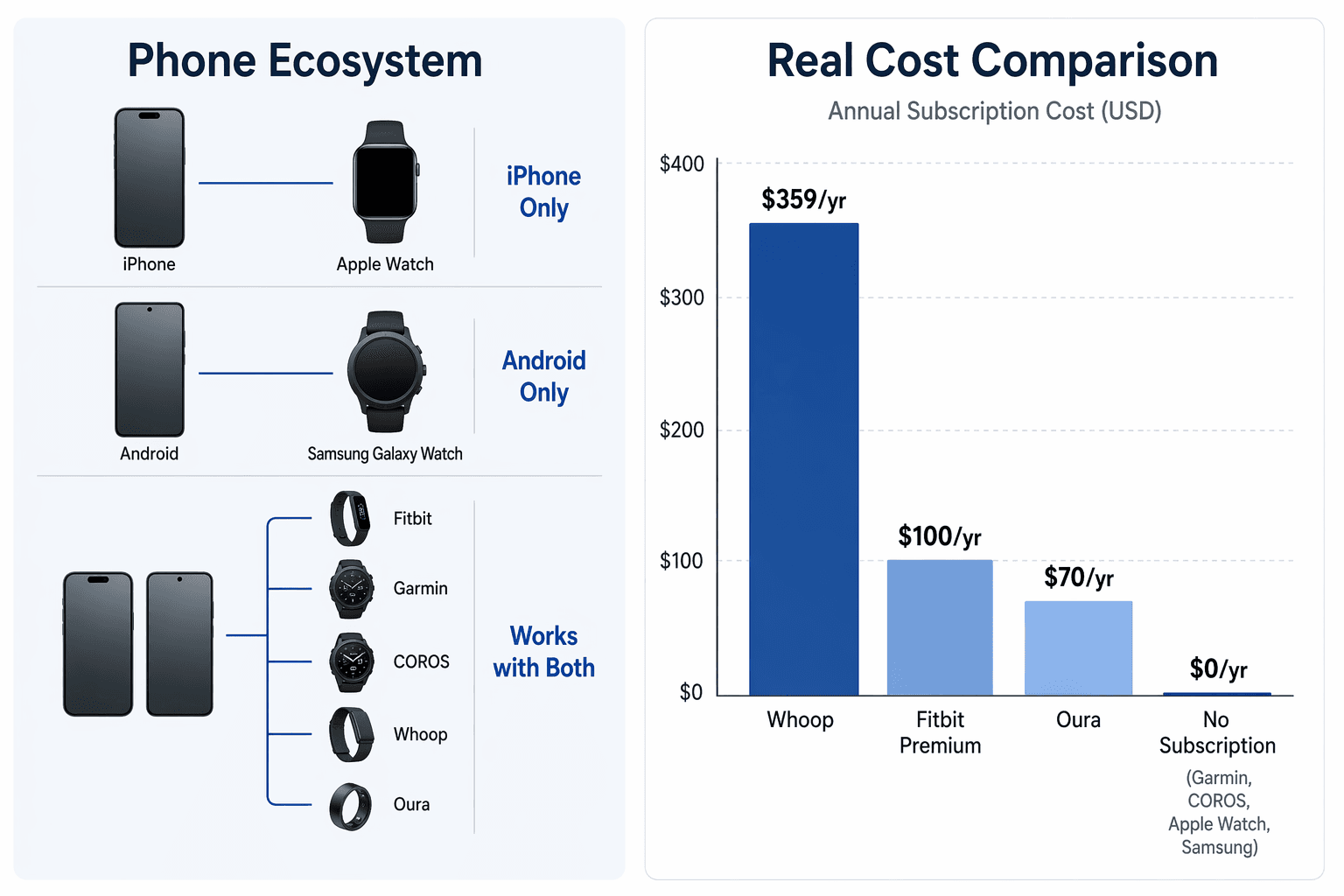
- Apple Watch pairs only with iPhone; current compatibility requires iPhone 11 or later running iOS 26.[6]
- Samsung Galaxy Watch 8 pairs only with Android phones running Android 12 or later.[7]
- Fitbit, Garmin, COROS, Amazfit, Polar, Whoop, and Oura generally support both iOS and Android, though individual features can still vary by phone platform.[1][3]
This is where a lot of bad purchases should end before they become returns. An iPhone user tempted by a Galaxy Watch 8 should stop. An Android user looking at Apple Watch should stop. If you change phones often or dislike platform lock-in, Garmin, COROS, Fitbit, Whoop, Oura, Amazfit, and Polar deserve more attention than the two phone-tied smartwatch families.
For a deeper ecosystem comparison, Fitbit vs Garmin vs Apple Watch is the more targeted next read; this guide only needs the compatibility filter to keep the shortlist honest.
Match The Watch To The Workout You Actually Do
The right exercise tracking watch for running is not automatically the right one for strength training, indoor cycling, walking, swimming, or recovery tracking. The device should reduce friction in your most common workout, not impress you with features you will open twice.
If You Run Outside, Built-In GPS Matters
Outdoor runners should separate built-in GPS from phone-tethered GPS. Garmin, COROS, Apple Watch, and Samsung Galaxy Watch models can track route, distance, and pace without bringing your phone. Fitbit Charge 6 and Xiaomi Smart Band 10 can be useful fitness bands, but their route tracking depends on the phone connection in the cases described in current product coverage.[1][2]
That difference is not a spec-sheet nitpick. If you run with your phone anyway for safety or music, tethered GPS may be fine. If you are buying a watch because you want to leave the phone at home, a no-GPS or phone-tethered band is the wrong tool.
If You Mostly Train At Home, Comfort And Battery Can Beat Metrics
For home strength sessions, mobility work, treadmill walks, indoor bike rides, and general activity, the watch does not need to be a serious GPS instrument. Comfort, automatic activity recognition, heart-rate trends, sleep tracking, and battery life may matter more. A slim fitness band or recovery tracker can be easier to live with than a large sports watch if the workout happens ten feet from your phone.
Strength training is also where precision expectations should stay grounded. Wrist optical heart-rate sensors can struggle during gripping, fast intervals, and arm-flexed movements because the sensor depends on stable skin contact and blood-flow readings. For most home exercisers, the useful signal is trend direction over weeks, not a perfect calorie number from one dumbbell session.
If your workouts vary by modality, Which Fitness Tracker Works Best for Your Home Workout Type? is the better place to split the decision by training style.
If Recovery Is The Main Point, A Screen May Be Optional
Recovery-focused buyers are the one group that may be happier without a screen. Whoop 5.0 and Fitbit Air are built around passive wear, sleep, readiness, strain, and coaching rather than mid-workout interaction. That trade makes sense if you mainly want to know whether your training and sleep habits are trending in the right direction.
It makes less sense if you want a timer, live heart rate, pace alerts, or a clear display during intervals. For recovery-first shopping, Best Fitness Trackers for Recovery in 2026 and a metric-by-metric recovery guide are more useful than another broad watch roundup.
Treat Subscriptions As Part Of The Price
The most expensive device is not always the one with the highest checkout price. In this category, the second-year cost can matter more than the sale price, especially when advanced analytics, coaching, or recovery interpretation sit behind a membership.
| Brand or product | Subscription cost in brief | Buying implication |
|---|---|---|
| Whoop 5.0 | $199/year Essential or $359/year Peak | Membership is central to the product, not an optional extra |
| Fitbit Air with Google Health Premium | $10/month or $100/year for AI coach and advanced analytics | The low device price does not represent the full recovery-coaching cost |
| Oura | $6/month or $70/year | Useful ring-style health tracking comes with an ongoing fee |
| Garmin, COROS, Amazfit, Polar | $0 mandatory subscription for core features | Higher device prices may be easier to justify if you keep the watch for years |
Whoop is the clearest example: its 2026 membership pricing is listed at $199 per year for Essential and $359 per year for Peak. That means the recurring cost is the product economics. If you like the coaching and recovery model, fine; just do the math before calling it cheaper than a watch.[8]
Fitbit Air has the opposite risk: the device price looks approachable, but Google Health Premium is required for the AI coach and advanced analytics at $10 per month or $100 per year. For a buyer who only wants sleep duration, steps, and basic trends, that may not matter. For a buyer attracted by the coaching pitch, it absolutely does.[9]
Oura’s membership is lower at $6 per month or $70 per year, but it is still an ownership cost. Garmin, COROS, Amazfit, and Polar are cleaner on this point because their core features are included with the device purchase and do not require a mandatory ongoing subscription.[10][11]
This is where the budget shopper should slow down. A device that looks affordable at checkout can cost more than its hardware price within one or two years if the feature set you actually want depends on an annual plan.
Decide How Much Data You Will Actually Use
More metrics are useful only when they change a decision. HRV, VO2 max estimates, sleep stages, training readiness, recovery scores, and calorie burn can all help, but they do not all deserve equal weight for every buyer.
- Choose basic data if you want steps, workout time, resting heart rate, sleep duration, and simple activity trends.
- Choose recovery data if you adjust workouts based on sleep, HRV, resting heart rate, and readiness-style scores.
- Choose training data if you run, cycle, or train outdoors and care about pace, zones, intervals, training load, and route history.
- Choose smartwatch data if notifications, apps, calls, payments, and health alerts matter alongside exercise tracking.
The caveat is accuracy. Wrist-based optical heart rate is convenient, not magical. Calorie estimates are even softer because they combine sensor readings with assumptions about your body and movement. Treat those numbers as directional, especially for strength training, mixed intervals, and workouts with lots of wrist movement.
Sleep tracking deserves a separate kind of skepticism. The best sleep tracker is the one you still wear at 2 a.m. A watch with excellent sleep features but 18-to-24-hour battery life can work if you are disciplined about charging. If nightly charging already sounds like a chore, a multi-day fitness band, Garmin-style watch, Whoop, or similar long-wear device is the safer bet.[2][4]
The Shortlist By Constraint
Once the filters are in the right order, the recommendations get much simpler.
| Your main constraint | Start here | Avoid |
|---|---|---|
| You use iPhone and want the richest smartwatch | Apple Watch SE 3 or another Apple Watch model that fits your budget | Samsung Galaxy Watch |
| You use Android and want the richest smartwatch | Samsung Galaxy Watch 8 or another Android-compatible smartwatch | Apple Watch |
| You run outside without your phone | Garmin, COROS, Apple Watch, or Samsung Galaxy Watch with built-in GPS | Screenless bands and phone-tethered fitness bands |
| You want basic fitness tracking with low fuss | Fitbit Charge 6, Xiaomi Smart Band 10, or similar fitness band | Premium recovery subscriptions you will not use |
| You care most about recovery and sleep | Whoop 5.0, Fitbit Air, Oura, or a recovery-focused Garmin/Fitbit option | Daily-charge watches if charging disrupts sleep tracking |
| You hate subscriptions | Garmin, COROS, Amazfit, or Polar | Whoop, Oura, or Fitbit features that depend on Google Health Premium |
| You want the best value GPS sports watch | COROS Pace 4 is the budget outlier to compare first | No-GPS trackers sold mostly on wellness language |
There is still room for taste. Some people want the Apple Watch because their friends use it, because the bands look better, or because it feels familiar. Those are valid reasons. They just should not override hard constraints. If the phone does not pair, the workout needs GPS, the subscription annoys you, or the battery routine breaks sleep tracking, the nice parts will not save the purchase.
Common Gotchas Before You Buy
- Check whether GPS is built in or phone-tethered; route tracking may require carrying your phone.
- Calculate two-year cost, not checkout price, when subscriptions unlock the features you want.
- Do not buy across phone ecosystems; Apple Watch and Galaxy Watch have hard pairing limits.
- Be honest about charging; daily battery life can make sleep tracking feel like homework.
- Do not overpay for training metrics if your real routine is walking, home strength, and sleep tracking.
So the clean answer is this: if your phone rules out a device, remove it. If your workout requires phone-free GPS, do not buy a no-GPS band. If subscriptions irritate you, avoid products whose best features depend on annual fees. If sleep tracking matters, battery life is not a side detail. After those filters, the “best” exercise tracking watch usually becomes a much shorter list.
References
- The Best Fitness Trackers We've Tested for 2026, PCMag.
- The Best Fitness Trackers of 2026, CNET.
- Best fitness tracker 2026, Wareable.
- The 3 Best Fitness Trackers of 2026, Wirecutter / The New York Times.
- Smartwatches vs. fitness trackers, Tom's Guide.
- Apple Watch compatibility, Apple.
- Samsung Galaxy Watch8 compatibility, Samsung.
- Whoop membership pricing, Whoop, verified June 2026.
- Google Health Premium pricing, Google / Fitbit.
- Oura membership pricing, Oura.
- Manufacturer feature pages for Garmin, COROS, Amazfit, and Polar.
Comments
Join the discussion with an anonymous comment.