
I've been burned by 'AI' fitness apps before — has 2026 changed anything?
Two years ago, I downloaded an app that promised AI-powered programming. It asked me my goals, equipment, experience level. Then it spat out a plan that looked like a copy-pasted template from 2018. The only thing AI about it was the word "AI" in the description. I quit after two weeks.
That experience made me skeptical of every marketing claim about algorithmic training. But 2026 is a different year. I've spent the last few months testing five apps that actually use genuine adaptive programming — JEFIT, Load Muscle, Caliber, TR[Ai]NER, and (with caveats) Fitbod. I wanted to know: have these apps crossed a threshold where their plan generation rivals a mid-range personal trainer? And if so, where do they still fall short?
This piece is not a roundup. It's an investigation. I tested each app for at least two weeks with the same home gym equipment (adjustable dumbbells, bench, pull-up bar) and the same training background. I logged every set accurately. I looked at what the algorithm actually did with that data. And I compared it to my own experience working with a personal trainer for six months. If you've read our Best AI Fitness Apps 2026 article, this goes deeper: it asks whether those apps actually deliver on their promises.
What 'AI' actually means in a fitness app — and what it doesn't
Before we get to the test results, let's clear up a confusion. When an app says "AI-powered," it could mean one of two very different things:
- Rule-based progressive overload: The app takes your last session's performance (e.g., you hit 10 reps on bench press with 50 lbs) and applies a simple rule: next time, increase weight by 5 lbs if you hit the target rep range. This is algorithmic, not intelligent in any deep sense, but it works. JEFIT uses this.
- Generative AI plan builder: The app takes your goals, equipment, experience level, and schedule, then generates a complete training plan from a large database of exercises. Load Muscle claims this. The AI decides which exercises to include, how to split them across days, and how to progress week to week.
Neither is magic. Both are only as good as the data you feed them. Log inaccurate sets? The algorithm adjusts to the wrong reality.
How we tested: 2 weeks per app, same equipment, same skeptic
I tested each app on the same iPhone (iOS 19) with the same home gym: adjustable dumbbells (5-52.5 lbs), a flat bench, a pull-up bar, resistance bands, and a yoga mat. No cable machines, no barbells. My goal was consistent: build strength with a focus on progressive overload, three to four sessions per week.
I spent at least two weeks with each app — enough time for a serious algorithm to collect 6–8 training sessions and start adjusting. I evaluated five dimensions:
- Planning depth: does the app generate a full multi-week plan or just a single session?
- Exercise library size: but more importantly, how many exercises actually fit my equipment?
- Personalization: does it adapt based on my logged performance, or just ask once and stay static?
- Price: total monthly cost including any required subscription.
- Real-time form feedback: can it correct my form during a set? Spoiler: no.
| App | AI Planning Depth | Exercise Library | Personalization | Price (monthly) | Real-time Form Feedback |
|---|---|---|---|---|---|
| JEFIT | Rule-based progressive overload | 1,400+ exercises | Adapts from logged performance | $12.99 Elite | No |
| Load Muscle | Generative AI plan builder | 4,000+ exercises | Equipment, schedule, goals | Free; premium tier available | No |
| Caliber | Hybrid: AI plan + human coaching | 500+ exercises | Initial assessment + coach feedback | Free; Pro $19, Premium $200 | No |
| TR[Ai]NER | Adaptive AI program generation | Not stated publicly | Goals, equipment, limiting factors | Free (3 programs); $14.99 thereafter | No |
A few takeaways jump out immediately. First, none of these apps offer real-time form correction — that's still a human trainer's domain. Second, the sizes of exercise libraries don't mean much if most exercises require equipment you don't own. We'll dig into that.
JEFIT's NSPI: a weekly score that actually drives decisions — or just looks good?
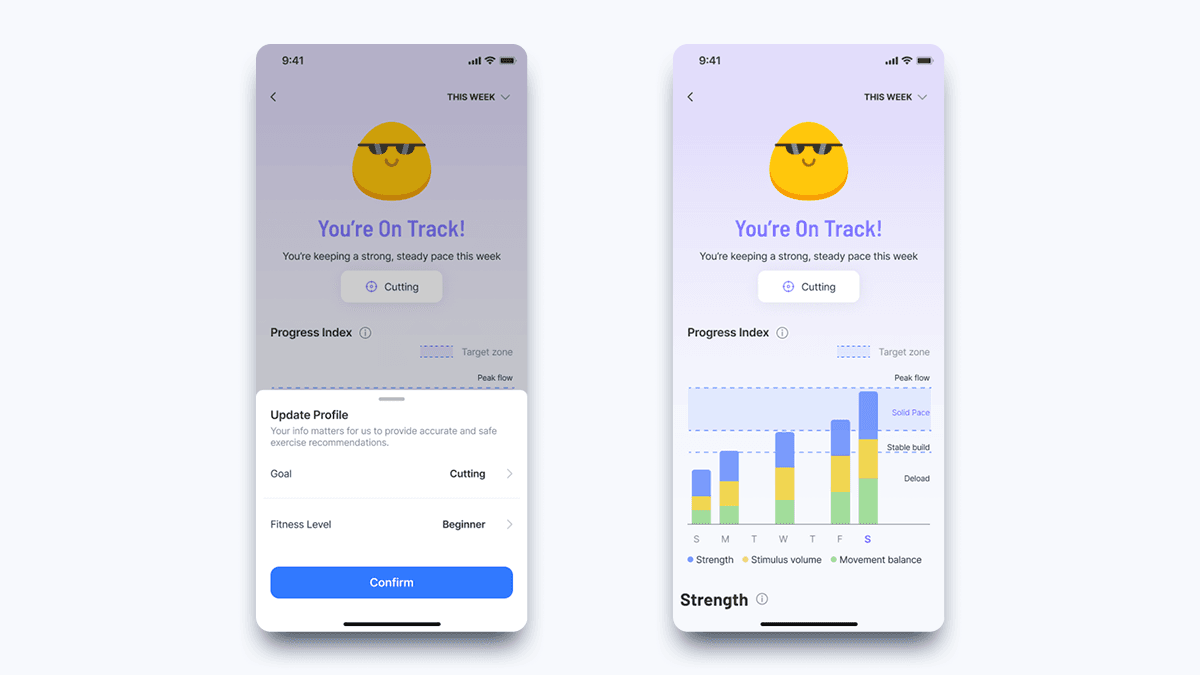
JEFIT's flagship feature is the North Star Progress Index (NSPI), a weekly score that aggregates volume across muscles, movement balance, strength gains, and consistency.
"NSPI pulls all training data into one weekly score reflecting volume across muscles, movement balance, strength gains, and consistency." — JEFIT blog
I set up a standard push/pull/legs split and logged every session for two weeks. After the first week, the NSPI dashboard showed a score of 68 out of 100. The app suggested I increase weight on dumbbell bench press from 45 lbs to 50 lbs because I had hit 10 reps two sessions in a row. I did. The next session, my form wasn't perfect — I was letting my elbows flare — but the app couldn't see that. It just saw the rep count and logged the weight increase.
The NSPI is useful for a self-aware lifter who knows their own form. It gives you a concrete signal to push harder or back off. But it's only as reliable as your logging. If you fudge reps, or skip the cardio warm-up, the score adjusts to a false picture. In my test, the algorithm correctly triggered progressive overload on bench press, rows, and squats. It missed the fact that my squat depth was deteriorating on the last set of each session — but that's not its job. That's a coach's job.
Load Muscle's 4,000 exercise AI: does quantity mean quality for home gyms?
Load Muscle boasts a library of 4,000+ exercises and an AI that builds complete plans from scratch.
"Load Muscle uses AI to build complete training plans from scratch using 4,000+ exercises with video demonstrations." — Load Muscle blog
I entered my equipment: adjustable dumbbells, bench, pull-up bar, resistance bands. The AI generated a 4-day upper/lower split. The plan looked solid on paper: dumbbell bench press, rows, overhead press, lat pulldowns (using bands attached to the pull-up bar). But then it threw in a "cable crossover" and a "barbell hip thrust." I don't own a cable machine or a barbell. The algorithm let me swap exercises, but that defeats the purpose of automatic generation.
The quantity of exercises here works against its own personalization. With 4,000 exercises to choose from, the AI has more opportunity to pick something that doesn't fit your actual setup. JEFIT's smaller library (1,400) is more curated, and I found it rarely suggested exercises I couldn't do. For a home gym with limited equipment, JEFIT is more reliable. Load Muscle might be better for someone with a fully equipped garage gym.
Caliber's human+AI hybrid: the best of both worlds at a price
Caliber takes a different approach. Its free version uses an algorithm to generate custom programs based on a quick assessment. The Pro tier ($19/month) adds group coaching. Premium ($200/month) gives you 1-on-1 coaching.
I tested the free version first. The initial assessment asked about goals, experience, equipment, and even injuries — that extra step is rare among these apps. The resulting plan was well-structured: it avoided exercises that might aggravate an old shoulder injury I mentioned. For a beginner, this would be valuable. For an intermediate lifter, the plan was solid but not magical.
The $200/month Premium tier is where the human enters. I didn't test it personally (the price is high for a single test), but from what I know of personal training rates, two to three in-person sessions cost the same. With Caliber Premium, you get daily check-ins, form review via video, and program adjustments from a real coach. That is the closest thing to a real trainer you'll find in an app. But at $200 a month, it's not a budget option. It's comparable to actual personal training.
The retention data suggests that AI personalization can help keep users engaged:
"73% of fitness app users abandon free apps within 30 days; AI-powered personalization can increase retention by up to 50%." — FitCraft citing Business of Apps
Caliber's hybrid model, with a human in the loop, likely does even better. But the cost curve is steep: free version (good), $19/month (decent extra coaching), $200/month (real trainer replacement). Most people reading this will land on the free version or at most the $19 tier.
TR[Ai]NER: adaptive AI that asks the right questions
TR[Ai]NER by Element 26 is the least known of the four, but it impressed me during testing. It offers up to three free programs (some lasting eight weeks), and the AI builds custom programs based on your equipment, limiting factors, and skill level.
The initial setup was more thorough than most: it asked about mobility limitations, past injuries, and even preferred training time. The generated program respected my equipment list flawlessly — not a single unusable exercise. Over two weeks, it adjusted rep ranges and rest periods based on how I rated the difficulty of each session. This is true adaptive programming, not just a rule-based up-or-down adjustment.
The free tier is generous: you can run two full eight-week programs before paying, which covers about six months of training. After that, it's $14.99/month or $99.99/year. For a beginner who wants genuine adaptive coaching without a human, this is the best value I tested.
Where AI already beats most trainers: programming consistency & progressive overload
In two weeks with JEFIT, I never missed a progressive overload cue. The app reliably told me when to increase weight or reps based on my logged performance. Compare that to my experience with a human trainer: she was great, but sometimes she forgot what I did last session and assigned the same weight. A good algorithm never forgets.
Across all four apps, planning density and periodization were at least as good as a mid-range trainer. Load Muscle gave variety; JEFIT gave consistency; TR[Ai]NER adapted to difficulty.
Industry data reinforces this:
"20% of top-rated fitness apps feature AI-powered personalized workout plans." — WifiTalents
That percentage will only grow. For programming, AI has crossed the threshold.
Where human trainers still own the floor: form assessment, motivation, and real-time adaptation
Three sessions into JEFIT, I hit a plateau on squats. The app recommended deloading — correct programming. But it couldn't see that my form was collapsing under fatigue. My knees were caving in, my back was rounding. A trainer would have caught that in one rep and told me to reduce the load or adjust my stance. The app just saw that I failed the rep and adjusted next week's weight down.
None of the tested apps offer real-time form feedback. They can replay video demos (JEFIT and Load Muscle have them), but they can't watch you and correct you. There are separate AI form correction tools like SHRED (not tested here, but it exists), but even those are limited to analyzing a recorded set, not live coaching.
Motivation is another gap. When I was working with a trainer, there were days I wanted to quit, and she pushed me through. An app can send a notification saying "Time for your workout!" but it can't sense that you're feeling low and tailor the session to match your energy. That's human work.
The verdict: who should buy which app (and who still needs a trainer)
| User type | Recommended app | Why |
|---|---|---|
| Experienced home lifter with solid form | JEFIT or Load Muscle free tier | You know your form; the algorithm handles overload reliably. |
| Beginner wanting guidance without a trainer | TR[Ai]NER or Caliber free version | TR[Ai]NER offers generous free trial; Caliber's initial assessment catches injuries. |
| Specific goals and need accountability | Caliber Premium ($200/mo) | Closest to a real trainer with daily check-ins and form review. |
| Budget-conscious intermediate | JEFIT Elite ($12.99/mo) or TR[Ai]NER ($14.99/mo) | Strong programming at a fraction of training cost. |
All prices are accurate as of mid-2026. Apps frequently change subscription structures, so verify before committing.
If you are a beginner, I recommend starting with a free tier — TR[Ai]NER gives you six months of use before you pay a cent. Use that time to build the habit and learn basic form from video demos.
If you already have a good sense of proper form and just need progressive overload managed for you, JEFIT's $12.99/month is a bargain.
If you have specific goals and the budget, Caliber's human+AI hybrid is the most complete replacement for a trainer. But don't expect it to check your form in real time unless you pay for the one-on-one coaching.
For more free options, see our guide to best free workout apps by fitness goal.
Algorithmic programming has crossed the threshold — but coaching is still human work
After testing five apps for two weeks each, my conclusion is clear: the best AI fitness apps in 2026 — JEFIT, Load Muscle, Caliber, TR[Ai]NER — have genuine adaptive algorithms that rival mid-range personal trainers for plan generation and progressive overload. They are not marketing gimmicks.
But they cannot replace the human elements of coaching: real-time form assessment, motivation, and adaptive coaching that responds to how you feel, not just what you logged. If you are an intermediate lifter with good form, an AI app might be all you need. If you are a beginner, use an app for programming, but still get occasional feedback from a human — even just a knowledgeable friend recording your sets.
The smartest user is one who combines both: let the algorithm handle the math, and let a human handle the art.
Comments
Join the discussion with an anonymous comment.