
Why the "Best App" Framing Is Broken
Every January, the same cycle repeats: a dozen outlets publish their "Best Workout Apps of the Year" lists, each ranking a slightly different set of platforms based on a reviewer's personal preference or an affiliate commission structure. A runner picks the #1 pick, downloads it, and finds it useless for logging deadlifts. A strength lifter follows a recommendation for a guided-class app and wonders why there's no way to track progressive overload. The problem isn't the apps — it's the framing.
Generic "best app" lists conflate three independent variables that determine whether a given app will actually serve you: what kind of training you do, how much direction you need, and what you're willing to pay. A single ranking can't account for these dimensions simultaneously, which is why the #1 pick on one site often ends up uninstalled within a week by a reader who had completely different needs.
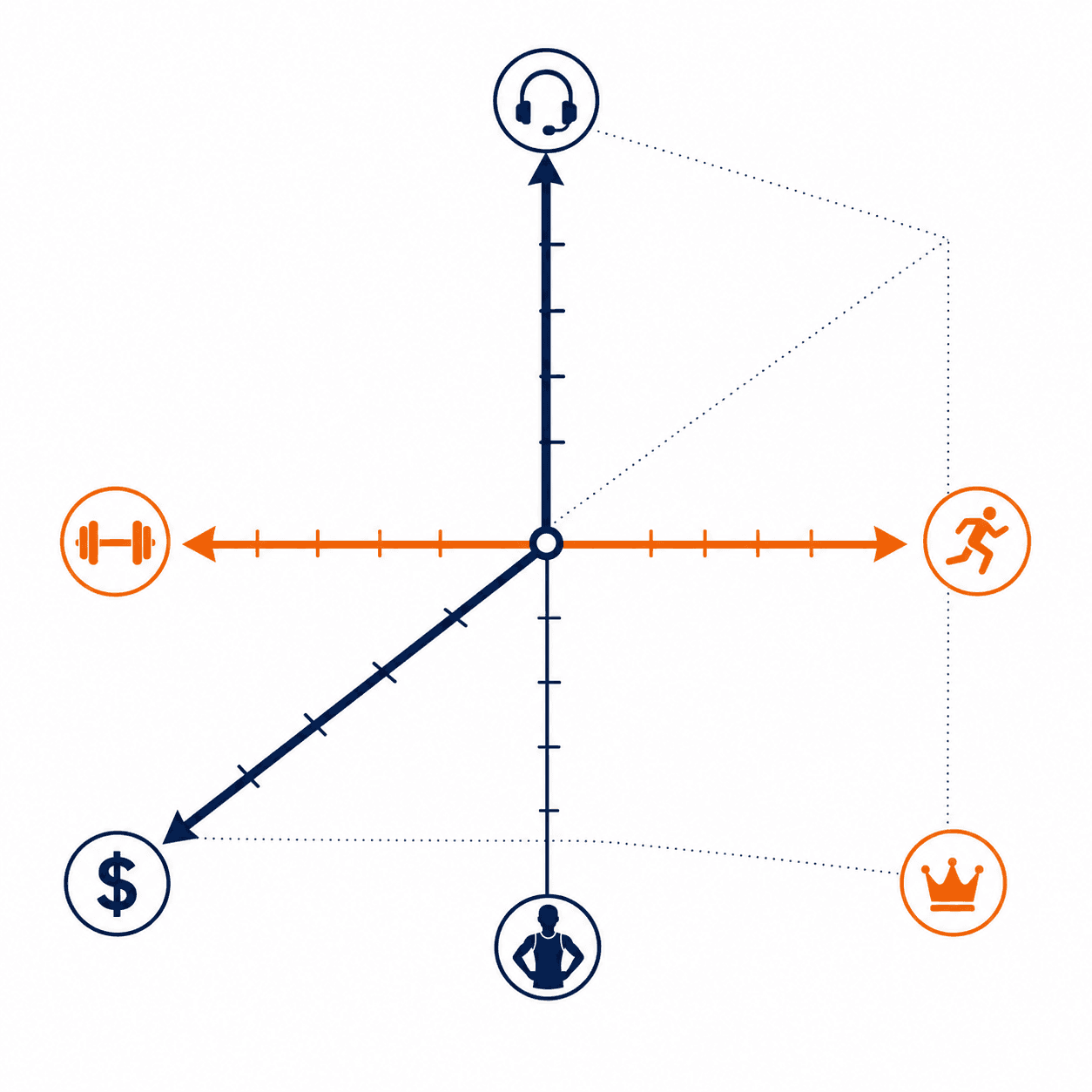
This article takes a different approach. Instead of handing you a winner, it gives you a three-axis decision framework — training modality, self-direction level, and budget — that you can apply to your own situation. By the end, you'll know which questions to ask about any app, not just which app a reviewer liked.
Decision Axis 1: What Kind of Training Do You Do?
The single biggest mistake people make when choosing an exercise tracker app is ignoring the fit between the app's primary design and their actual training modality. An app optimized for one type of training is often actively bad for another.
Most workout apps fall into one of four modality categories:
- Strength logging apps — Designed for tracking sets, reps, weight, and rest times. Examples include Hevy, Strong, JEFIT, and Setgraph. These apps typically have exercise libraries, progressive overload calculators, and detailed history views. They are useless for GPS tracking or video-led classes.
- GPS cardio apps — Built for runners, cyclists, and outdoor athletes. Strava, MapMyRun, and Nike Run Club focus on route mapping, pace analysis, and distance tracking. They lack the exercise databases and set-logging interfaces needed for strength work.
- Guided class platforms — Video-led workouts with a coach on screen. Nike Training Club, Peloton, and Apple Fitness+ fall here. These excel at instruction and motivation but offer minimal self-directed logging. You follow the class; you don't build your own program.
- Hybrid platforms — Apps that attempt to serve multiple modalities. Caliber offers both guided plans and free-form logging. Fitbod generates workouts algorithmically but also lets you log manually. These are the most versatile but often compromise depth in any single area.
The table below maps popular apps to their primary modality. This isn't a ranking — it's a starting point for narrowing your options.
| App | Primary Modality | Exercise Library Size | Best For |
|---|---|---|---|
| Hevy | Strength logging | 300+ exercises | Lifters who want a clean, social logbook |
| JEFIT | Strength logging | 1,400+ exercises | Lifters who want pre-made plans and a large database |
| Strong | Strength logging | 200+ exercises | Minimalist logging with quick workout entry |
| Setgraph | Strength logging | 200+ exercises | Data-focused lifters who want detailed analytics |
| Nike Training Club | Guided classes | 300+ workouts | People who prefer following a coach on video |
| Caliber | Hybrid (guided + logging) | 500+ exercises | Lifters who want both coaching and manual tracking |
| Fitbod | Hybrid (AI-generated) | 400+ exercises | People who want an algorithm to plan their workouts |
| Strava | GPS cardio | N/A (route-focused) | Runners and cyclists who want social competition |
If you do both strength training and cardio, you have two honest options: find an app that does one well and accept the other will be a secondary feature, or use two specialized apps. The Stop Looking for One Perfect App article explores the pairing approach in detail.
Decision Axis 2: How Much Direction Do You Need?
The second axis separates apps by how much programming they do for you. This is the difference between a tool and a coach, and it's the dimension most likely to cause buyer's remorse when misaligned.
On one end of the spectrum are self-programmed logbooks. These apps assume you already know what exercises to do, how many sets and reps, and when to progress. They provide a clean interface for recording your workout and reviewing history, but they won't tell you what to do next. Hevy, Strong, and Setgraph are pure logbooks. Their free tiers are genuinely usable because the core value — logging — isn't locked behind a paywall.
On the other end are coached and AI-programmed platforms. These apps generate your workouts based on your goals, available equipment, and past performance. Fitbod's algorithm adjusts volume and exercise selection session by session. JEFIT Elite uses a progressive overload algorithm and its North Star Progress Index to recommend weight increases. Caliber's Premium tier ($200+/month) includes 1:1 human coaching. These are the apps that justify a subscription because they're doing work you'd otherwise have to do yourself.
The key question to ask yourself is honest: Do you enjoy planning your own training, or do you want an app to handle that for you? If you're an intermediate lifter who already has a program you like, paying for AI progression is wasted money. If you're a beginner who doesn't know how to structure a week of training, a logbook-only app will leave you stranded.
Decision Axis 3: What Are You Willing to Pay?
The average workout app subscription costs $34 per month, according to Garage Gym Reviews' testing of over 70 apps. But that average is misleading — it's pulled upward by premium coaching services like Future ($199/month) and Caliber Premium ($200+/month). The median user's spending is much lower, and many lifters can get everything they need from a free tier.
Here's the current pricing landscape for the most popular strength-focused apps, current as of Q2 2026:
| App | Free Tier Quality | Monthly Price | Annual Price | Key Paid Feature |
|---|---|---|---|---|
| Hevy | Excellent — core logging, progress charts, social community | $2.99 | $23.99 | Unlimited routines, advanced analytics |
| JEFIT | Good — 1,400+ exercise library, unlimited logging | $12.99 | $69.99 | AI progressive overload, NSPI index |
| Strong | Limited — 3 custom routines max | $9.99 | $69.99 | Unlimited routines, iCloud sync |
| Setgraph | Good — core logging, basic analytics | N/A (one-time purchase) | N/A | One-time purchase model |
| Caliber | Excellent — 500+ exercises, ad-free, no paywall on logging | $19.00 (Pro) | $72.00 (Pro) | Group coaching (Pro), 1:1 coaching (Premium) |
| Fitbod | Trial only — no permanent free tier | $15.99 | N/A | AI workout generation, volume tracking |
| Nike Training Club | Full access — 100% free since 2020 | $0 | $0 | N/A — all features are free |
A few patterns stand out. Hevy's free tier is widely considered the most generous for strength tracking — core logging, progress charts, and social features are all accessible without paying. JEFIT's free tier gives you access to its massive exercise library and unlimited workout logging, which is rare among apps with 1,400+ exercises. Nike Training Club has been completely free since 2020, making it the obvious choice for guided classes at zero cost.
The subscription churn data from Sensor Tower's Q4 2025 report tells a clear story: fitness app churn hit 11.7% per month in 2025, up from 8.2% in 2023. Of those cancellations, 42% were due to "too expensive / value for money". This suggests a lot of people are paying for features they don't actually use. The framework here is designed to prevent that mismatch.
The Decision Matrix: Mapping Apps to Your Profile
The three axes — training modality, self-direction level, and budget — combine to create distinct app profiles. The matrix below shows which apps fit each combination. Find your row on each axis, and the intersection points you toward the right category of app.
| Training Modality | Self-Direction Level | Budget | Recommended App Type | Example Apps |
|---|---|---|---|---|
| Strength | Self-programmed | Free | Pure logbook | Hevy, JEFIT (free), Setgraph |
| Strength | Self-programmed | Paid | Logbook with analytics | Hevy premium, Strong premium |
| Strength | Coached/AI | Free | Limited AI or trial | Caliber free, Fitbod trial |
| Strength | Coached/AI | Paid | AI programming or human coach | JEFIT Elite, Fitbod, Caliber Pro/Premium |
| Guided classes | Coached | Free | Full-access free platform | Nike Training Club |
| Guided classes | Coached | Paid | Premium class library | Peloton, Apple Fitness+ |
| GPS cardio | Self-programmed | Free | Basic route tracking | Strava free, MapMyRun free |
| GPS cardio | Coached | Paid | Training plans and analysis | Strava premium, TrainingPeaks |
| Hybrid | Self-programmed | Free | Multi-modality logbook | Caliber free |
| Hybrid | Coached/AI | Paid | Full-service platform | Future, Caliber Premium |
This matrix is a starting point, not a final answer. The next section walks through four real-world personas to show how the framework works in practice.
Four User Personas: Applying the Framework
Let's apply the three-axis framework to four distinct home fitness scenarios. These are composite profiles based on common reader situations, not real individuals.
Persona 1: The Intermediate Strength Lifter on a Budget
This person has been lifting for 18 months, follows a self-written Push/Pull/Legs split, and knows exactly what exercises they need to do each session. They don't want an app to plan their workouts — they want a clean, fast logbook that tracks progressive overload and doesn't cost more than a few dollars a month.
Framework application: Strength modality + self-programmed + free/low-cost budget.
Recommendation: Hevy (free tier). The free version includes core logging, progress charts, and the ability to create custom routines. If they want unlimited routine storage and advanced analytics, the premium tier is $2.99/month — the cheapest paid option on the market. JEFIT's free tier is a strong alternative if they want access to 1,400+ exercises for exercise discovery, but the interface is busier.
Persona 2: The Cardio-Focused Beginner Who Wants Guidance
This person is new to home fitness, wants to start with bodyweight and light cardio, and doesn't know how to structure a workout. They need an app that tells them what to do, shows proper form, and doesn't require them to learn exercise programming.
Framework application: Guided classes modality + coached direction + free budget.
Recommendation: Nike Training Club. It's completely free, offers hundreds of on-demand and live classes, and requires no equipment for many sessions. The guided format removes all decision-making — just pick a class and follow along. For a beginner who needs structure without spending money, this is the clearest fit.
Persona 3: The Hybrid Athlete Who Needs Flexibility
This person does strength training three days a week and runs or cycles two days a week. They want one app that can handle both modalities reasonably well, with the ability to log sets in the gym and track runs without switching platforms.
Framework application: Hybrid modality + self-programmed + moderate budget.
Recommendation: Caliber (free tier). The free version includes a library of over 500 exercises with video demonstrations, step-by-step instructions, and muscle maps. It handles strength logging well and offers curated workout plans. For GPS cardio, they'll need to accept that Caliber isn't a running app — they can pair it with Strava's free tier for route tracking. If they want a single app that does both adequately, no platform excels at both strength logging and GPS tracking, which is why the pairing approach (covered in Stop Looking for One Perfect App) is often the practical answer.
Persona 4: The Experienced Lifter Ready for AI Coaching
This person has been training for 3+ years, has hit plateaus, and wants an app that can intelligently adjust their programming based on performance data. They're willing to pay for genuine value but don't want a human coach.
Framework application: Strength modality + AI-coached direction + paid budget.
Recommendation: JEFIT Elite ($12.99/month) or Fitbod ($15.99/month). JEFIT Elite's progressive overload algorithm and North Star Progress Index are designed specifically for lifters who want data-driven weight progression. Fitbod's AI adjusts volume and exercise selection based on recovery and past performance. Both are significantly cheaper than human coaching ($199–$200+/month) while still providing intelligent programming. The trade-off is that no AI can match the feedback of a human coach — if you need form correction or injury management, Caliber Premium's 1:1 coaching is the better (but more expensive) choice.
Non-Obvious Criteria That Matter More Than You Think
Feature grids and pricing comparisons dominate most app reviews, but several secondary criteria often determine whether an app survives on your phone for more than a month. These are worth checking before you commit.
- Offline mode: A 2024 survey found that 37% of commercial gym users report unreliable WiFi in the weight room. If you train in a basement, garage, or any location with spotty connectivity, an app that requires an internet connection to log sets will fail you mid-workout. JEFIT and Strong both offer offline logging; Hevy requires an internet connection for some features.
- Data export: Can you leave the app without losing years of training history? JEFIT offers CSV export. Most other apps lock your data inside their ecosystem. If you've been logging for 12+ months, the inability to export your history is a lock-in risk — you stay because you can't leave, not because the app is still serving you.
- Privacy and data handling: A 2025 IAPP survey found that 68% of fitness app users are concerned about health data privacy. Of fitness app cancellations in 2025, 28% were due to privacy concerns. Before signing up, check whether the app sells or shares your workout data, and whether you can delete your account and all associated data.
- Wearable sync: If you use a Garmin, Apple Watch, Fitbit, or Whoop, check whether the app syncs heart rate data and workout completion automatically. Some apps (like Hevy) sync with Apple Health; others (like Strong) have limited wearable integration. This matters more if you rely on heart rate data for training zone tracking.
Free vs. Paid: When the Upgrade Actually Matters
The most common mistake in the exercise tracker app market isn't choosing the wrong app — it's paying for features you don't use. With subscription churn at 11.7% per month and 42% of cancellations attributed to poor value for money, it's clear that many users are upgrading before they understand what they actually need.
Here are clear upgrade thresholds based on the three-axis framework:
| Your Situation | Stick with Free | Upgrade When |
|---|---|---|
| Strength lifter, self-programmed | Hevy free, JEFIT free, Setgraph free | You want unlimited routine storage, advanced analytics, or AI progression recommendations |
| Strength lifter, wants AI coaching | Caliber free (limited AI), Fitbod trial | You want full AI workout generation (Fitbod) or human coaching (Caliber Pro/Premium) |
| Guided class follower | Nike Training Club (100% free) | You want a specific class library not available on NTC (Peloton, Apple Fitness+) |
| GPS cardio athlete | Strava free, MapMyRun free | You want training plans, advanced performance analysis, or route planning |
| Hybrid athlete | Caliber free (strength) + Strava free (cardio) | You want a single platform that handles both modalities adequately |
The most important rule: start with the free tier. Use it for at least two weeks. If you find yourself wanting a specific feature that's locked behind the paywall — and only then — consider upgrading. The apps with the most generous free tiers (Hevy, JEFIT, Caliber, Nike Training Club) give you enough functionality to make an informed decision without spending a cent.
For a detailed breakdown of exactly what you get at each price tier across the most popular apps, the Free vs Paid Exercise Tracker Apps article covers that ground in depth. This framework is designed to help you decide which tier to evaluate, not to repeat the feature-by-feature comparison.
Comments
Join the discussion with an anonymous comment.