
The 2026 Strength Training App Landscape: AI Planners vs. Manual Trackers vs. Human-Coached Platforms
Choosing a strength training app in 2026 means picking a category first: AI-powered planners that program for you, manual loggers that track your lifts, or human-coached platforms that hold you accountable. This guide breaks down each category with pricing, top contenders, and a decision framework to match the right app type to your goals, experience level, and budget.
The Strength Training App Market in 2026: Why the Right Category Matters More Than the Right App
The fitness app industry is no longer a niche. In 2025, the market generated $3.4 billion in revenue, a 24.5% increase year over year, with 540 million users and 888 million downloads globally, according to data from Business of Apps. That scale means the app store is flooded with options, and the average workout app now costs $34 per month — a non-trivial recurring expense for anyone building a home fitness practice.
The problem isn't a lack of good apps. It's that most comparison articles rank apps by feature count without asking the fundamental question: what kind of value do you actually need? The market has converged into three distinct categories — AI adaptive planners, manual tracking loggers, and human-coached platforms — and each serves a completely different user need. Picking the wrong category is a far bigger mistake than picking the wrong app within a category.
This guide breaks down each category with current pricing, top contenders, and a decision framework to match the right app type to your goals, experience level, and budget. If you already know you want a deep dive on free tiers or the AI-versus-human coaching debate, we have dedicated articles for those angles. Here, we're focused on the landscape-level choice that determines everything else.
The Three Categories of Strength Training Apps: What Each One Actually Does
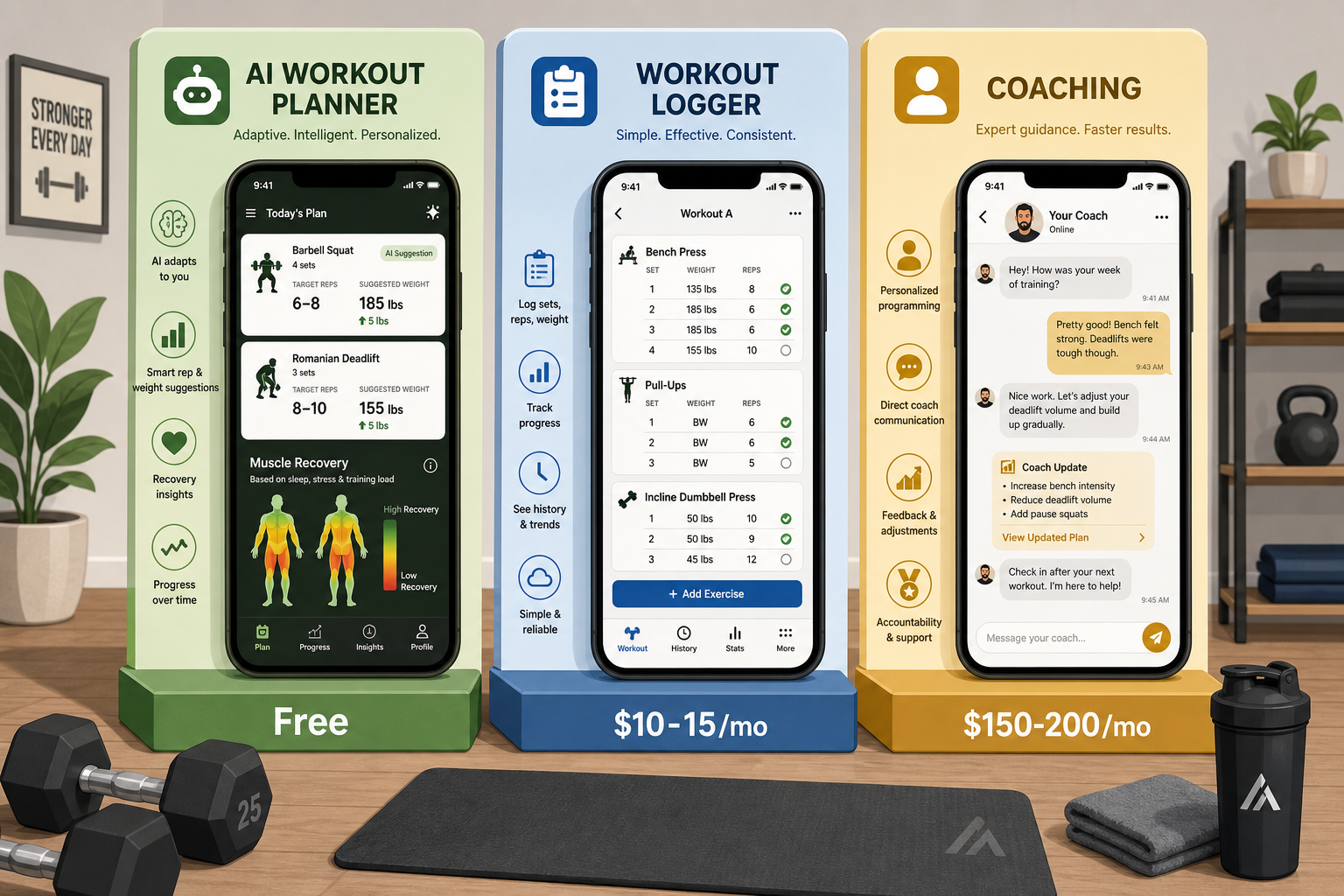
Before comparing specific apps, it helps to understand the three distinct value propositions on the market. Each category solves a different core problem: programming (what workout should I do?), tracking (how much did I lift last week?), or accountability (will I actually show up?).
| Category | Core Value | Price Range | Best For | Examples |
|---|---|---|---|---|
| AI Adaptive Planners | Generates and adjusts workouts based on your equipment, recovery, and progress | $10–$15/month | Users who need programming guidance, especially home gym users with limited gear | Fitbod, TR(AI)NER, StrongLifts 5x5 |
| Manual Tracking Loggers | Logs sets, reps, and weights — does not generate workouts or coach | Free–$5/month | Experienced lifters who already know their program and just need a logbook | Hevy, Strong, JEFIT |
| Human-Coached Platforms | Provides 1:1 coaching with personalized programming, form feedback, and accountability | $150–$200/month | Users who need accountability and have the budget for a dedicated coach | Future, Caliber Premium |
The table above is the key takeaway. If you need programming, you want an AI planner. If you already have a program and just need to track it, a manual logger is cheaper and simpler. If you need someone to hold you accountable and provide expert feedback, a human-coached platform is worth the premium.
Category 1: AI Adaptive Planners ($10–$15/month)
AI adaptive planners are the closest thing to having a personal programmer in your pocket. They don't just log your lifts — they decide what you should lift, when, and how much weight to add. The core advantage is adaptation to your constraints: available equipment, recovery status, injury history, and even how many days per week you can train.
Fitbod ($12.99/month or $79.99/year) scored 5/5 for equipment demands in Garage Gym Reviews' testing, meaning it handles everything from a full commercial gym down to bodyweight-only workouts. It also scored 3/5 for progressive overload, which is a notable limitation — the AI may not always push you as aggressively as a human coach would. TR(AI)NER by Element 26 ($14.99/month) takes a different approach: it asks about your limiting factors, injuries, and skill level during setup, which Fortune reviewers noted took "maybe 30 seconds." A user could say "I have access to my work gym three days a week" and the AI would account for it. StrongLifts 5x5 ($9.49/month premium) is simpler — it implements progressive overload by design (add 2.5 kg each session, auto-deload on failure) but has a 3–6 month shelf life before the linear progression model plateaus.
The trade-off with AI planners is limited accountability and community features. They handle the programming but won't text you to ask why you missed a session. If you're self-motivated and need programming guidance, this category is the sweet spot.
Category 2: Manual Tracking Loggers (Free–$5/month)
Manual tracking loggers are the simplest and most affordable category. They do one thing well: record your sets, reps, and weights so you can see progress over time. They do not generate workouts, provide coaching, or adapt programs. For experienced lifters who already know their program, a simple logger is often the best and cheapest option.
Hevy leads the free tier category. Its free version covers core logging features, and the Pro tier costs $2.99/month or $23.99/year. Garage Gym Reviews named it the best free weightlifting app. FindYourEdge rated it 4/5 overall but noted it scores low (1/5) on accountability and progressive overload — because it's a tracker, not a coach. Strong is a close competitor: free with limits, Pro from $4.99/month. It's purely a logger with no workout generation, but its clean interface has a loyal following. JEFIT offers a free ad-supported version and Elite at $6.99/month, with an AI system that analyzes performance to recommend weight and rep targets.
| App | Free Tier | Pro/Paid Tier | Key Limitation |
|---|---|---|---|
| Hevy | Core logging features | $2.99/month or $23.99/year | No workout generation or coaching |
| Strong | Free with limits | $4.99/month | Purely a logger, no workout generation |
| JEFIT | Free with ads | $6.99/month Elite | AI recommendations are basic compared to dedicated planners |
For intermediate and advanced lifters who want a deeper look at logging speed, analytics, and social features, our Workout Tracker App Decision Framework covers the tracker category in more detail.
Category 3: Human-Coached Platforms ($150–$200/month)
Human-coached platforms are the premium end of the market, and for good reason. You get a real person who programs your workouts, reviews your form via video check-ins, and holds you accountable through regular communication. The price is steep — Future costs $199/month, and Caliber Premium runs $200+/month — but for users who need accountability and have the budget, the results can justify the cost.
Future scored 5/5 in Garage Gym Reviews testing for accountability, workout variety, progressive overload, and equipment demands. It's specifically recommended for home gym users because coaches adapt programs to whatever equipment you have. Caliber offers a more flexible pricing structure: a free-forever version, Pro at $19/month (group coaching), and Premium at $200+/month (1:1 coaching). It scored 5/5 for progressive overload and accountability in the same testing.
Who should pay $150–200/month? Users who have tried free apps and abandoned them because they lacked accountability. Users who want expert form feedback without hiring a personal trainer. Users who have the budget and treat fitness as a high-priority expense. Who should skip this category? Self-motivated lifters who already follow a program consistently — a $5/month logger or $15/month AI planner will serve them just as well.
Pricing Traps and Subscription Gotchas: What to Watch For
Subscription pricing in the fitness app space is designed to lock you in. Before committing to any app, watch for these common traps:
- Annual-only plans that don't offer a monthly option. You're committing to a full year before you know if the app works for you.
- Auto-renewal policies that require navigating to a specific settings page to cancel. Some apps make cancellation deliberately hard.
- Features that disappear after a free trial. An app might offer AI programming during a 7-day trial, then revert to a basic logger once the trial ends.
- Apps that charge for basic logging features that competitors offer for free. Always check whether the free tier is genuinely useful or just a teaser.
Quick-Pick Recommendation Table: Which App for Which User?
The following table maps common user profiles to the recommended category and specific app. Find your profile and start there.
| User Profile | Recommended Category | Top Pick | Why |
|---|---|---|---|
| Beginner with no program, limited equipment at home | AI Adaptive Planner | Fitbod ($12.99/mo) | Adapts to whatever equipment you have; handles programming from scratch |
| Experienced lifter who knows their program, just needs a logbook | Manual Tracking Logger | Hevy (free) | Free tier covers core logging; clean interface; social features optional |
| Busy professional who needs accountability and form feedback | Human-Coached Platform | Future ($199/mo) | 1:1 coaching with video check-ins; adapts to your schedule and equipment |
| Intermediate lifter who wants programming but doesn't need 1:1 coaching | AI Adaptive Planner | TR(AI)NER ($14.99/mo) | Quick setup; adapts to injuries, skill level, and schedule constraints |
| Budget-conscious user who wants a structured program for free | Manual Tracking Logger + Free Program | Caliber (free) + StrongLifts 5x5 (free core) | Caliber's free version covers basic programming; StrongLifts 5x5 free core gives a proven linear progression program |
| Home gym user with barbell and rack, wants linear progression | AI Adaptive Planner | StrongLifts 5x5 ($9.49/mo premium) | Simple, effective progressive overload; auto-deload on failure |
How to Test-Drive an App Before Committing
The best app is the one you'll actually use consistently. A simple logger used daily beats a sophisticated planner abandoned after two weeks. Here's how to evaluate an app before spending money:
- Start with the free tier. Every app in this guide except Future offers a free version or trial. Use it for at least one week of real workouts.
- Test the logging speed. If it takes more than 10 seconds to log a set, you'll hate it after a month. Hevy and Strong are fast; some AI planners require more taps.
- Check whether the app adapts to your actual equipment. If you only have dumbbells and a bench, an app that assumes a barbell and squat rack will be frustrating.
- Verify the cancellation policy before subscribing. Screenshot the cancellation instructions. Set a calendar reminder to cancel before the trial ends if you decide not to continue.
- Ask yourself: after one week, did I look forward to opening this app, or did it feel like a chore? The answer is your best guide.
The strength training app market in 2026 is mature enough that there's a right tool for almost every situation. The key is knowing which category fits your needs first — then picking the best app within that category. Start with the quick-pick table above, test-drive the free tier, and commit only when you're confident the app will support your training, not complicate it.
What a small equipment investment adds
We don't have a build tagged to this exact tier yet. Browse all builds.
How often should you repeat this?
See our recovery and rest reference for citation-anchored rest-interval guidance.
Spot something off?
Tell us if a movement, tier assumption, or duration didn't match your experience.