
The Fake-Free Epidemic: How Most 'Free' Workout Apps Actually Monetize
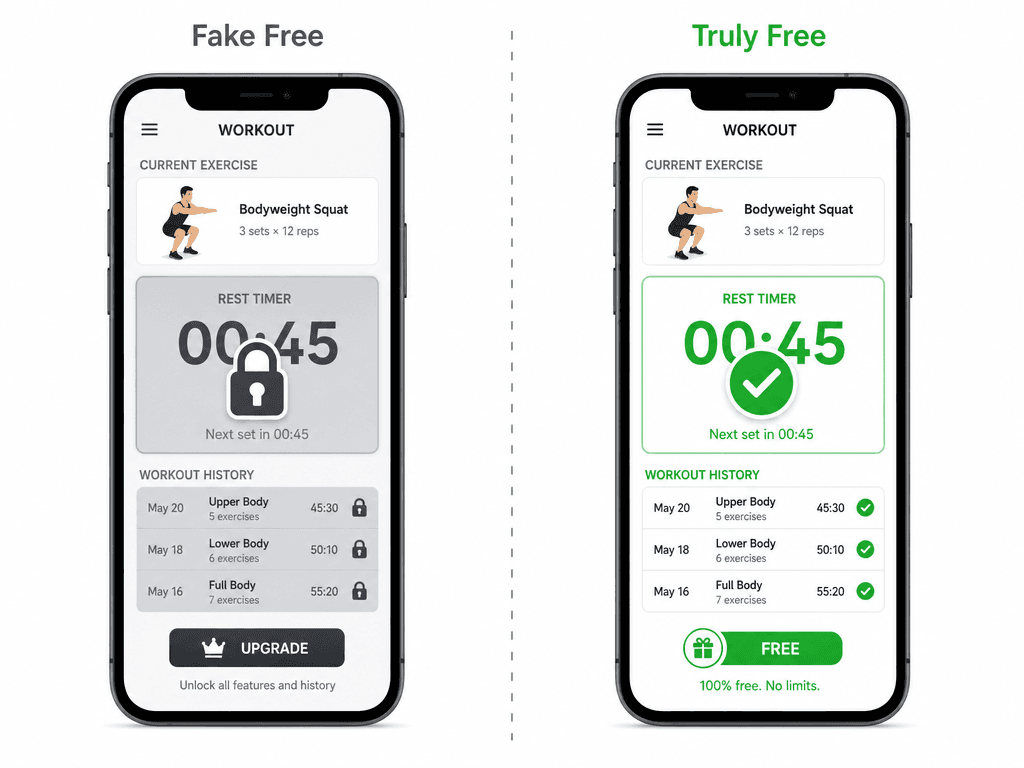
Open any app store and search for "workout tracker." You will find hundreds of apps with a "Free" label. Download one, log a few workouts, and within a week you hit a wall. The rest timer is grayed out. Your history shows only the last 10 sessions. A full-screen ad fires between your third and fourth set. The app was never free — it was a demo dressed as a download.
The fitness app industry has refined several monetization strategies that let developers claim "free" while making regular use impractical without paying. Understanding these traps is the first step to avoiding them.
The Four Flavors of 'Free'
Based on an analysis by the team at Setgraph, nearly every "free" workout app falls into one of four categories. Only one of them is genuinely useful for long-term training.
| Model | How It Works | Usable Long-Term? |
|---|---|---|
| Free, fully featured | Core tracking, set logging, full history, and basic progress charts are available forever with no cap. | Yes |
| Free trial | Everything works for 7–30 days, then the app goes read-only or locks logging entirely. | No |
| Freemium with hard cap | You get a fixed number of exercises, workouts, or history days before the app stops logging new data. | No |
| Free but ad-supported | No paywall, but interstitial ads fire between sets, breaking your workout rhythm. | Barely |
The most deceptive model is the freemium hard cap. An app may let you log 3 workouts or 12 exercises before it demands payment. You only discover the limit after you have invested time entering your data. The free trial model is equally frustrating — your entire workout history becomes a read-only museum piece the moment the trial expires.
The Four Things That Should Never Be Behind a Paywall
Setgraph's analysis identifies four core features that any legitimate workout app must provide for free. If an app locks any of these, it is not a free app — it is a sales funnel.
- Unlimited set logging. You should be able to record every set of every workout without hitting a counter.
- Full access to your own history. Your past workouts are your data — the app should not hold it hostage.
- A rest timer. Timing rest between sets is a basic logging function, not a premium feature.
- At least basic progress charts. You need to see whether your weights and reps are trending up over time.
The 5-Minute Test: How to Expose a Fake-Free App Before You Waste Your Time
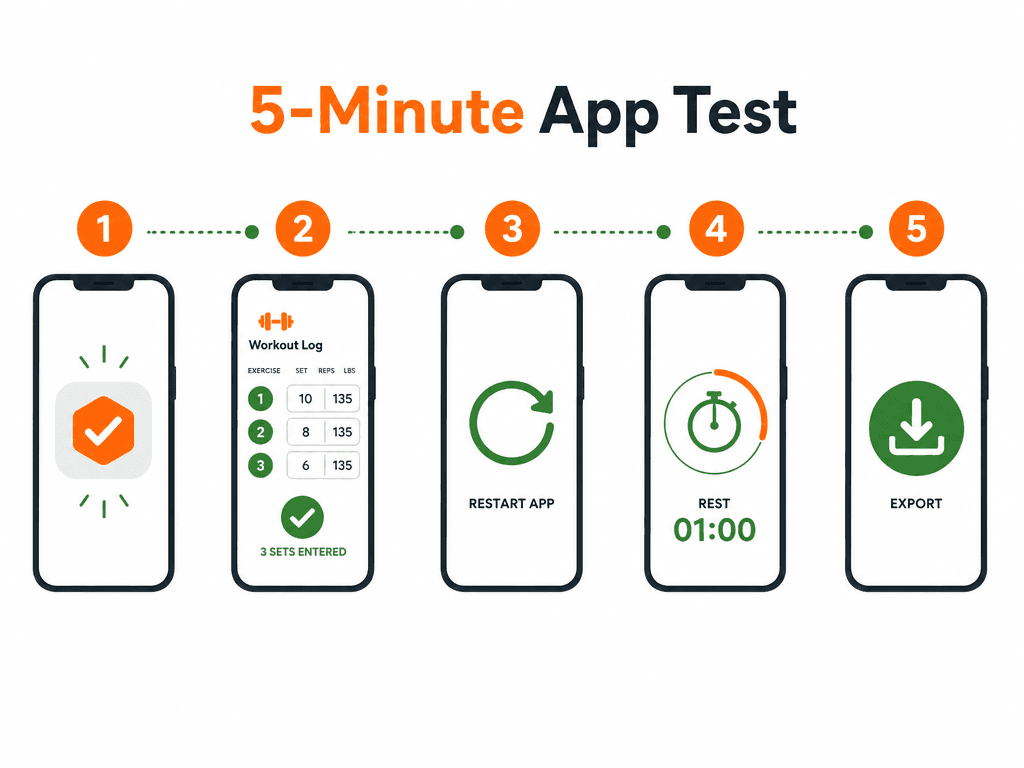
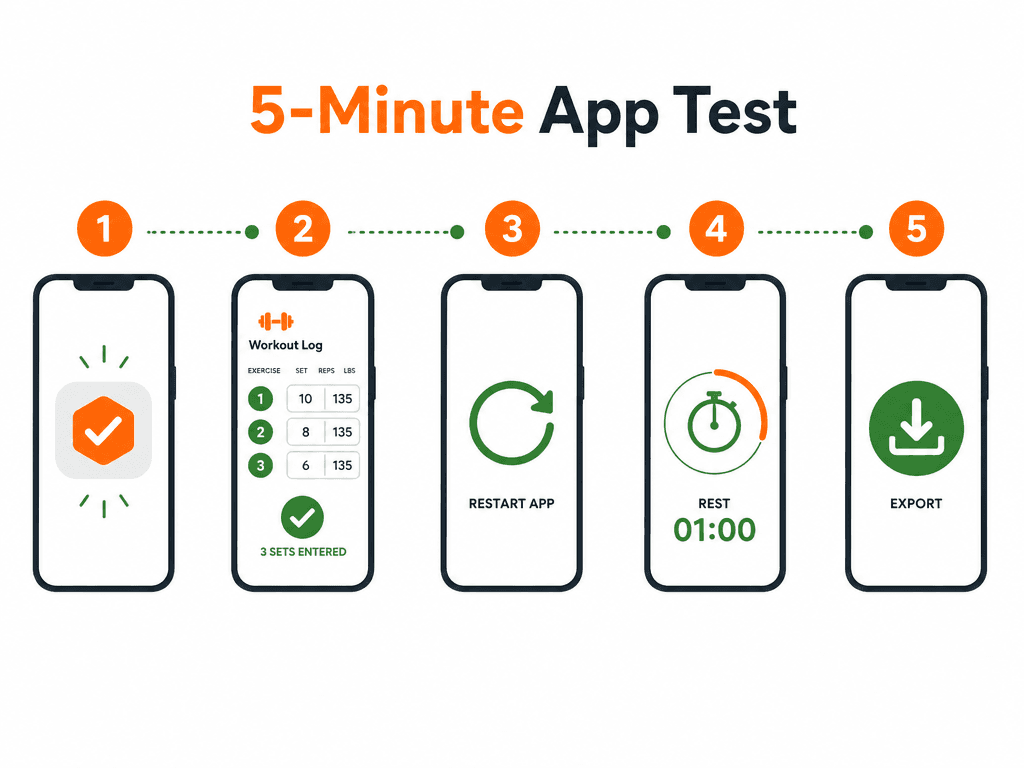
You do not need to read a single review to determine whether an app is truly free. A simple five-minute test, adapted from the methodology used by Setgraph, will reveal every hidden limitation.
Step-by-Step: The 5-Minute Test
- Log three complete sets. Enter an exercise, a weight, and reps for at least three sets. Save the workout.
- Close the app completely. Swipe it away from your recent apps list. Reopen it.
- Check your history. Can you see all three sets exactly as you entered them? If the history is empty or shows only partial data, the app has a hard cap.
- Try the rest timer. Start a rest timer between sets. Does it work without prompting you to upgrade? If the timer is grayed out or shows a lock icon, it is a paywalled feature.
- Count the ads. Perform a few more actions — start a new workout, browse the exercise library, check your profile. How many full-screen or interstitial ads appeared? More than zero during a workout session is unacceptable.
- Check data export. Look for an export or backup option. Can you download your data as a CSV or JSON file? If the app locks your data inside its ecosystem, you are not the customer — you are the product.
If the app fails any of these six checks, delete it. There is no scenario where a hard-capped history or a paywalled rest timer becomes acceptable after you have logged 50 workouts. The apps that pass this test are rare, but they do exist.
6 Truly Free Workout Apps: Deep-Dive Profiles
The following six apps pass the 5-minute test. Each one provides unlimited set logging, full history access, a working rest timer, and basic progress charts — all without a subscription, without ads, and without upgrade pressure. Some have premium tiers, but their free tiers are complete products, not crippled demos.
Nike Training Club — Best for Guided Workouts and Variety
Nike Training Club is the only major-brand fitness app with zero premium tier. It has been completely free since 2020, and according to both Garage Gym Reviews (GGR Score 4.2) and Forbes Health (5.0/5), it shows no signs of introducing a paid plan. The app offers over 300 workouts across 10+ categories, led by certified Nike trainers. You can filter by fitness goal, target muscle group, equipment level, and class length. No account is required to browse the library.
This is the best option for users who want guided, trainer-led sessions rather than self-directed strength logging. It is not a traditional set-and-reps tracker — you follow along with video workouts — so it serves a different purpose than the other apps on this list.
Hevy — Best for Strength Tracking and Social Accountability
Hevy's free tier is the most complete strength-tracking option available without paying. According to Garage Gym Reviews (GGR Score 3.8) and Jefit's 2026 app roundup (4.7/5 for social accountability), the free version includes unlimited workout logging, full exercise history, progress graphs, a community feed, and routine management. There is no cap on the number of exercises or workouts you can log.
Hevy's premium tier costs $2.99 per month, $23.99 per year, or $74.99 for a lifetime license. It adds advanced analytics, custom charts, and additional data export options — but the free tier is not crippled to push upgrades. You can use Hevy indefinitely without ever seeing an upgrade prompt during a workout.
A standout feature, noted by Zapier, is the ability to sort workouts by location (home vs. gym) or available equipment, with customizable rest timers. This makes Hevy particularly useful for home gym users who rotate between bodyweight, dumbbell, and machine sessions.
Caliber — Best for AI-Generated Programs and Coaching Structure
Caliber was named Best Free Workout App Overall by Garage Gym Reviews (GGR Score 4.6). Its free version includes AI-generated custom workout programs, a library of over 500 exercises with video demonstrations and step-by-step instructions, body metric tracking (weight, waist size, body fat percentage), and community groups. There are no ads, no exercise cap, and no history limit on the free tier.
Caliber's premium offering adds human coaching at an additional cost, but the free tier is a complete product for self-directed training. The AI program generation is particularly valuable for intermediate lifters who have outgrown basic linear progression but do not want to design their own periodization.
Setgraph — Best for Freestyle Training and Per-Exercise History
Setgraph provides unlimited workout logging with complete per-exercise history — your entire history for every movement, regardless of which routine you used it in — entirely free. According to Jefit's 2026 review (4.6/5 for freestyle training), the free tier includes a plate calculator and visual progress graphs. There are no ads.
Setgraph is designed for lifters who do not follow rigid pre-built programs. If you like to mix exercises across different splits or train intuitively, Setgraph's per-exercise history view is more useful than the routine-bound history most apps provide. It is also the app that published the 5-minute test methodology used in this article, which signals a genuine commitment to free-tier transparency.
StrongLifts 5x5 — Best for the Complete Beginner Strength Program
StrongLifts 5x5 is fully free for the basic 5x5 barbell program with automatic progression. Garage Gym Reviews confirms that the free version includes the core program: five sets of five reps on compound lifts, with weight automatically increasing each session. The paid version ($6.99 per month) adds deload calculations and warm-up set recommendations, but the free version is complete for running the base program.
This app is extremely narrow in scope — it only supports the 5x5 protocol. If you want to run a different program or customize your training, StrongLifts will not work for you. But if you are a beginner who wants a proven, no-thinking-required strength program, this is the most straightforward free option available.
FitNotes — Best Hidden Gem for Android Users
FitNotes is a completely free, no-ads, no-subscription workout tracker available exclusively on Android. It has an extremely loyal user base and is frequently cited in Reddit fitness communities as the best hidden gem in workout tracking. The app provides unlimited set logging, full history, rest timer, progress charts, and data export — all without a single upgrade prompt.
The interface is utilitarian. FitNotes does not have polished animations, social features, or AI coaching. It is a straightforward logging tool that respects your data and your time. For Android users who want a no-frills, permanent free solution, FitNotes is the strongest candidate.
At-a-Glance Comparison: What's Free vs. What's Premium
The table below summarizes what each app provides on its free tier and what (if anything) requires payment. All six apps pass the core test: unlimited set logging, full history, rest timer, and basic progress charts are free forever.
| App | Free Tier Includes | Premium Adds | Ads | Account Required? |
|---|---|---|---|---|
| Nike Training Club | 300+ workouts, 10+ categories, certified trainers, filter by goal/equipment/duration | No premium tier exists | None | No (browsing); optional for saving |
| Hevy | Unlimited logging, full history, progress graphs, social feed, routine management | Advanced analytics, custom charts ($2.99/mo or $74.99 lifetime) | None | Yes |
| Caliber | AI programs, 500+ exercise videos, body metric tracking, community groups | Human coaching (additional cost) | None | Yes |
| Setgraph | Unlimited logging, per-exercise history, plate calculator, progress graphs | None specified in sources | None | Yes |
| StrongLifts 5x5 | Full 5x5 program with automatic progression | Deload calculations, warm-up sets ($6.99/mo) | None | Yes |
| FitNotes | Unlimited logging, full history, rest timer, progress charts, data export | No premium tier exists | None | No |
What You Give Up by Avoiding Paid Apps
Choosing a truly free app means accepting certain trade-offs. This is not an argument to upgrade — for most lifters, the free tier is sufficient. But honest evaluation requires acknowledging what you lose.
- Advanced analytics. Paid apps like Hevy's premium tier or Strong's subscription offer volume tracking, estimated one-rep max trends, and fatigue management metrics. Free apps show basic progress charts — weight lifted over time — but not the deeper analysis.
- AI coaching and personalized programming. Caliber's free tier includes AI-generated programs, but most free apps do not adapt your training based on performance. Paid apps like Fitbod or Jefit Elite adjust volume and exercise selection automatically.
- Deload calculations. StrongLifts 5x5's free version handles basic progression, but it does not automatically calculate deload weeks or reset your working weights after a stall. The paid version handles this for you.
- Customer support. Free apps typically offer email support with slower response times. Paid subscribers often get priority support or dedicated coaching channels.
- Cross-platform sync. Some free apps are limited to a single platform (FitNotes is Android-only). Paid apps more consistently offer seamless sync across iOS, Android, and web.
None of these trade-offs prevent you from building muscle or making progress. As Setgraph notes, mechanical tension from training hard near failure — not a premium subscription — is what drives muscle growth (PMID: 32826845). The question is whether you value convenience features enough to pay for them.
Which Truly Free App Should You Choose?
The best app depends on your training style and what you value in a logging experience. Here is a direct recommendation for each reader profile.
- For strength lifters who want a complete, no-nonsense tracker: Hevy. Its free tier is the most generous on the social-accountability front, and the ability to sort by equipment and location makes it ideal for home gym users.
- For beginners running a simple linear progression program: StrongLifts 5x5. It is the most straightforward option — download, enter your starting weights, and follow the program. No configuration, no decision fatigue.
- For guided workout variety without tracking: Nike Training Club. If you prefer following video workouts rather than logging sets and reps, this is the best free option. The library is large enough that you will not repeat sessions frequently.
- For freestyle lifters who change exercises frequently: Setgraph. The per-exercise history view is uniquely useful for lifters who do not follow fixed routines. You can see your progress on any movement regardless of which workout you used it in.
- For Android users who want maximum privacy and zero account requirements: FitNotes. No account, no data collection, no upgrade path. Just a local workout log that respects your privacy.
- For lifters who want AI-generated programming without paying: Caliber. The free tier's custom program generation is rare at this price point. If you want structured programming without designing it yourself, Caliber is the best choice.
For a deeper feature-by-feature comparison of the top workout trackers, see our Workout Tracker App Showdown, which compares logging depth, analytics, and ecosystem lock-in across the five most popular apps. And if you are specifically focused on progressive overload, our guide to the best strength training apps for progressive overload covers which free and paid apps actually help you get stronger over time.
Comments
Join the discussion with an anonymous comment.