
Which Workout Tracker App Fits Your Training Style? A Decision-Based Guide for Strength, Bodybuilding, Home Workouts, and Hybrid Training
Stop choosing a workout app by feature count or price. This guide helps you match the right tracker to your actual training style — strength, hypertrophy, guided home workouts, hybrid cardio+strength, or beginner — so you get an app that supports how you actually train.
Why the 'Best' App Depends on How You Train
The fitness app market is crowded, and most reviews treat it like a single category. They rank apps by feature count, free-tier generosity, or star rating, as if one app could serve a powerlifter, a home HIIT enthusiast, and a marathon runner equally well. The reality is different: an app built for rapid barbell logging feels useless to someone following guided video workouts, and a library-heavy app with AI programming frustrates a lifter who just wants to tap through sets quickly.
This guide takes a different approach. Instead of asking "which app has the most features?" it asks "how do you actually train?" The answer determines which app will feel like a tool and which will feel like an obstacle. We've mapped 12 apps across six training styles — strength, hypertrophy, guided home workouts, hybrid cardio+strength, beginner/undecided, and AI-seeking — so you can match the app to your training, not the other way around.
Quick Decision Tree: What's Your Training Style?
Use this decision tree to jump directly to the section that matches your primary training style. If you train across multiple styles, read the hybrid section and the quick-reference table at the end.
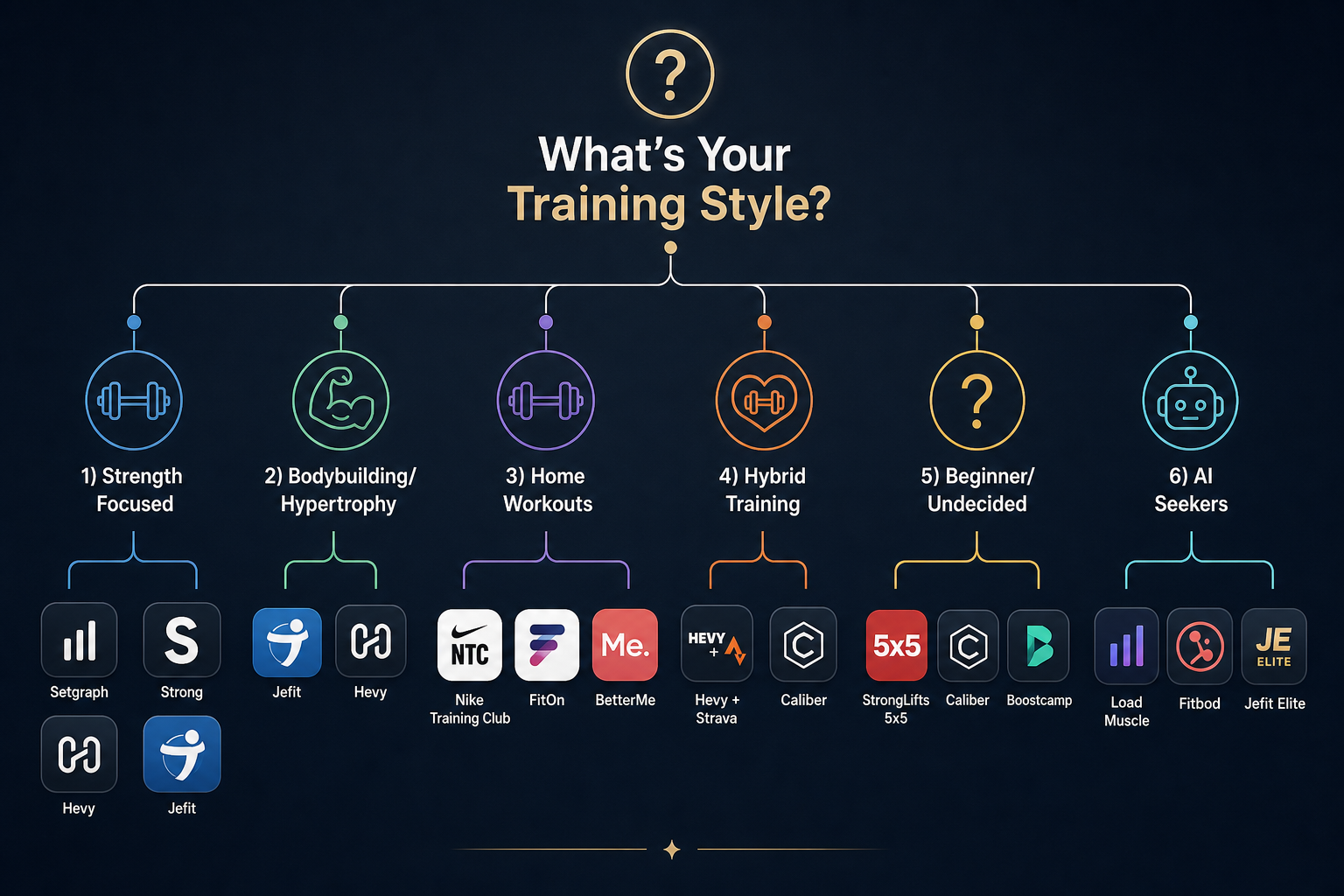
- Strength-focused (barbell, progressive overload, minimal phone time between sets): Jump to the strength section.
- Bodybuilding / hypertrophy (high volume, muscle group isolation, exercise variety): Jump to the hypertrophy section.
- Home / guided video (follow-along workouts, no equipment, classes): Jump to the home workout section.
- Hybrid (strength + cardio, separate workflows): Jump to the hybrid section.
- Beginner / undecided (don't know your style yet, want zero-decision programming): Jump to the beginner section.
- AI-seeking (want adaptive programming, automated workout generation): Jump to the AI section.
Strength-Focused Lifters: Speed, Progressive Overload, and Barbell Work
If your training revolves around barbell compounds, progressive overload, and short rest periods, your app's most important feature is logging speed. You don't want to scroll through menus or wait for animations between sets. You want to tap the weight, tap the reps, and get back to the bar.
Four apps stand out for strength-focused lifters, each with a different trade-off between speed, features, and cost.
| App | Best For | Free Tier Limits | Paid Cost | Standout Feature |
|---|---|---|---|---|
| Setgraph | Speed, iOS-only | Full free tier | $4.99/month or $29.99/year | Fastest logging for weightlifting; minimal UI friction |
| Strong | Apple Watch integration | 3 saved routines | $4.99/month or $29.99/year | Best Apple Watch companion for quick set logging |
| Hevy | Free social accountability | Unlimited logging, 4 routines, 3-month history | $2.99/month or $23.99/year | Generous free tier with social features and PR tracking |
| Jefit | Analytics and progressive overload | 1,400+ exercises, unlimited logging, community routines | $12.99/month or $69.99/year | Progressive overload algorithm and NSPI score |
Setgraph is the fastest option for pure logging. It's iOS-only and designed around speed — you can log a set in two taps. The trade-off is a smaller exercise library and fewer analytics. For lifters who know their program and just need a stopwatch and a log, it's the most efficient choice.
Strong offers the best Apple Watch integration, letting you log sets from your wrist without touching your phone. Its free tier is limited to three saved routines, which is restrictive for anyone running multiple programs. At $4.99/month or $29.99/year, it's mid-range on price.
Hevy is the strongest free option for strength training. Its free tier includes unlimited workout logging, RPE logging, a plate calculator, automatic rest timer, supersets, up to 4 saved routines, 7 custom exercises, and workout data from up to 3 months back. The social features — follow friends, share workouts, leaderboards — add accountability that many lifters find more valuable than AI features. Hevy Pro costs $2.99/month or $23.99/year, unlocking unlimited routines and complete training graphs.
Jefit is the analytics powerhouse. Its progressive overload algorithm and North Star Progress Index (NSPI) provide weekly scores across volume, movement balance, strength gains, and consistency — a feature set unique among free apps. The free tier includes the full 1,400+ exercise library, unlimited workout logging, and community routines. Jefit Elite costs $12.99/month or $69.99/year.
Bodybuilders and Hypertrophy Seekers: Volume Tracking, Exercise Variety, and Muscle Maps
Hypertrophy training demands a different set of app features: a large exercise library for exercise variety, volume tracking across multiple sets and exercises, and visual tools like muscle heat maps to monitor which muscle groups are getting enough work. Speed matters less here than breadth and analysis.
Two apps dominate this category, and they serve different preferences.
| App | Exercise Library | Volume Analytics | UI Style | Free Tier | Paid Cost |
|---|---|---|---|---|---|
| Jefit | 1,400+ exercises with HD demos and muscle activation maps | NSPI score, volume tracking, movement balance analysis | Feature-rich, denser interface | Full library, unlimited logging, community routines (ads) | $12.99/month or $69.99/year |
| Hevy | 300+ exercises | Muscle distribution charts, set count per muscle group (Pro) | Cleaner, modern UI | Unlimited logging, 4 routines, 3-month history | $2.99/month or $23.99/year |
Jefit is the better choice for lifters who want deep analytics and a massive exercise library. Its 1,400+ exercises come with HD video demonstrations, muscle activation maps, and form instructions. The NSPI score gives you a weekly progress index across four dimensions: volume, movement balance, strength gains, and consistency. For bodybuilders who periodize their training and need to track volume across mesocycles, Jefit's analytics are unmatched in the free tier.
Hevy offers a cleaner, more modern interface with muscle distribution charts and progress photos on the free tier. Its exercise library is smaller — around 300 exercises — but the app's social features (follow friends, share workouts, comment) provide accountability that many bodybuilders find useful for staying consistent. Hevy Pro adds set count per muscle group, a warm-up set calculator, and body fat/circumference tracking.
Home Workout and Guided Video Users: Follow-Along Programming Without Equipment
If your training consists of following along with video workouts — whether strength, HIIT, yoga, or mobility — you need an app that delivers structured, trainer-led sessions, not a logging tool. The key features are video quality, program variety, and trainer credibility. Logging speed is irrelevant.
Three apps serve this audience, and one stands out as the clear leader.
| App | Pricing | Workout Library | Trainer Quality | Best For |
|---|---|---|---|---|
| Nike Training Club | Completely free | 300+ workouts covering strength, HIIT, yoga, mobility | Certified Nike trainers | Users who want free, high-quality guided workouts across multiple modalities |
| FitOn | Free basic version | Live and on-demand classes | Celebrity and certified trainers | Users who want live class energy and social features |
| BetterMe | Freemium | Beginner pilates, bodyweight, stretching | Structured programs | Absolute beginners focused on pilates and bodyweight |
Nike Training Club is the standout: it is completely free with no paid plan, offering over 300 workouts led by certified Nike trainers. It covers strength, HIIT, yoga, mobility, and pilates, with periodized programming that includes both at-home and gym programs. Since going fully free in 2020, it has become the default recommendation for anyone who wants guided video workouts without a subscription.
FitOn offers live classes alongside its on-demand library, which appeals to users who want the energy of a live session. Its free basic version includes a solid selection of classes, though premium features require a subscription.
BetterMe targets absolute beginners with structured pilates and bodyweight programs. It's less suited for experienced lifters but works well for someone starting from scratch who wants guided, low-impact sessions.
Hybrid Trainers: Combining Strength and Cardio in One Workflow
Hybrid training — combining strength work with running, cycling, or other cardio — presents a unique app challenge. No single app does both well. Strength logging apps lack GPS tracking and route mapping. Running apps lack set-and-rep logging. The most common solution among experienced hybrid trainers is a two-app workflow.
The most frequently recommended pairing on Reddit and fitness forums is Hevy for strength training + Strava for cardio. Hevy handles set logging, progressive overload tracking, and muscle distribution charts. Strava handles GPS tracking for runs and rides, pace analysis, and social features for endurance activities. Both have generous free tiers: Hevy's free tier includes unlimited logging and 3-month history; Strava's free tier includes GPS tracking, social features, and clubs.
For users who prefer a single-app solution, Caliber offers free strength programming with progressive overload tracking and a human coaching option. Its free version includes over 500 exercises with demonstration videos, step-by-step written instructions, muscle maps, custom program building, and is ad-free. Caliber's paid tiers add group coaching ($19/month) or 1:1 coaching ($200+/month). While Caliber doesn't replace a dedicated cardio tracker, it provides a complete strength programming experience that pairs well with any cardio app.
Beginners and the Undecided: Zero-Decision Programming and Structured Entry Points
If you don't yet know your training style — or you're just starting out and want someone else to make the programming decisions — the best app is one that reduces decision fatigue. You don't need a feature-rich analytics platform. You need a clear, structured program that tells you exactly what to do each session.
Three apps excel at this, each with a different approach to beginner programming.
| App | Pricing | Programming Style | Best For |
|---|---|---|---|
| StrongLifts 5x5 | Free with premium tier | Zero decisions: barbell-only 5x5 program, auto-increment weights | Absolute beginners who want a simple, proven barbell program |
| Caliber | Free with coaching upgrades | Structured programs with 500+ exercise video demos, custom program building | Beginners who want guided strength programming with video form cues |
| Boostcamp | Free with Pro at $14.99/month or $39.99/year | Auto-calculates working weights for 50+ proven programs (5/3/1, nSuns, GZCLP, Candito) | Beginners who want to follow expert-designed programs without manual weight calculations |
StrongLifts 5x5 is the ultimate zero-decision app. It prescribes a single barbell program — five sets of five reps on compound lifts — and auto-increments the weight each session. There are no exercise choices, no rep range decisions, and no program design. It's ideal for absolute beginners who want to build a strength foundation without analysis paralysis.
Caliber offers more flexibility while still providing structured programming. Its free version includes over 500 exercises with demonstration videos, step-by-step written instructions, muscle maps, and custom program building — all ad-free. For beginners who want guided strength programming with the option to eventually customize, Caliber is a strong middle ground.
Boostcamp takes a different approach: it auto-calculates working weights for over 50 proven programs, including 5/3/1, nSuns, GZCLP, and Candito. This is ideal for beginners who want to follow expert-designed programs without manually calculating percentages each week. Boostcamp also handles deloads automatically. Its free version includes 1,000+ strength programs from expert coaches.
AI Seekers: Adaptive Programming and Automated Workout Planning
AI-driven workout apps promise to eliminate programming decisions entirely: tell the app your goals, available equipment, and recovery status, and it generates a workout for you. The reality is more nuanced. AI programming works well for variety seekers and intermediate lifters who want to avoid routine stagnation, but advanced lifters often find the programming unpredictable or insufficiently periodized.
Three apps lead the AI category, each with a different approach.
| App | Pricing | AI Approach | Exercise Library | Best For |
|---|---|---|---|---|
| Load Muscle | Free plan available | AI workout planner with 4,000+ exercises and video demos | 4,000+ exercises | Users who want a large exercise library with AI-generated workouts on a free tier |
| Fitbod | $15.99/month (trial limited to 3 workouts) | Adaptive recovery-based programming; adjusts volume based on muscle recovery | Large library with exercise substitutions | Variety seekers who want AI to handle exercise selection and recovery management |
| Jefit Elite | $12.99/month or $69.99/year | Progressive overload algorithm with NSPI score (volume, movement balance, strength gains, consistency) | 1,400+ exercises | Lifters who want AI-assisted analytics alongside manual program control |
Load Muscle offers the largest exercise library at 4,000+ exercises with video demonstrations and an AI workout planner on its free plan. It's a good entry point for users who want to experiment with AI-generated workouts without committing to a subscription.
Fitbod is the most well-known AI training app. Its adaptive algorithm adjusts volume based on muscle recovery — if your chest is still sore from yesterday, it reduces chest volume and increases volume for recovered muscle groups. This is useful for variety seekers who train different modalities. However, advanced lifters often criticize Fitbod for unpredictable programming that doesn't follow periodization principles. At $15.99/month, it's the most expensive app on this list.
Jefit Elite takes a hybrid approach: its progressive overload algorithm and NSPI score provide AI-assisted analytics, but you retain control over program design. The NSPI score gives you a weekly progress index across volume, movement balance, strength gains, and consistency — actionable data that helps you adjust your training without handing over full control to an algorithm.
Quick-Reference Table: 12 Apps Mapped to 6 Training Styles
Use this table to quickly identify which apps match your training style. Apps may appear in multiple columns if they serve more than one style well.
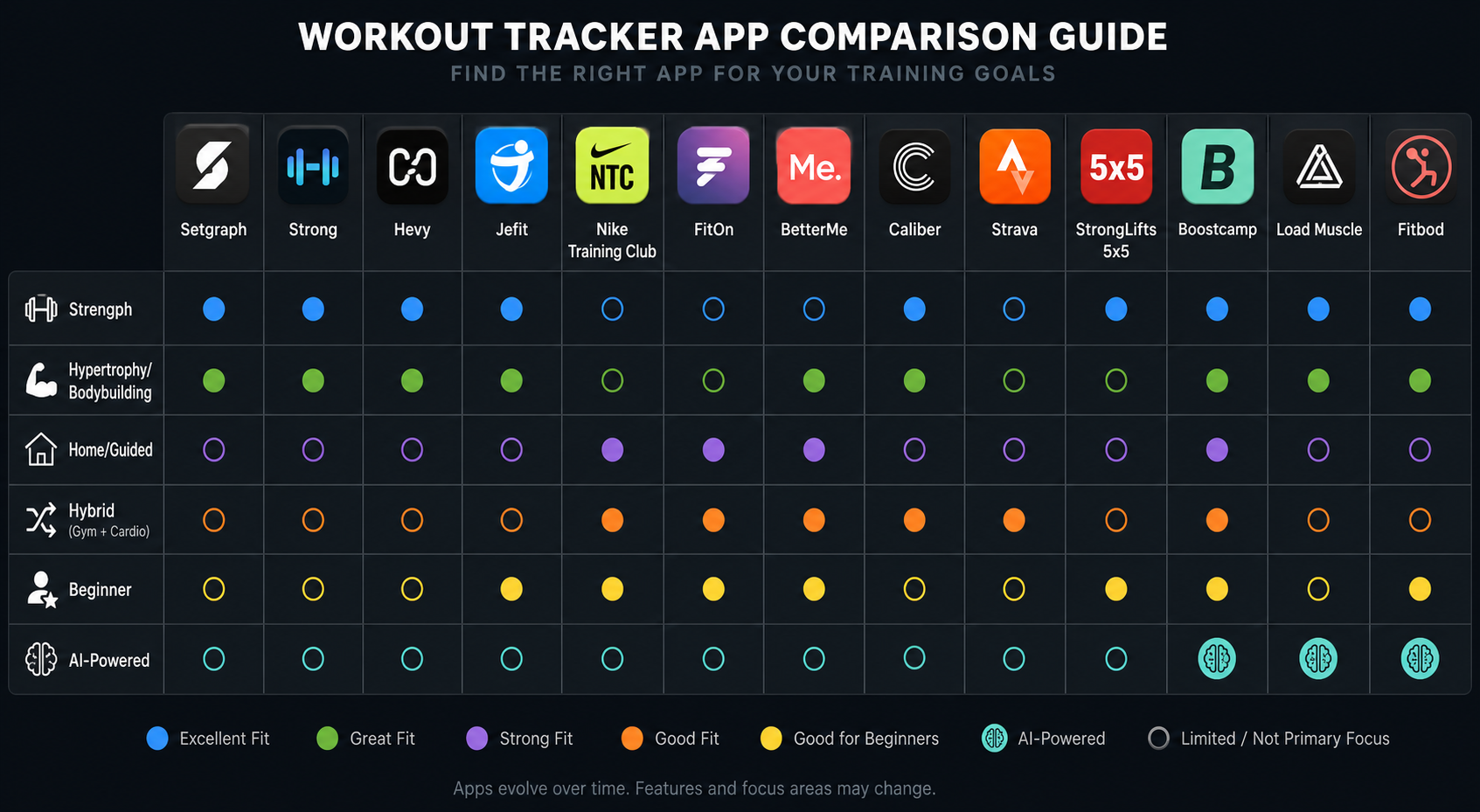
| App | Pricing Model | Strength | Hypertrophy | Home / Guided | Hybrid | Beginner | AI-Powered | Standout Feature |
|---|---|---|---|---|---|---|---|---|
| Setgraph | $4.99/month | ✓ | Fastest logging; iOS-only | |||||
| Strong | $4.99/month | ✓ | Best Apple Watch integration | |||||
| Hevy | Free / $2.99/month | ✓ | ✓ | ✓ | Best free social accountability | |||
| Jefit | Free / $12.99/month | ✓ | ✓ | ✓ | 1,400+ exercises, NSPI analytics | |||
| Nike Training Club | Free | ✓ | 300+ guided workouts, completely free | |||||
| FitOn | Free basic | ✓ | Live classes | |||||
| BetterMe | Freemium | ✓ | ✓ | Beginner pilates and bodyweight | ||||
| Caliber | Free / $19+/month | ✓ | ✓ | Free custom programs with video demos | ||||
| Boostcamp | Free / $14.99/month | ✓ | Auto-calculates weights for 50+ programs | |||||
| StrongLifts 5x5 | Free / premium | ✓ | Zero-decision barbell programming | |||||
| Load Muscle | Free plan | ✓ | 4,000+ exercises, AI planner on free tier | |||||
| Fitbod | $15.99/month | ✓ | Adaptive recovery-based AI |
Final Take: Match the App to Your Training, Not the Other Way Around
No single workout tracker app is best for everyone. The app that a powerlifter swears by will frustrate a home HIIT user, and the app that a bodybuilder loves will feel bloated to someone who just wants to log five sets of squats and leave. The key is matching the app's strengths to your training style — not the other way around.
Start with the free tier of the app that matches your training style from the decision tree above. Use it for at least two weeks before considering a paid upgrade. Most apps on this list have generous free tiers that give you a real sense of whether the app fits your workflow. If it doesn't, try the next app in your category. The right app should feel like an invisible tool — it should get out of your way and let you train.
This result comes from one real apartment under the stated conditions — it is a strong signal, not a guarantee your space will measure identically.
Builds this evidence supports
No build currently links to this specific test. Browse all builds with a matching tag.
Spot something off?
If this result didn't match your own space, let us know — floor-damage and noise claims carry real deposit-risk consequences if we get them wrong.