
Is the Whoop Fitness Tracker Worth It for Home Workouts? A Practical Assessment
For home exercisers weighing a $200+/year wearable subscription, Whoop’s Strength Trainer uniquely differentiates muscular load from cardiovascular strain, but its screenless design and multi-year cost may not suit everyone. This article evaluates who benefits most from Whoop’s features and when cheaper alternatives make more sense.
You’ve got the weights. Does Whoop actually change anything?
Dumbbells, resistance bands, maybe a kettlebell. No coach watching your form, no gym buddy to gauge intensity. Just a screenless wristband that costs $239 a year. I’ve been burned by wearables that call a heavy deadlift session “light strain” because my heart rate didn’t stay elevated. Whoop’s Strength Trainer is different—it finally gives weightlifters a number that matches how hard the workout actually was. But if your home setup is a spin bike or a treadmill, the lack of a screen and the subscription price make it a hard sell.
Most reviews test Whoop on runners and CrossFitters in commercial gyms. I trained at home. So I dug into the data to see which home exercisers get real value—and which ones would be better off with an Apple Watch or a Fitbit.
Why heart rate alone fails at weightlifting
Here’s the core problem: heart rate doesn’t measure muscular load. When you do a set of heavy dumbbell rows, your heart rate might bump to 120 bpm for thirty seconds, then drop. A standard tracker records that as “very low strain” because the cardiovascular system wasn’t taxed for long. But your muscles were. Without a coach, you’re left guessing whether the session actually challenged you.
That gap matters more at home. In a commercial gym you can eyeball another lifter’s weights, follow a written program, ask a trainer. At home, the only feedback is the data on your wrist. If that data misrepresents your effort, you’re training blind. Before Whoop’s Strength Trainer, weightlifting sessions routinely appeared as light workouts – a complete mismatch between what you felt and what the tracker reported.
The Strength Trainer: the only feature that solves it
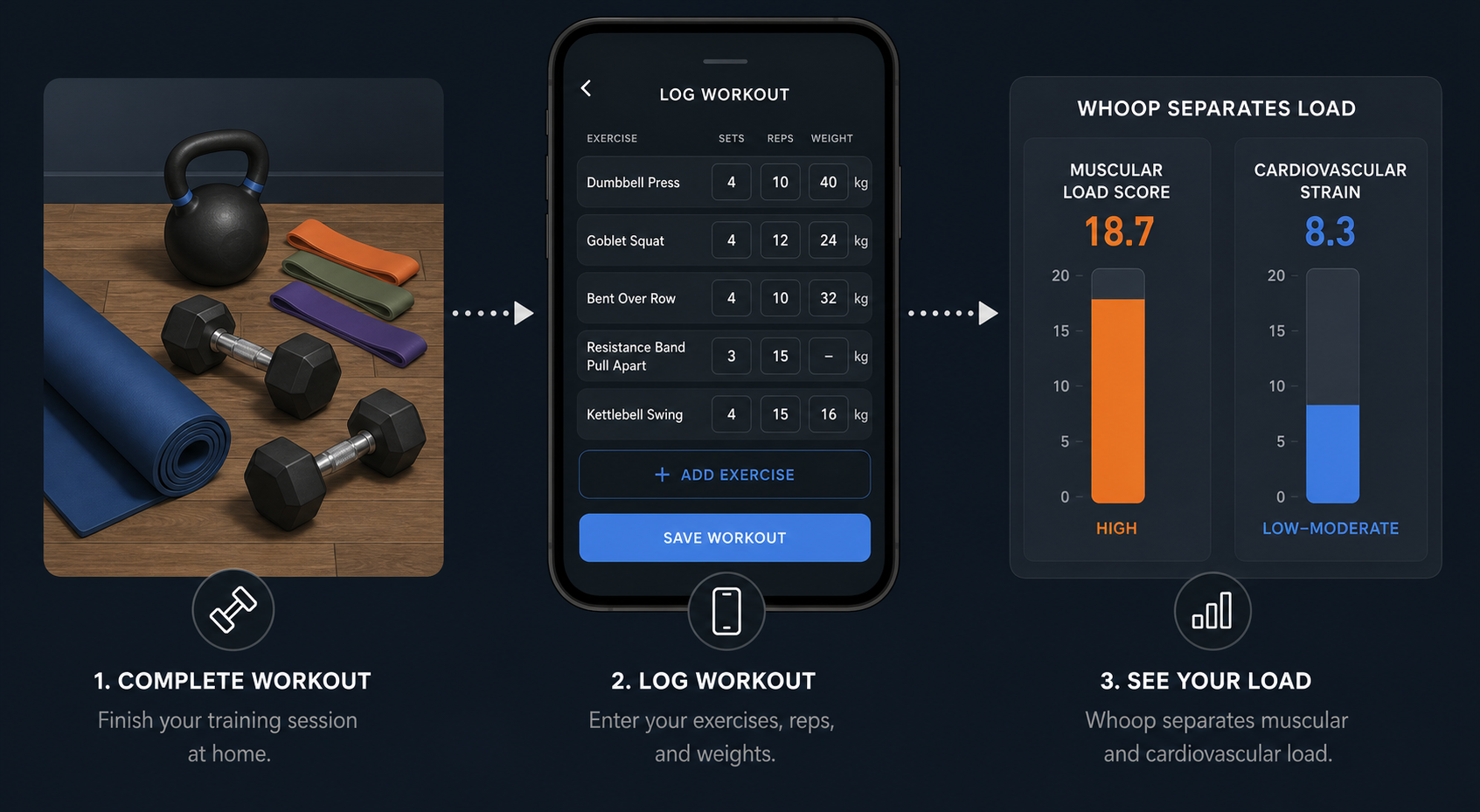
Whoop’s Strength Trainer is the only wearable feature I’ve seen that actually distinguishes muscular load from cardiovascular strain. It works through post-hoc logging: after your workout, you open the app and enter exercises, sets, reps, and weights. Whoop then calculates a muscular load score that gets folded into your overall Strain score. Before this feature, a heavy squat session and a light jog looked nearly identical on the dashboard. Now they diverge into clearly different numbers.
The recommended workflow – log after, not during – is worth noting because the live mode is finicky. You’d be fumbling with a screenless band and phone mid-set. Whoop themselves acknowledge that logging after the fact gives the most accurate results. That means you have to remember what you did, but for a home lifter doing the same three exercises every session, it takes maybe a minute.
For home exercisers who lift weights – dumbbells, barbells, kettlebells, resistance bands – this is genuinely useful. You finally get a number that reflects the real difficulty of the workout. No other wearable does this yet, not the Apple Watch, not Fitbit, not Oura. If strength training is your primary modality, the Strength Trainer alone can justify the subscription.
But if you mostly do cardio at home, the trade-off is real
Now the other side. If your home setup is a spin bike, treadmill, or HIIT mat, Whoop’s screenless design becomes a real limitation. You cannot glance at your wrist to see your current heart rate or pace. All data is retroactive – viewed in the app after you stop moving. For steady-state cardio that’s fine – you can go by feel and check later. But for interval training where you need real-time feedback to stay in the right zone, that retroactive model is a pain.
Heart rate accuracy also raises flags. On a seven-mile run, Whoop’s MG band reported 159 BPM average against a Garmin chest strap's 153 BPM. During tennis it read 130 BPM versus an Apple Watch’s 141 BPM. These are not catastrophic errors, but they’re noticeable. For a home runner who wants consistent pace and HR on the move, a watch with a screen and a proper optical sensor is a better choice.
Recovery tracking, on the other hand, is quite good. Whoop’s journal lets you self-report factors like bedtime, hydration, and alcohol, and then shows how each affects your recovery score. I found that consistent bedtime improved recovery by 8% – a meaningful signal for a home exerciser without a coach. But the insights are only as good as the data you enter. If you skip logging your late-night snack, you lose that connection.
The cost that hurts: $717 over three years
This is where I have the strongest reaction. Whoop Peak costs $239 per year. That works out to about $20 a month, which feels manageable month-by-month. But over the lifespan of a typical wearable – let's say three years – you’re looking at $717. Compare that to the total cost of other trackers that also track sleep, HRV, and activity:
| Option | Upfront cost | Subscription | Total over 3 years |
|---|---|---|---|
| Whoop Peak (5.0) | $0 in hardware | $239/yr | $717 |
| Oura Ring 4 | $349 | $69.99/yr (after first year free) | $559 |
| Fitbit Air with Premium | $99 | $99.99/yr Premium | $447 |
| Apple Watch SE (no subscription) | $249 | $0 | $249 |
The Apple Watch SE with no subscription costs less than a single year of Whoop. The Fitbit Air with Premium costs about half as much over three years. Even the Oura Ring, which also has a subscription, comes out cheaper. And all of those offer a screen for real-time pace, heart rate, and workout controls. For the home cardio crowd, that difference is decisive.
Who should buy—and who should skip
After looking at the data, I land in a specific place. The Whoop fitness tracker is worth it for a narrow slice of home exercisers.
- Buy if you primarily lift weights at home – dumbbells, barbells, kettlebells, bodyweight with progressive overload. The Strength Trainer gives you a muscular load score no other wearable offers, and the recovery tracking helps you know when to push vs. rest. Without a coach, these two features genuinely fill a gap.
- Skip if your home workouts are mostly cardio – running, cycling, HIIT, rowing. The screenless design and inconsistent HR accuracy make it less practical than a watch with a screen, and the subscription cost is hard to justify when an Apple Watch or Fitbit checks all the same boxes for less money.
If you do mixed training (some lifting, some cardio), the decision gets harder. I’d recommend trying a free month trial first. Log your lifting sessions in the Strength Trainer and see if the muscular load data changes how you train. If it feels like a gimmick, cancel. If it feels like the missing feedback loop, you’ll know you’re in the target audience.
This result comes from one real apartment under the stated conditions — it is a strong signal, not a guarantee your space will measure identically.
Builds this evidence supports
No build currently links to this specific test. Browse all builds with a matching tag.
Spot something off?
If this result didn't match your own space, let us know — floor-damage and noise claims carry real deposit-risk consequences if we get them wrong.