
Why the Last Roundup Let You Down
You clicked a headline that promised the best strength training apps of 2026, hoping for a clean answer. I did too. Then I downloaded one, selected “home gym” from the equipment menu, and got a program that assumes a barbell rack, a cable crossover, and a leg press. That is not my living room, and it is probably not yours either.
Most roundups are written for commercial gym users. The apps themselves are built the same way. When the research says the average workout app costs $34 per month, that number includes coaching services priced for people who already pay a gym membership. A home exerciser who has already dropped money on dumbbells and a bench needs a different value calculation.
This article is not another generic roundup. I evaluate strength training apps on three things that actually matter when you train at home: whether the app genuinely adapts to whatever equipment you own, whether its progressive overload logic works with the weight increments a home lifter can actually accumulate, and whether the total cost makes sense for someone who is not also paying for a gym.
What I Look For in a Home Gym App
After testing half a dozen apps that promised to adapt to limited equipment, I have boiled it down to three criteria that separate a genuinely useful app from a wasted subscription.
- Equipment flexibility: Not a toggle that says “home gym” and then still prescribes a leg press. The app must let you tell it exactly which dumbbells, bands, bench, and barbell you have, and then build programs that stay within those limits. I have seen apps claim adaptive but they just filter exercises by tags – they do not adjust progression.
- Progressive overload that works with limited weight increments: At home you probably have dumbbells in 5 lb jumps, maybe a barbell with 2.5 lb plates. The app's progression logic needs to handle those increments, not assume you have microplates. I have had programs that max out my dumbbell weight after four weeks – that is not true overload.
- Cost that aligns with your budget: You have already spent on equipment. Paying $30–$200 per month for an app on top of that is a different decision than paying $10/month when you also pay a gym fee.
The Garage Gym Reviews tested over 70 workout apps across 10 categories including equipment demands, progressive overload, and value. Those scores are a starting point – but I want to know what they actually mean in practice. A 5/5 for equipment demands could mean the app has a huge exercise library, not that it refuses to give you a barbell squat when you only own dumbbells. I will dig into that.
How the Top Contenders Stack Up on Equipment and Overload
Here is the core comparison. For each app I looked at equipment demands score, progressive overload score, and what those scores actually mean when you are training in a spare bedroom. Sources include Garage Gym Reviews, Fortune, and CNET.
| App | Equipment Demands | Progressive Overload | Key Home-Gym Detail |
|---|---|---|---|
| Nike Training Club | n/a* | 3/5 | Free, but overload tracking is basic – good for general fitness, not strength progression. |
| Boostcamp | 5/5 | 5/5 | Free version includes strong programming for dumbbells and bodyweight. PRO ($14.99/mo) adds more. |
| Caliber Strength Training | 5/5 | n/a* | Free version has 500+ exercises and custom routines. Pro ($19/mo) adds coaching. |
| Fitbod | 5/5 | n/a* | Workouts adapt to exact equipment you list. $15.99/mo. |
| SHRED | 5/5 | 4/5 | AI-generated programs. $9.99/mo (but premium tier reported at $14.99–$19.99 – see callout). |
| Ladder | 5/5 | 5/5 | iOS-only. $30/mo. Great if you have iPhone, useless on Android. |
| Future | 5/5 | n/a* | Human coach designs programs for your equipment. $199–200/mo. |
| Muscle Booster | 5/5 | 5/5 | No free trial. $14.99/mo (other sources say $19.99–$29.99). |
Now, what these scores really mean. Nike Training Club gets a 3/5 for progressive overload, and that is the right signal: it is free and excellent for getting moving, but if you want to systematically add weight over months, it is not built for that. Boostcamp and Caliber both earn top marks because they let you filter programs by exact equipment – not just a “home gym” blanket. Boostcamp’s free version actually includes programs designed for dumbbells only, which is rare.
Hevy scores 1/5 for progressive overload and accountability. It is a logging app, not a programming app – it tracks what you do but does not design your progression. If you already have your own plan and just want a clean log, Hevy at $2.99/mo is fine. But this article is about apps that the programming, so Hevy does not fit that lens.
Ladder scores 5/5 across the board, but it is iOS-only. If you have an Android phone, do not get invested – it is not coming. Future also is iOS-only at $199–$200/mo. That price buys you a real human coach who will design programs around your home equipment, but the cost is an outlier. For most home lifters, the AI-guided apps like Fitbod or Boostcamp deliver similar equipment adaptation for a fraction of the price.
The Real Price of Home-Friendly Programming
The $34/month average that people cite includes apps like Future and expensive coaching platforms. For the apps that genuinely support home equipment, the real average is closer to $15–20/month. Here is the price picture:
| App | Monthly Cost | Annual Cost | Free Version |
|---|---|---|---|
| Nike Training Club | $0 | $0 | Full free |
| Boostcamp PRO | $14.99 | $39.99 | Yes – substantial free content |
| Caliber Pro | $19 | n/a* | Yes – 500+ exercises free |
| Fitbod | $15.99 | $79.99 | No, but 7-day trial |
| SHRED | $9.99 (basic) | $119 (premium) | Yes – basic tier |
| Ladder | $30 | $180 | No |
| Future | $199-$200 | n/a* | No |
| Hevy Pro | $2.99 | $23.99 | Yes – logging free |
| Apple Fitness+ | $10 | $80 | No |
Notice that the best home-gym apps cluster between $0 and $15 per month. Future is the clear exception. If you have the budget and want a coach, it may be worth it. But for most home exercisers, the free or low-cost options provide the equipment adaptation you need.
Which App Fits Your Equipment Setup?
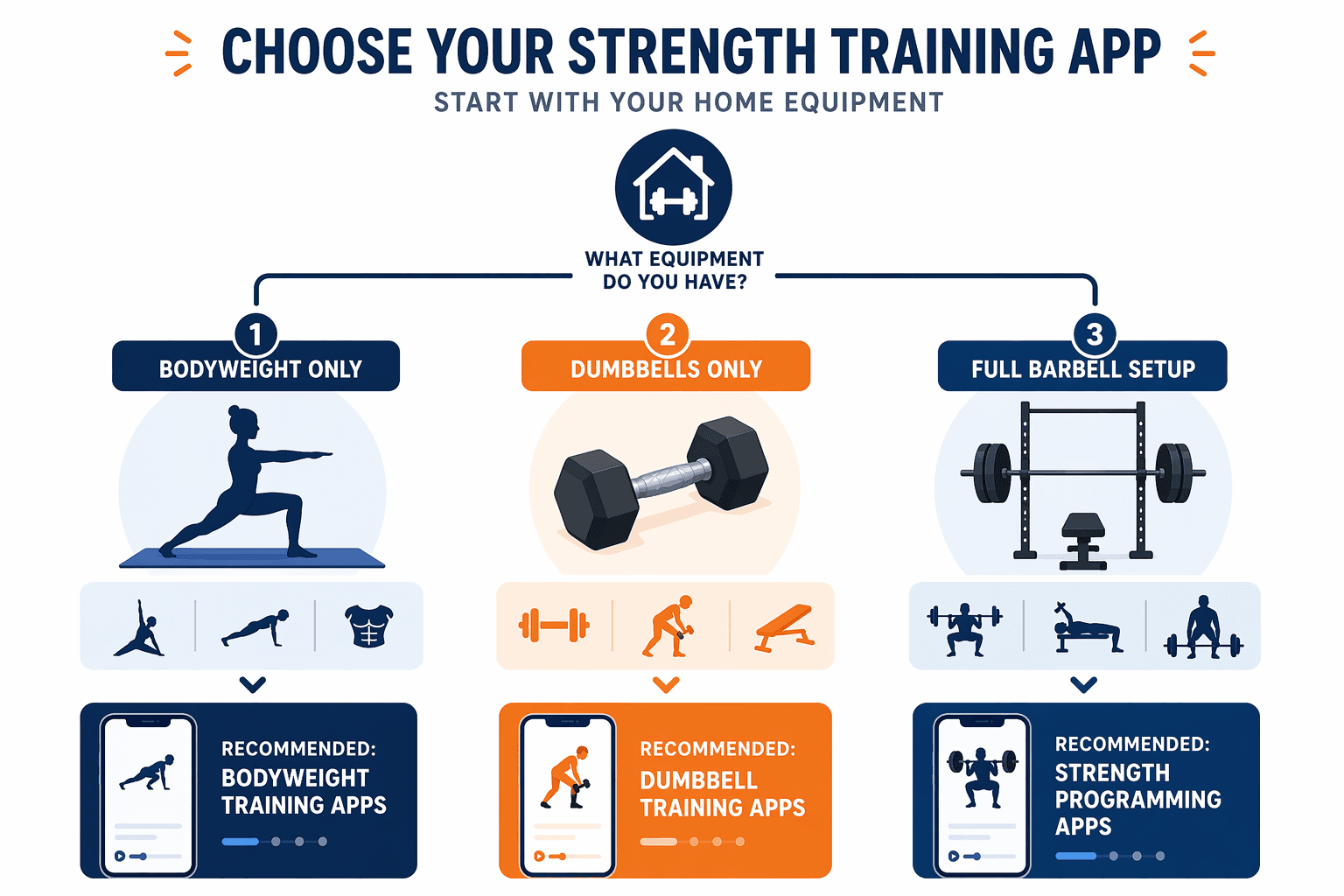
Your equipment level should drive your choice. Here is a quick decision framework:
Bodyweight Only
Nike Training Club is the clear winner – it is free, has a huge library of bodyweight routines, and does not assume any gear. The progressive overload limitation matters less for bodyweight because you can progress through harder variations (e.g., push-up variations) without needing to add weight. If you want more structure, Boostcamp’s free bodyweight programs are also solid.
Dumbbells Only (up to 50 lbs)
This is the sweet spot for most home gym users. Boostcamp and Caliber both shine because their free versions include dumbbell-specific programs and let you filter by the weights you own. Fitbod also adapts well, but it has no free version. SHRED’s AI generates reasonable dumbbell workouts, but the pricing discrepancy means you should check the current cost before committing.
If you only own dumbbells up to 50 lbs, note that many progression paths will max out in six to eight weeks. Boostcamp and Caliber are better than most at incorporating higher-rep schemes and tempo changes to keep progression alive when you cannot add weight.
Full Barbell Setup (rack, bench, plates)
The field narrows. Boostcamp still works well – it has programs designed around squat, bench, deadlift. Fitbod can handle a barbell setup, and its equipment customization is deep. Future is the premium option with a coach who will write a periodized plan around your rack. Ladder is also strong but iOS-only. If you are an Android user with a full barbell setup, your best bets are Boostcamp, Caliber, or Fitbod.
Bottom Line: My Pick, With Caveats
If I had to pick one app for the widest home-gym audience, it would be – its free version genuinely handles dumbbells and bodyweight, its PRO tier is affordable, and its progressive overload programming is built for real weight increments. For iOS users with a bigger budget, scores perfectly and is built specifically for home strength. If you want absolutely free and do not need structured overload, is unbeatable.
The key takeaway: do not let a generic roundup sell you an app built for a commercial gym. The best strength training app for your home gym is the one that adapts to the equipment you already own, programs progressive overload in the increments you can actually use, and costs less than what you would pay for a month of a commercial gym membership.
If you want to explore further, check out our guide to free workout planner apps and our framework for choosing a workout tracker app.
Comments
Join the discussion with an anonymous comment.