
Which Fitness Apps Collect the Most Data? A 2026 Privacy Audit of Fitbit, Strava, Nike Training Club, and PUSH
A structured privacy audit of popular exercise tracker apps, comparing how many data types each app collects and shares. Based on a January 2026 analysis of 16 top fitness apps, this guide helps privacy-conscious users choose an app that balances features with data protection.
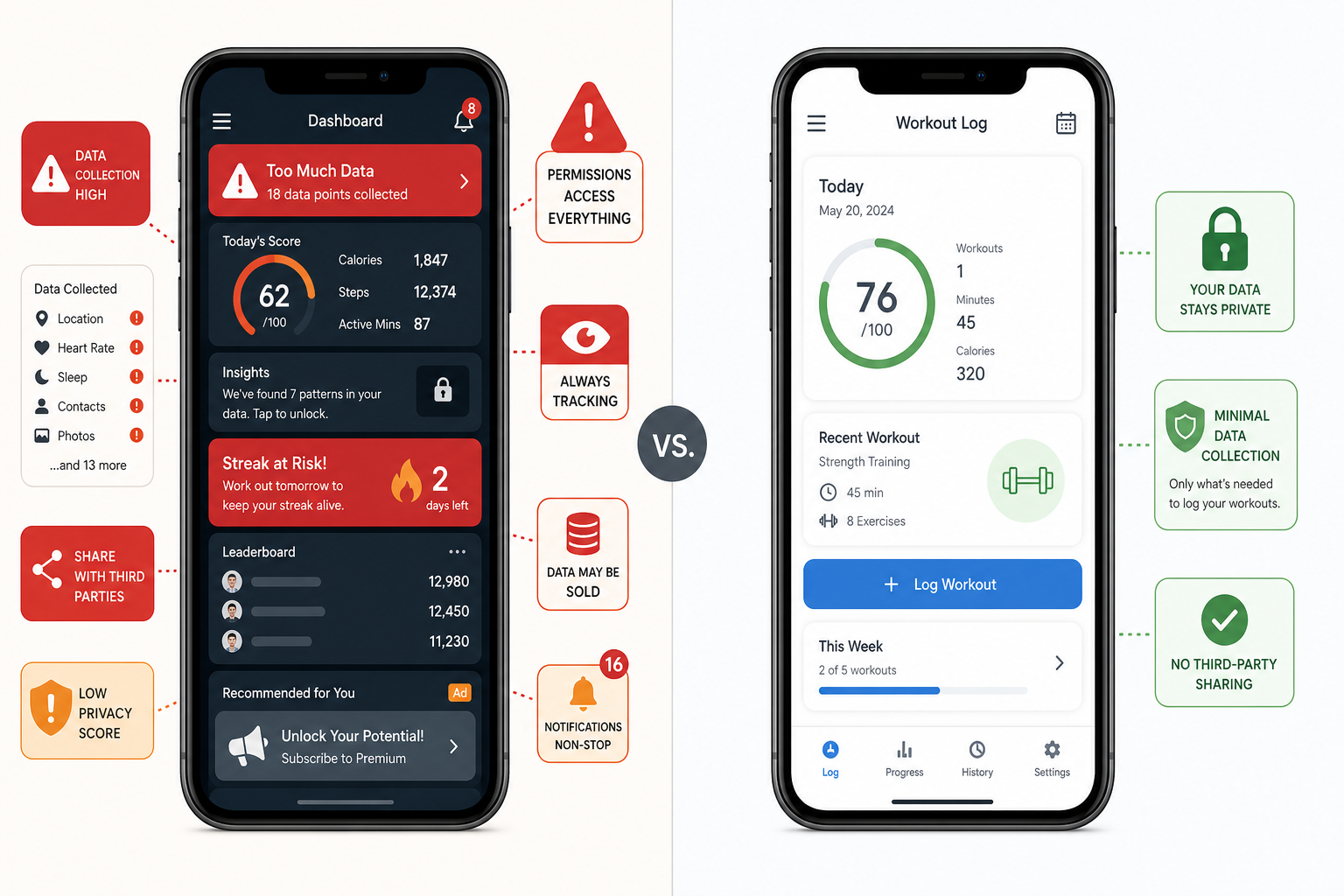
What Data Do Fitness Apps Actually Collect?
When you download a fitness app from the App Store, you are shown a privacy nutrition label — a standardized list of data types the app may collect from you. Apple defines 35 distinct data categories, grouped into four buckets: data used to track you across apps and websites, data linked to your identity, data linked to your device, and data that is not linked to you at all.
These categories cover everything from your precise GPS location and health metrics (heart rate, sleep patterns) to your device ID, purchase history, and even sensitive information like sexual orientation or religious beliefs. The labels are self-reported by app developers, but Apple audits them periodically, making them the most consistent cross-app privacy benchmark available.
The 35 Data Types Defined by Apple
The full list spans contact info, health and fitness data, financial info, location, sensitive info, contacts, user content, browsing history, usage data, diagnostics, and device identifiers. For fitness apps specifically, the most commonly collected types include:
- Health & Fitness: Heart rate, workout routes, step counts, sleep analysis, and body measurements.
- Location: Precise GPS coordinates for route mapping and coarse location for regional content.
- Identifiers: User ID, device ID, and advertising ID used for cross-app tracking.
- Usage Data: Product interaction logs, feature engagement metrics, and session duration.
- Diagnostics: Crash data, performance statistics, and error logs.
This framework is the foundation of the Surfshark January 2026 audit of 16 top fitness apps, which used Apple's privacy labels to count exactly how many data types each app collects and whether that data is shared with third parties or used beyond core functionality.
The Current Privacy Landscape: Key Findings from the 2026 Audit
The fitness app market was valued at $12 billion in 2025 according to Straits Research, with North America accounting for 35.6% of that total. By 2034, the market is projected to reach $38 billion. As the industry grows, so does the volume of personal health data flowing through these apps — and the incentive for companies to monetize it.
Surfshark's analysis of 16 apps from lists published by CNET, Tom's Guide, and TechRadar revealed several striking patterns:
- The average fitness app collects 12 different data types out of the 35 defined by Apple.
- 75% of apps share user data with third parties — meaning your workout data, location, or device ID may be passed to advertising networks or analytics firms.
- Over 90% of apps exploit user data beyond app functionality, using it for analytics, product personalization, or marketing purposes.
| Metric | Finding |
|---|---|
| Average data types collected per app | 12 out of 35 |
| Apps sharing data with third parties | 75% |
| Apps using data beyond core functionality | Over 90% |
| Most data-hungry app (Fitbit) | 24 data types |
| Least invasive app (PUSH) | 3 data types |
| Most data exploited beyond functionality (Strava) | 21 data types |
| Most third-party data sharing (Nike Training Club) | 4 types shared |
The gap between the most and least invasive apps is not small — it is an eightfold difference. That range means a privacy-conscious user can make a meaningful choice simply by selecting a different app, without necessarily sacrificing core functionality.
App-by-App Privacy Profiles
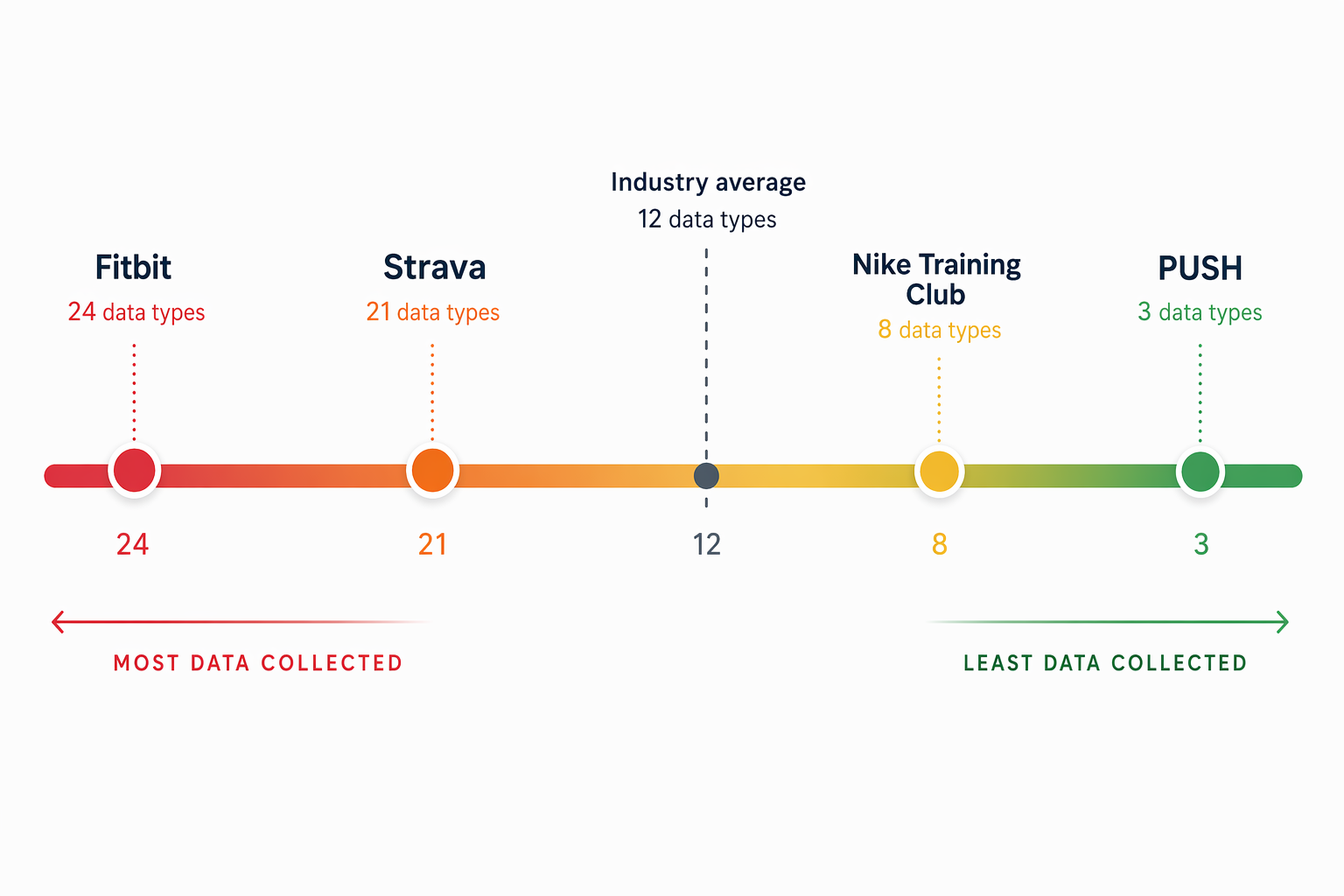
Not all fitness apps are created equal when it comes to data collection. Here is a detailed look at four apps that represent the full spectrum of privacy behavior, based on the Surfshark audit.
Fitbit: The Most Data-Hungry App (24 Data Types)
Fitbit collects 24 unique data types — nearly double the industry average. As a full-platform health ecosystem that includes wearables, sleep tracking, nutrition logging, and social features, Fitbit's scope is broad. But that breadth comes at a privacy cost. The app collects health metrics, location data, contact info, search history, browsing history, usage data, diagnostics, device identifiers, and purchase history, among others.
Fitbit is owned by Google, and its data practices reflect that integration. The app links data to your identity and uses it for analytics, product personalization, and potentially advertising. If you use a Fitbit wearable, the data pipeline is even deeper — the device syncs continuously, feeding real-time health data into the app's ecosystem.
Strava: Most Data Exploited Beyond Functionality (21 Data Types)
Strava collects 21 data types — slightly less than Fitbit — but it leads the category in a different metric: data exploited beyond app functionality. The audit found that Strava uses 21 different data types for analytics, product personalization, or marketing purposes, meaning nearly every piece of data it collects serves a secondary purpose beyond running the app.
For runners and cyclists who use Strava's route mapping and social features, this means your GPS tracks, performance data, and social interactions are all feeding into the company's analytics and personalization engines. Strava's public heatmap feature, while useful for discovering popular routes, also means your workout data is visible to the broader community unless you adjust your privacy settings.
Nike Training Club: Shares Sensitive Data with Third Parties
Nike Training Club does not collect as many data types as Fitbit or Strava, but it leads in third-party data sharing. The app collects four types of data that it shares with third parties: coarse location, sensitive info, device ID, and product interaction data. The inclusion of "sensitive info" in the shared category is particularly notable — Apple defines this category to include data about race, ethnicity, sexual orientation, religious beliefs, or political affiliations.
PUSH: The Least Invasive App (3 Data Types)
PUSH collects just 3 data types: user ID, product interaction, and crash data. Critically, the app does not link this data to individual users and uses it strictly for app functionality — not for analytics, personalization, or marketing. This makes PUSH the most privacy-respecting app in the audit.
However, context matters. PUSH is a specialized strength training app — it logs sets, reps, and weights. It does not track GPS routes, monitor sleep, or provide guided running classes. Its narrow scope naturally limits the data it needs. Comparing PUSH directly to Fitbit or Strava is not entirely fair, but it does demonstrate that a functional, useful fitness app does not need to collect two dozen data types.
| App | Data Types Collected | Data Shared with Third Parties | Data Used Beyond Functionality | Primary Scope |
|---|---|---|---|---|
| Fitbit | 24 | Yes | Yes | Full health & fitness ecosystem |
| Strava | 21 | Yes | 21 types (most) | Running & cycling social network |
| Nike Training Club | Moderate | Yes (4 types, incl. sensitive info) | Yes | Guided workouts & classes |
| PUSH | 3 | No | No | Strength training logging |
What 'Tracking' Means in Practice for Your Workout Data
Privacy labels are abstract. To understand what these data types actually mean for your daily life, it helps to map them to real-world scenarios.
Location Data and Route Mapping
When an app like Strava or Fitbit collects your precise GPS location, it is not just for showing your run on a map. That location data can be used to build a profile of where you live, work, and exercise. It can be shared with advertising networks to serve location-targeted ads. In the case of Strava's public heatmap, your route data may be visible to anyone — including people who could infer your home address from repeated workout start points.
Health Data and Personalized Coaching
Heart rate, sleep patterns, and body measurements are the lifeblood of fitness apps. They enable personalized coaching, recovery recommendations, and progress tracking. But this data is also highly sensitive — it reveals information about your physical condition, stress levels, and daily habits. When an app uses this data "beyond functionality," it may be analyzed to improve the app's algorithms, sold to data brokers, or used to train AI models without your explicit consent.
Device ID and Cross-App Advertising
Your device ID and advertising ID allow apps to track you across different applications and websites. A fitness app that collects your device ID can share it with an ad network, which then recognizes you in a shopping app and serves you an ad for running shoes. This is the "tracking" that Apple's App Tracking Transparency framework is designed to block — but it only works if you opt out.
Product Interaction Data and Feature Optimization
When an app logs which features you use most, how long you spend on each screen, and where you tap, that is product interaction data. This is the least concerning category — it is typically used to improve the app. However, when combined with other data types and shared with third parties, it can contribute to a detailed behavioral profile.
How to Evaluate App Privacy Before Downloading
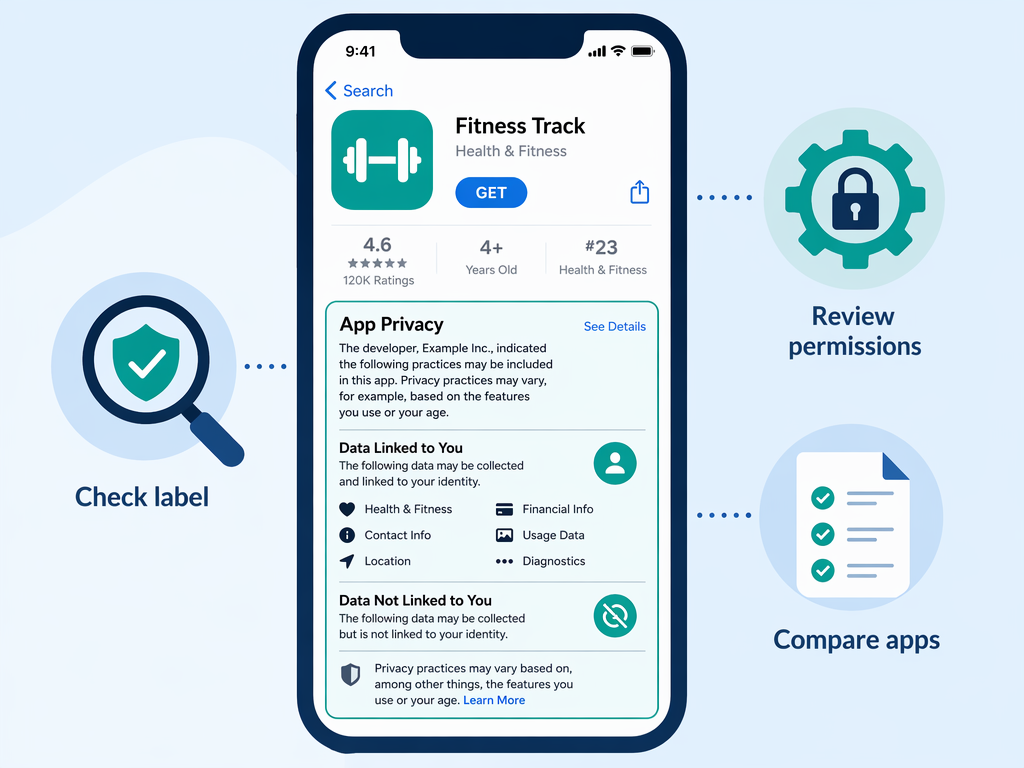
You do not need to be a privacy expert to make an informed choice. Here is a practical framework you can use before downloading any fitness app.
1. Read the App Store Privacy Nutrition Label
On the App Store, scroll down past the screenshots and reviews to find the "App Privacy" section. It shows a summary of data types collected, whether they are linked to you, and whether they are used for tracking. Look for apps that collect fewer data types and do not share data with third parties.
2. Review Permission Requests During Setup
When you first open an app, it will ask for permissions: location, health data, notifications, camera, and contacts. Ask yourself whether each permission is truly necessary. A strength training app does not need your precise location. A running app does not need your contacts. Deny permissions that are not essential — many apps will still function with reduced features.
3. Check the Privacy Policy for Third-Party Sharing Clauses
The privacy policy is where apps disclose whether they share data with third parties for advertising, analytics, or other purposes. Look for phrases like "we may share your information with third-party partners" or "we use your data for personalized advertising." If the policy is vague or uses broad language, consider that a red flag.
4. Use Research Tools Like Surfshark's Audit
Independent audits like the one from Surfshark provide a side-by-side comparison of app privacy practices. Bookmark the research page and check it before downloading a new app. For a broader overview of how fitness apps handle your data, see our Workout Tracker App Data Privacy in 2026 guide.
Balancing Features and Privacy: Recommendations for Privacy-Conscious Users
The good news is that you do not have to choose between a useful fitness app and protecting your privacy. The key is matching your privacy tolerance to the right app for your training needs.
| Privacy Tier | Recommended App | Data Types | Best For |
|---|---|---|---|
| Privacy-First | PUSH | 3 | Strength training logging with minimal data exposure |
| Balanced | Hevy or Strong | Moderate | Workout tracking with reasonable data practices |
| Feature-First with Adjustments | Fitbit or Strava | 21–24 | Full ecosystem users who adjust privacy settings |
| Guided Workouts | Nike Training Club | Moderate | Users who accept third-party sharing for free content |
Privacy-First: PUSH for Strength Training
If your primary training modality is strength training and you want the absolute minimum data collection, PUSH is the clear winner. Its 3 data types, no third-party sharing, and strict functionality-only data use make it the gold standard for privacy. The trade-off is scope — you get a focused logging tool, not a full health ecosystem.
Balanced: Apps with Moderate Data Collection
Apps like Hevy and Strong offer robust workout tracking features while collecting fewer data types than the major platforms. They typically do not track GPS location or health metrics beyond what you manually enter. These are strong choices for users who want good features without the data footprint of a Fitbit or Strava.
Feature-First with Privacy Adjustments: Fitbit and Strava
If you need the full ecosystem — wearable integration, social features, route mapping, and health metrics — you can still take steps to protect your privacy. On both Fitbit and Strava, adjust your privacy settings to limit data sharing, disable public profiles, and opt out of data collection for advertising purposes. On iOS, use App Tracking Transparency to block cross-app tracking.
For Beginners Still Deciding
If you are new to fitness apps and unsure which one fits your needs, start with our How to Choose Your First Workout App decision framework. It walks you through matching your goals, equipment, and privacy preferences to the right app — before you commit to a download.
This result comes from one real apartment under the stated conditions — it is a strong signal, not a guarantee your space will measure identically.
Builds this evidence supports
No build currently links to this specific test. Browse all builds with a matching tag.
Spot something off?
If this result didn't match your own space, let us know — floor-damage and noise claims carry real deposit-risk consequences if we get them wrong.