
Screenless Fitness Tracker vs. Smartwatch: Which Is Right for Your Home Fitness Setup?
Should you ditch your smartwatch for a screenless band? We compare battery life, sleep tracking, workout data, and cost to help you decide — and explain why the best home fitness setup in 2026 might be both.
The Case for Going Screenless: Why Home Fitness Practitioners Are Making the Switch
If you’ve been training at home with a smartwatch strapped to your wrist, you’ve likely run into the same friction points: the battery dies before your third workout of the week, the screen is a distraction during yoga or bodyweight circuits, and the device is bulky enough that you take it off before bed — which means your sleep data is incomplete. These are not minor annoyances. For anyone serious about tracking recovery, sleep, and daily strain, a smartwatch’s limitations become the bottleneck.
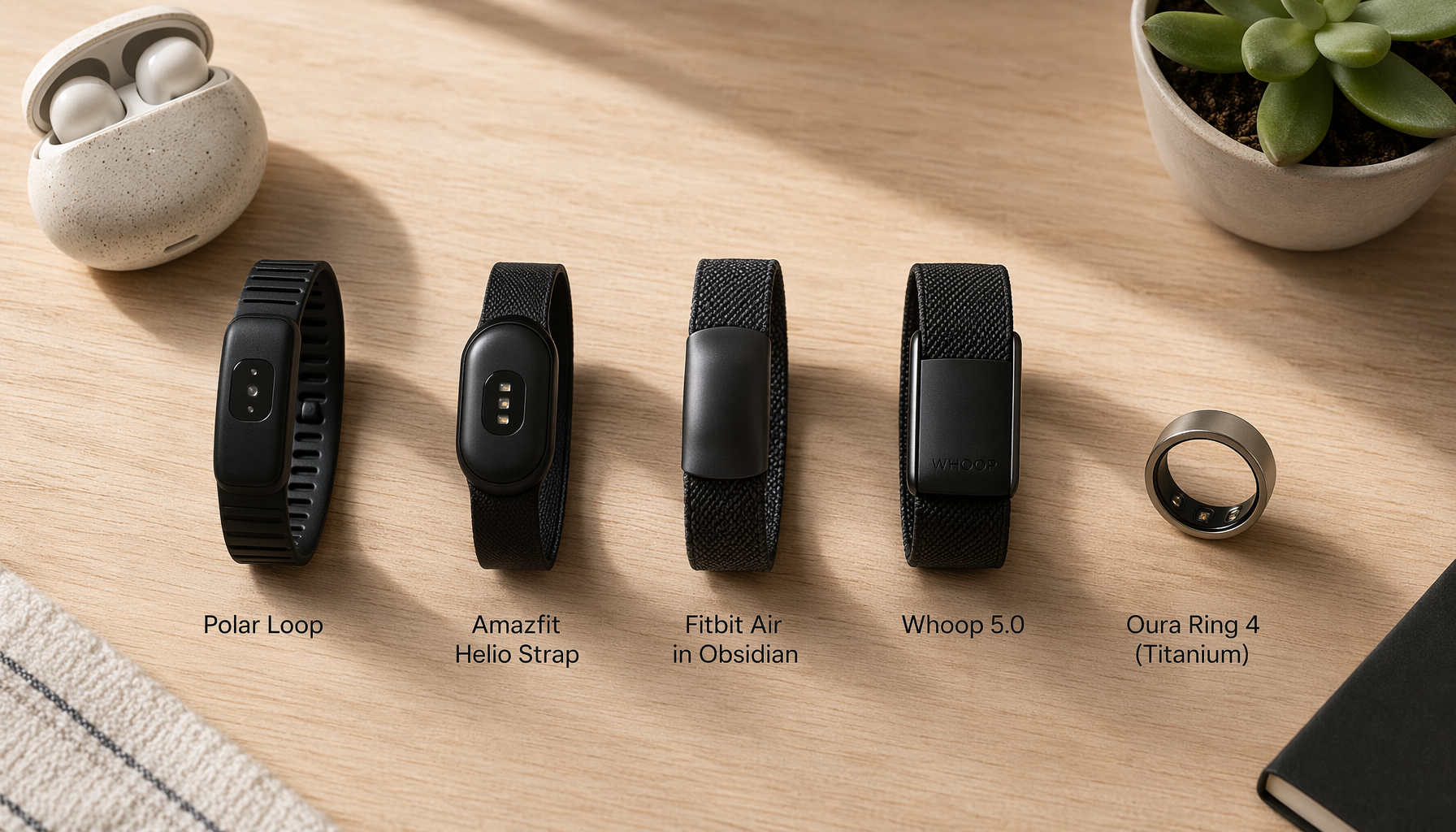
Enter the screenless fitness tracker. Devices like the Fitbit Air, Whoop 5.0, Amazfit Helio Strap, and Polar Loop strip away the AMOLED display entirely. By doing so, they solve the battery problem (most last 7–14 days), become comfortable enough to wear 24/7, and remove the temptation to check notifications mid-workout. The trade-off is real: you lose on-wrist metrics like real-time pace, interval timers, and map navigation. But for a growing number of home fitness practitioners, that trade-off is worth it.
The question this article answers is not “which screenless tracker should you buy?” — that depends on your budget and subscription tolerance. The question is: should you replace your smartwatch with a screenless band, or is there a better way to use both?
Screenless Tracker vs. Smartwatch: The Five Key Trade-Offs
Before deciding, you need to understand exactly what changes when you switch from a smartwatch to a screenless band. These five dimensions cover the most important differences for home fitness use.
| Dimension | Screenless Tracker | Smartwatch | Why It Matters for Home Fitness |
|---|---|---|---|
| Battery Life | 7–14 days (Fitbit Air: ~7 days; Whoop 5.0: ~14 days; Amazfit Helio Strap: ~10 days) | 24–36 hours (Apple Watch, Galaxy Watch, Garmin) | Screenless trackers can be worn through the night without needing a recharge cycle, enabling continuous sleep tracking. |
| Sleep Tracking Adherence | High — users forget they’re wearing it; no charging break overnight | Low to moderate — often removed before bed due to bulk or charging | Consistent sleep data is the foundation of recovery tracking; gaps in data make HRV and sleep stage analysis unreliable. |
| Workout Data Depth | Good for post-workout analysis; no real-time on-wrist metrics (pace, HR zone, interval timer) | Excellent — real-time pace, HR zone, interval timing, GPS maps on wrist | If you need to pace a run or time rest between sets without looking at your phone, a smartwatch is essential. |
| Notification Management | None — no screen means no distraction | Full notification mirroring; can be distracting during workouts | For yoga, bodyweight circuits, or focused strength training, removing notification distraction improves workout quality. |
| Upfront Cost | $50–$200 (Xiaomi Smart Band 10 ~$50; Fitbit Air $99; Polar Loop $200) | $300–$800+ (Apple Watch Series 11 ~$400; Garmin Fenix 8 ~$800) | Screenless trackers are significantly cheaper upfront, though some (Whoop, Oura) require ongoing subscriptions. |
Let’s unpack each dimension with specific device examples so you can see how the trade-offs play out in practice.
Battery Life: The Decisive Advantage
The single biggest reason people switch to a screenless tracker is battery life. By eliminating the power-hungry AMOLED display, these devices achieve 7–14 days of runtime. The Fitbit Air lasts about a week, the Whoop 5.0 pushes to nearly two weeks, and the Amazfit Helio Strap advertises 10 days (tested at 8 days by Wirecutter). Even the budget Xiaomi Smart Band 10, at roughly $50, claims a 21-day battery — though it lacks GPS and advanced sensors.
Compare that to an Apple Watch or Samsung Galaxy Watch, which needs nightly charging. If you wear your smartwatch to track sleep, you have to find a charging window during the day — and many people simply skip sleep tracking as a result. A screenless band removes that friction entirely.
Sleep Tracking Adherence: You Can’t Track What You Don’t Wear
Sleep tracking is only useful if you wear the device every night. Smartwatches, with their bulk and nightly charging requirement, have poor adherence. Screenless bands and rings solve this. The Oura Ring 4 (at $349 + $70/year subscription) is designed specifically for sleep and readiness, with an 8-day battery. The Polar Loop ($200, no subscription) provides reliable sleep data with Nightly Recharge metrics that reviewers say are consistent with the Oura Ring 4. The Fitbit Air introduces a new Sleep Score feature that Google claims is 15% more accurate thanks to a new ML model, plus a Smart Wake feature that wakes you at an optimal point in your sleep cycle.
The result: users who switch to a screenless band often report their first complete week of uninterrupted sleep data in years. That data is the foundation for HRV trends, readiness scores, and recovery insights.
Workout Data Depth: Where Smartwatches Still Lead
This is the area where screenless trackers are weakest. If you need to see your heart rate zone, current pace, or interval timer on your wrist during a workout, a smartwatch is the better tool. The Fitbit Air has no built-in GPS — it uses your phone’s GPS — so you can’t go for a phone-free run and get accurate distance data. The Polar Loop also lacks built-in GPS. The Amazfit Helio Strap tracks 27 workout activities but relies on your phone for GPS.
However, for post-workout analysis — reviewing heart rate curves, recovery time, and strain — screenless trackers are perfectly capable. The Whoop 5.0 is built around this concept: you log your workout manually or let it auto-detect, and the analysis happens in the app afterward. The Fitbit Air automatically detects workouts and feeds data into Google’s Health Coach (powered by Gemini) for AI-driven insights.
Notification Management: The Hidden Benefit of No Screen
Tom’s Guide senior writer Erin Bashford, after testing the Amazfit Helio Strap for three weeks, noted: “I find myself so much more involved in my activity… during yoga, I’m pushing myself further, and while running, I’m focusing on controlling my breathing and improving my gait.” The absence of a screen eliminated the temptation to check messages, emails, or notifications during workouts.
For home fitness practitioners who do yoga, bodyweight circuits, or focused strength training, this is a real benefit. A smartwatch’s notification mirroring, while useful during the day, becomes a distraction during a workout. A screenless band removes that entirely.
Cost: Screenless Can Be $99 One-Time vs. $400+ Smartwatch
The upfront cost difference is stark. The Fitbit Air starts at $99.99. The Amazfit Helio Strap is $99. The Polar Loop is $200 with no subscription. The Xiaomi Smart Band 10 is roughly $50. Compare that to an Apple Watch Series 11 at $400 or a Garmin Fenix at $800.
However, some screenless trackers require ongoing subscriptions. The Whoop 5.0 costs $199–$359 per year. The Oura Ring 4 costs $349 upfront plus $70/year for full features. The Fitbit Air includes core tracking (heart rate, sleep, SpO2) for free, but the AI-powered Health Coach requires Google Health Premium at $9.99/month or $99.99/year (a 3-month trial is included).
Heart Rate Accuracy During Home Workouts: What the Data Actually Shows
A common concern about screenless trackers is heart rate accuracy during exercise. The short answer: wrist-based optical HR sensors on both screenless bands and smartwatches lose accuracy during weightlifting and HIIT. The longer answer is more nuanced.
The Amazfit Helio Strap provides a useful data point. When worn on the upper arm (using an optional bicep strap), its heart rate readings were nearly identical to a Garmin chest strap — within 1–2 BPM, according to Wareable’s testing. This is because the upper arm has better blood flow and less movement artifact than the wrist. The Whoop 5.0 also offers a bicep band for improved accuracy during intense exercise.
The Polar Loop uses Polar’s Precision Prime sensor platform (GEN 3.5 OHR) but struggles during high-intensity intervals, according to reviewers. The Fitbit Air uses “more traditional sensors” than the Pixel Watch 4, which CNET notes could limit accuracy in peak heart rate zones.
The key takeaway: for steady-state cardio (walking, jogging, cycling), both screenless bands and smartwatches are accurate enough. For HIIT and weightlifting, accuracy drops for both — but a screenless band worn on the upper arm can match a chest strap.
The Dual-Wearable Strategy: Why the Best Setup Might Be Both
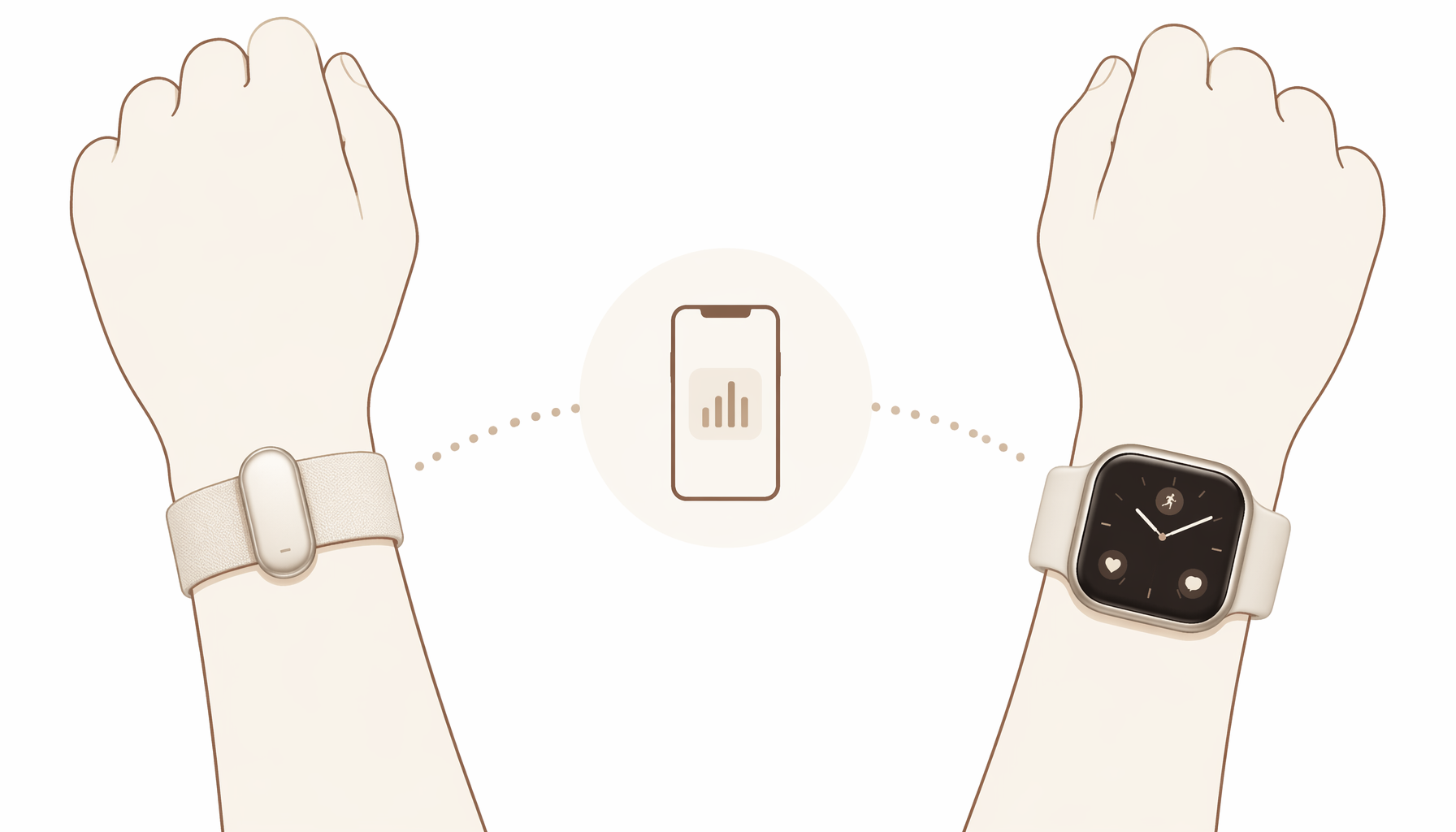
Here’s the thesis that changes the conversation: you don’t have to choose. The best home fitness setup in 2026 may be wearing both a screenless band and a smartwatch.
The idea is simple. Wear a screenless band — like the Fitbit Air or Whoop 5.0 — 24/7 for continuous heart rate, sleep tracking, HRV, and recovery metrics. Then wear your smartwatch only during workouts for on-wrist metrics: real-time pace, heart rate zone, interval timing, and GPS. When the workout ends, the smartwatch goes back on the charger, and the screenless band continues tracking through the night.
This approach solves the two biggest problems with each device type. The smartwatch’s poor battery life no longer matters because you’re only wearing it for 1–2 hours a day. The screenless band’s lack of real-time workout metrics no longer matters because you have the smartwatch for that. And you get the best of both worlds: uninterrupted sleep and recovery data from the screenless band, plus full workout data from the smartwatch.
The infrastructure to support this is already here. Google’s Google Health app now supports connecting a Fitbit Air and a Pixel Watch simultaneously, enabling multi-device pairing. This means your sleep data from the Fitbit Air and your workout data from the Pixel Watch appear in a single dashboard. CNET’s reviewer, who previously tested the Whoop 4.0, noted that the Fitbit Air is “an ideal second wearable for someone who uses a smartwatch only for workouts.”
How to Decide Based on Your Workout Style and Goals
Not everyone needs the dual-wearable approach. Here’s a decision framework based on your primary workout style.
- Strength training / HIIT at home: A screenless band with a bicep strap option (Whoop 5.0, Amazfit Helio Strap) is ideal. You don’t need real-time pace or GPS, and the bicep strap improves HR accuracy during intense sets. The lack of a screen keeps you focused on form. A smartwatch adds little value here.
- Running / cycling (outdoor): A smartwatch with built-in GPS is still the better primary device. You need real-time pace, distance, and route navigation on your wrist. A screenless band can supplement for sleep and recovery tracking, but it won’t replace the smartwatch for the workout itself.
- Yoga / bodyweight / pilates: A screenless band is the clear winner. The distraction-free experience improves focus and mind-muscle connection. Heart rate data is useful for post-workout analysis but not critical in real time. The Fitbit Air or Polar Loop are strong choices.
- Mixed training (strength + cardio + yoga): The dual-wearable approach shines here. Wear a screenless band 24/7 for recovery and sleep, and put on your smartwatch only for running or cycling sessions. This gives you complete data without compromising battery life or comfort.
If you’re still unsure, start with a budget-friendly screenless band like the Amazfit Helio Strap ($99, no subscription) and wear it alongside your existing smartwatch for two weeks. After that period, you’ll know whether the dual-wearable approach works for you or whether you prefer one device.
Who Should Just Stick With a Smartwatch
A screenless tracker adds little value for certain users. Here’s when you should skip the screenless band entirely:
- You need on-wrist notifications. If you rely on your smartwatch to screen calls, messages, and calendar alerts throughout the day, a screenless band will feel like a downgrade. The whole point of these devices is to remove that distraction.
- You run or cycle without your phone. Most screenless bands lack built-in GPS. The Fitbit Air, Polar Loop, and Amazfit Helio Strap all rely on your phone’s GPS. If you want to leave your phone at home, you need a smartwatch with built-in GPS.
- You use smartwatch-specific health features. ECG, fall detection, cellular connectivity, and blood oxygen notifications are not available on most screenless bands. The Fitbit Air does offer irregular heart rhythm notifications and Afib alerts, but it lacks ECG.
- You are unwilling to wear two devices. The dual-wearable approach requires wearing a band on one wrist and a smartwatch on the other (or swapping). If that sounds like too much hassle, stick with a single smartwatch and accept the battery and sleep tracking limitations.
There is no wrong answer here. The right choice depends on which trade-offs you’re willing to make.
The Bottom Line: Complementary, Not Competitive
Screenless fitness trackers and smartwatches are not competing products. They serve different needs within the same ecosystem. A screenless band excels at 24/7 wear, sleep tracking, and recovery monitoring — areas where smartwatches consistently fall short due to battery life and bulk. A smartwatch excels at real-time workout metrics, GPS, and notifications — areas where screenless bands are deliberately limited.
The best home fitness setup in 2026 recognizes this complementarity. Whether you choose a single device or the dual-wearable approach depends on your workout style, your tolerance for subscriptions, and whether you value uninterrupted sleep data more than on-wrist notifications.
This result comes from one real apartment under the stated conditions — it is a strong signal, not a guarantee your space will measure identically.
Builds this evidence supports
No build currently links to this specific test. Browse all builds with a matching tag.
Spot something off?
If this result didn't match your own space, let us know — floor-damage and noise claims carry real deposit-risk consequences if we get them wrong.