
Whoop 5.0 Review: Is the Subscription Worth It for Home Fitness?
A comprehensive review of the Whoop 5.0 for home fitness enthusiasts evaluating its subscription cost against competitors. We break down hardware improvements, accuracy across wear positions, membership tiers, and key features to help you decide if the investment is worth it.
Let me tell you what I saw when I opened the Whoop app the first time: a blank white screen with a message that my recovery score would appear after I'd worn the band for four days. A four-day wait before the device tells you anything about yourself. And you're already paying for that month.
That's the Whoop experience in a nutshell. The hardware is free with a subscription, but the subscription is the real product — and the cost is the main event.
You Never Actually Buy the Band
If you're searching whoop fitness tracker to decide whether to buy one, the first thing to understand is that you never actually buy it. Whoop does not sell hardware. It sells a membership. The band — the 5.0, the new MG, even the old 4.0 — is included in the price. You pay annually, and the longer you keep it, the more you spend. I've been burned by subscription lock-ins before, and this one demands a calculator.
The annual price range is $199 to $359, depending on the tier and the hardware you choose. The Peak membership costs $239 per year and includes the 5.0 band with a wireless charger. The One tier is $199 but drops key features. The Life tier runs $359 and adds ECG and blood pressure tracking on the premium MG hardware. Already I'm asking: what do I get for each dollar, and how many of those features will I actually use?
The Real Cost: $717 vs $399 Over Three Years
Here is the number that changed my mind about Whoop.
Peak membership: $239 per year. Over three years: $717. Over four years: $956.
An Apple Watch SE: $399 one-time. No subscription. After three years, the Apple Watch owner has spent $399 and the Whoop owner has spent $717. After four years, the gap is $556. The Whoop user is still paying $239 every year. The Apple Watch user pays $0 more.
The Oura Ring 4 tells a similar story: roughly the same cost at 2 years, much less at 3 years. The difference is Whoop's subscription-only model. Oura requires a subscription for some advanced features, but the ring itself is a $299–$399 purchase. Whoop has no purchase option. You rent the hardware forever.
| Device | 1-Year Cost | 3-Year Cost | 4-Year Cost |
|---|---|---|---|
| Whoop 5.0 (Peak) | $239 | $717 | $956 |
| Apple Watch SE | $399 (one-time) | $399 | $399 |
| Oura Ring 4 | $299 + sub | Approx $500–$600 | Approx $600–$700 |
These numbers are the strongest argument in this review. They force you to ask: "Will I get $239 worth of insight every year for the next three to five years?" I doubt most people will.
The Hardware Gets Out of the Way — Which Is the Least It Can Do
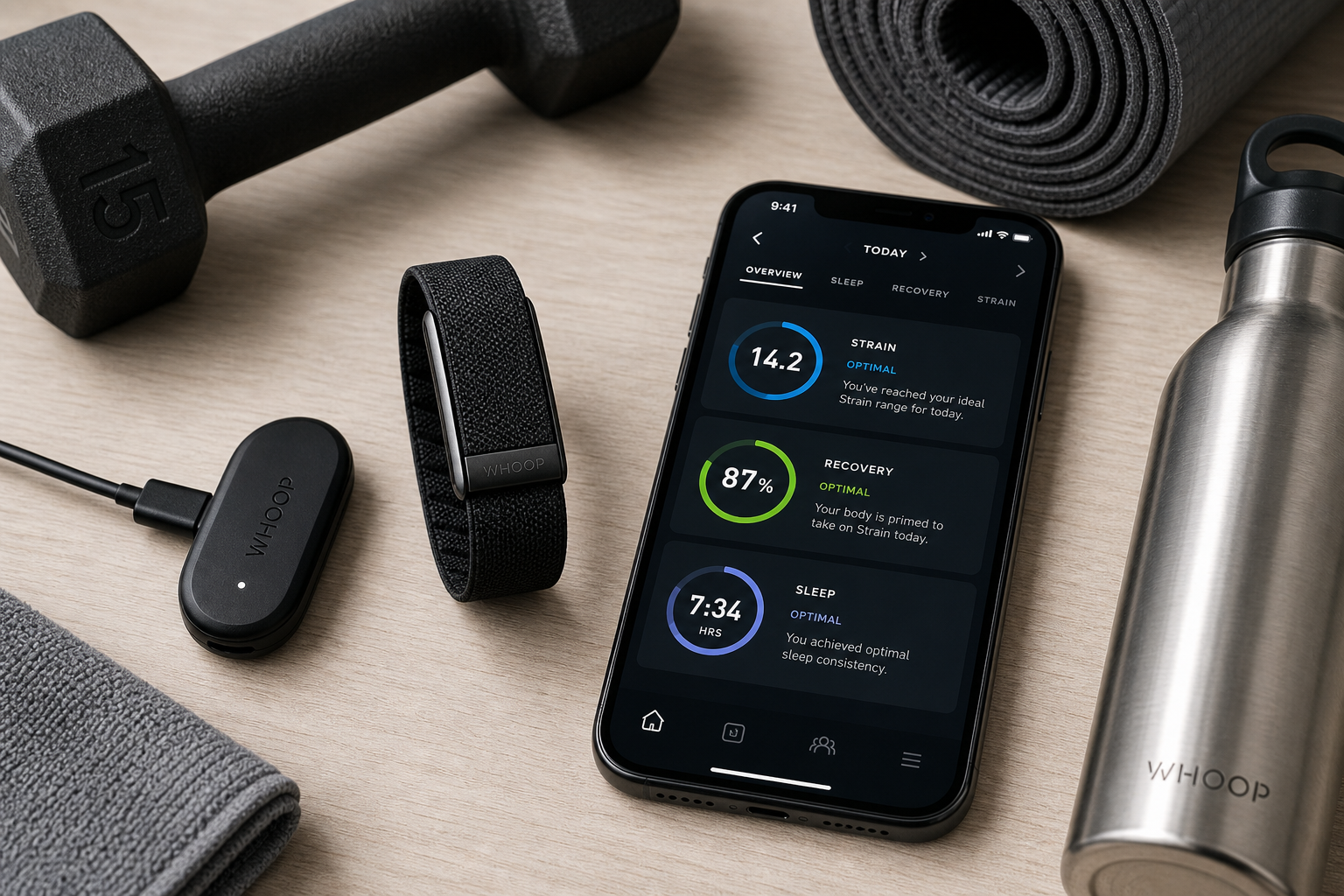
The Whoop 5.0 is a meaningful hardware upgrade. The battery life jumped from the 4.0's four or five days to 14–16.5 days in real use. The processor is 60% faster, which makes the band snappier during syncs. It's IP68 rated, so you can swim with it. It charges in about 30 minutes, and the wireless PowerPack can hold a charge for 30 days — you can wear the band while it recharges.
These are real improvements. But they are enablers, not reasons to buy. The battery life is nice because you forget you're wearing it. The faster processor helps the app feel less sluggish. Neither justifies a $240 annual bill. The hardware simply gets out of the way — which is the minimum requirement for a screenless tracker you wear 24/7. I'd rather see that battery life as a table-stakes feature, not a selling point.
Which Tier Actually Makes Sense?
Whoop now offers three membership tiers. The cheapest, One ($199/year), gives you the 5.0 band with a wired charger. But it strips out two features that matter if you care about recovery tracking: the Health Monitor (which tracks HRV, respiratory rate, resting heart rate, and skin temperature) and the Stress Monitor. Without Health Monitor, you lose the detailed physiological data that makes the daily recovery score useful. The One tier is a perfectly honest entry point for someone who only wants strain and sleep numbers, but it leaves out the sensors that differentiate Whoop from a simple step counter. For me, that's a dealbreaker if I'm paying for a recovery tracker.
The Peak tier ($239/year) includes both Health Monitor and Stress Monitor, plus a wireless charging pack. For $40 more per year, you get the full recovery data set. Most home fitness users who are serious enough to consider Whoop should pick Peak. The Life tier ($359/year) adds ECG and blood pressure tracking on the premium MG hardware. Those features are controversial — the FDA has disputed Whoop's blood pressure claims, and Whoop itself frames the data as "trends," not medical measurements. Unless you have a specific need for continuous ECG monitoring, the extra $120 per year is hard to justify. I'd tell most readers to choose Peak or walk away.
| Tier | Annual Cost | Hardware | Key Features Missing | Best For |
|---|---|---|---|---|
| One | $199 | Whoop 5.0 | Health Monitor, Stress Monitor, wireless charger | Budget-conscious, only want strain/sleep |
| Peak | $239 | Whoop 5.0 | — | Most home fitness users who want full recovery data |
| Life | $359 | Whoop MG | Adds ECG and BP trends (controversial) | Users who specifically want continuous ECG monitoring |
The $40 difference between One and Peak buys you the features that make Whoop worth considering at all. Without Health Monitor, you're paying $199 for a screenless sleep and activity tracker that costs more over 3 years than an Apple Watch. I'd tell most readers to choose Peak or walk away.
Wrist or Biceps? The Accuracy Caveat
Whoop's heart rate accuracy depends heavily on where you wear the band. On the biceps, it reached a 0.98 correlation with a reference chest strap across 19 workouts. That's best-in-class for optical HR. On the wrist, though, the story changes. During HYROX and CrossFit sessions, the5krunner found "clear deterioration" with "significant HR overestimation in high-intensity intervals."
If you're a home fitness enthusiast who does HIIT, CrossFit, or any workout with explosive movements — and you plan to wear the band on your wrist — this matters. The optical sensor has trouble locking on to your pulse when your arm is moving fast. Whoop's overall claimed accuracy of 94.44% (from TechGearLab testing) likely comes from mixed wear positions. Pure wrist accuracy during intense intervals is lower. This is not a minor footnote; it's a deciding factor.
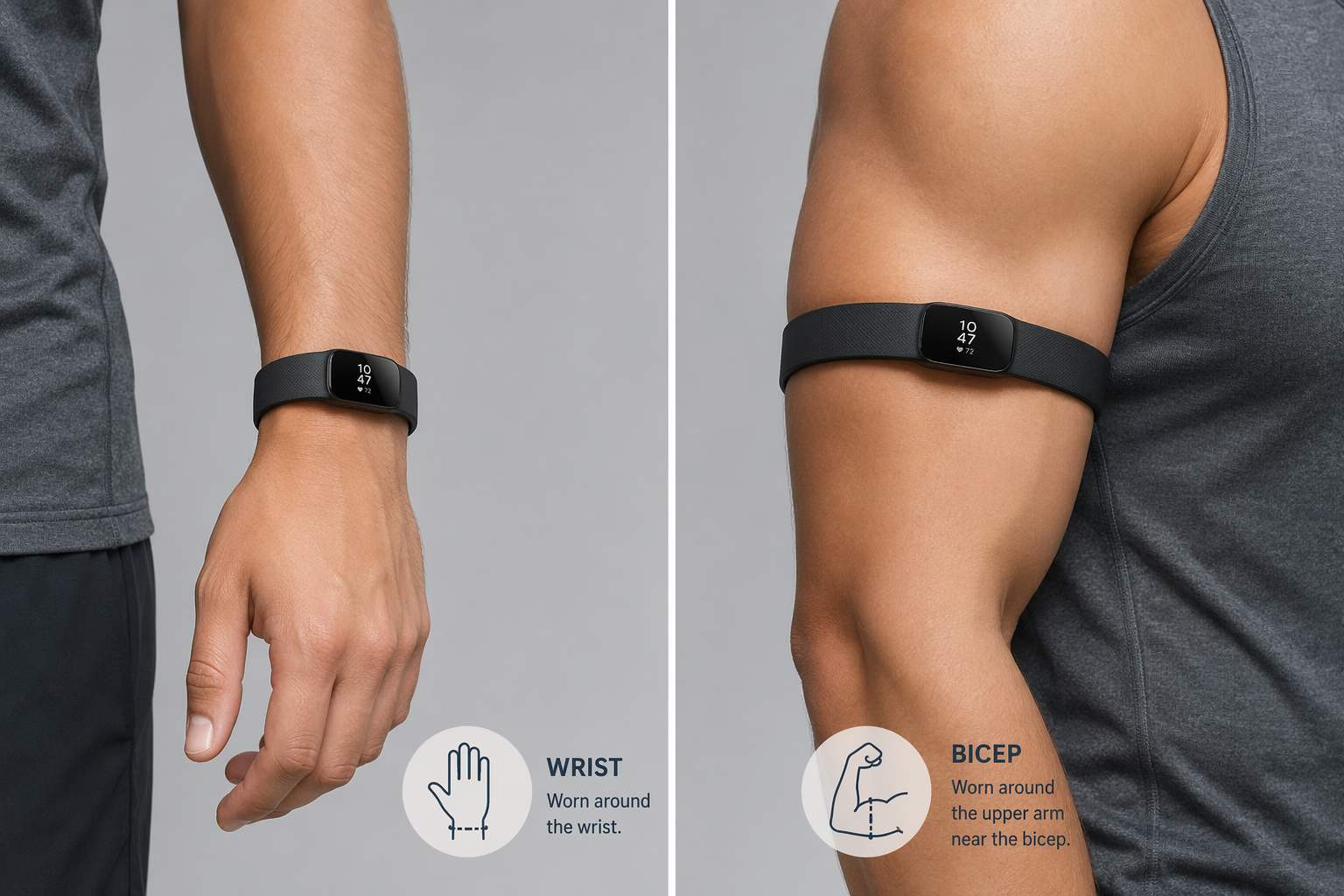
The biceps solution is simple: buy an armband clip and wear it there during workouts. But many users won't do that. They'll wear the band on the wrist 24/7 and wonder why their strain score doesn't match how they feel. This is a deciding factor: if you aren't willing to wear it on your biceps during training, you lose the accuracy that makes the recovery data worth having. I've seen people give up on Whoop for exactly this reason.
For a deeper look at form factor trade-offs, our heart rate monitor form factor guide explains why armband and chest strap placement consistently outperforms wrist for optical HR.
Strength Trainer Is Unique, But Only If You Log
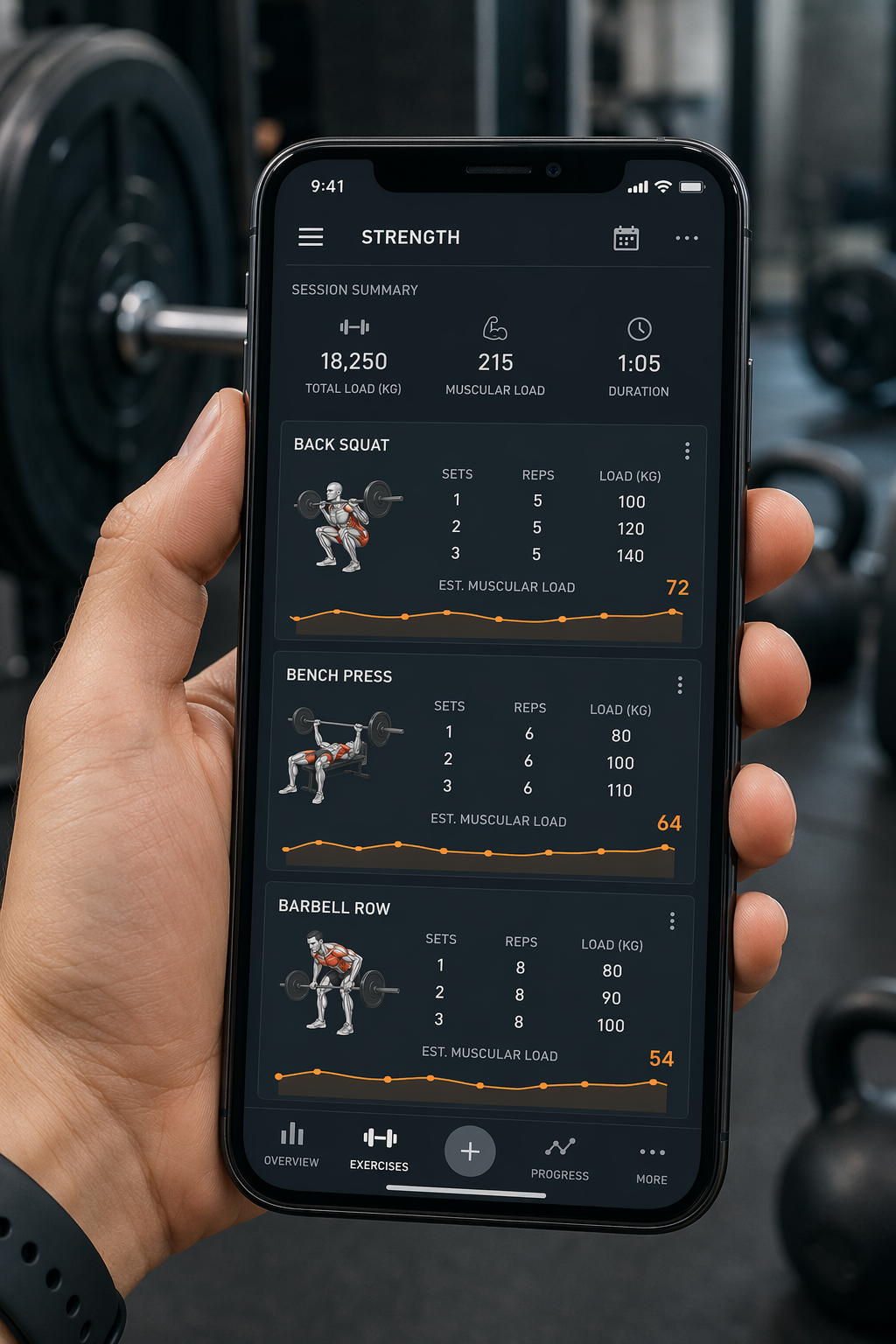
Whoop's Strength Trainer is the one feature no other mainstream wearable does. It uses velocity-based training (VBT) principles to calculate muscular load — tracking how heavy each set feels based on your bar speed, not just heart rate. The5krunner notes that no other mainstream wearable models muscular load this way. If you're serious about strength training and want to quantify your work capacity, this is genuinely useful.
But there's a catch: you have to log every set, every rep, every weight. Whoop's automatic detection is unreliable — the Women's Health Mag reviewer noted it consistently missed strength training sessions. So you're manually entering each exercise on your phone between sets. The question is: how many home fitness users will actually do that consistently, day after day, for weeks and months? I've seen this pattern before. A feature looks amazing in marketing, then becomes a dead feature because the effort required to use it exceeds the perceived benefit. If you are the type of person who already logs every rep in a notebook or app, Strength Trainer adds a new layer of data. If you're not, you'll stop using it after two weeks, and the feature becomes noise.
Healthspan Takes a Month – Is That a Problem?
Whoop's new Healthspan feature estimates your "physiological age" and pace of aging. It sounds compelling. But the onboarding delay is real: 21 days to get a VO2 max reading, 31 days for a healthspan prediction. For a new user excited about the longevity angle, that's a month of wearing a band before you see the headline number. That's a month of paying the subscription with no payoff. The AI Coach is another slow-burn feature. It integrates with the optional Advanced Labs blood test ($200) that pulls in 65 biomarkers. Again, this requires the test, the patience, and the commitment. For the casual user who just wants to know if they slept well last night, these features are overkill.
Who Should Buy – And Who Should Walk Away
After working through the numbers, the accuracy caveats, and the real-usage patterns, the answer is clear only if you fit a specific profile.
Buy the Whoop 5.0 (Peak tier) if: you consistently use strain coaching and sleep debt data to adjust your training. You log your strength sets and reps — or you intend to. You are willing to wear the band on your biceps during workouts for best accuracy. You have the discipline to follow the daily recovery and strain targets. And you accept that you'll be paying $239 every year for the foreseeable future.
Skip it if: you're a casual user who wants a simple activity and sleep tracker. You prefer wearing a watch that also tells time. You don't log workouts manually. You're not interested in wearing an armband. You'd rather pay once and own the hardware. For you, an Apple Watch SE or a Fitbit Air (released just last week, so long-term reliability is unproven) will deliver 80% of the benefit for a fraction of the long-term cost.
If you're still unsure, our workout-type tracker guide can help you match device features to your actual routine.
The Whoop 5.0 is the best recovery-focused wearable I've tested for someone who will actually use its core features — strain guidance, sleep debt calculation, and Strength Trainer logging. The hardware is excellent, the battery is finally good, and the biceps accuracy is genuinely best-in-class.
But the subscription cost is the real price of admission. Over three years, Peak membership costs $717 — nearly double the cost of an Apple Watch SE, and you don't own anything at the end. The value proposition only works if you engage with the daily metrics, log your training, and wear the band in the correct position. If you treat it as a passive data collector, the cost is impossible to justify. My recommendation: choose Peak if you're the type of person who will live inside the app. Skip it for everyone else.
This result comes from one real apartment under the stated conditions — it is a strong signal, not a guarantee your space will measure identically.
Builds this evidence supports
No build currently links to this specific test. Browse all builds with a matching tag.
Spot something off?
If this result didn't match your own space, let us know — floor-damage and noise claims carry real deposit-risk consequences if we get them wrong.