
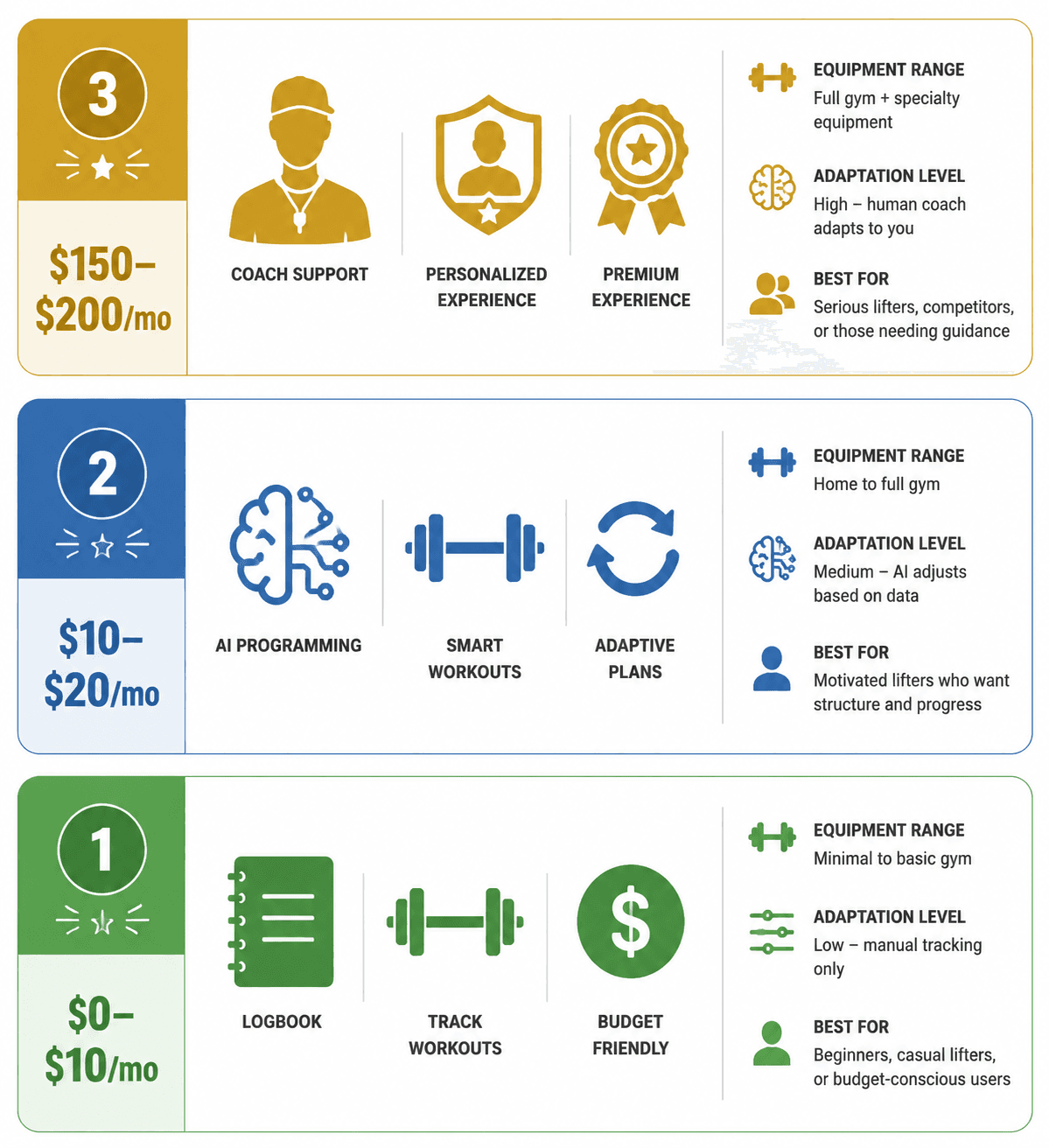
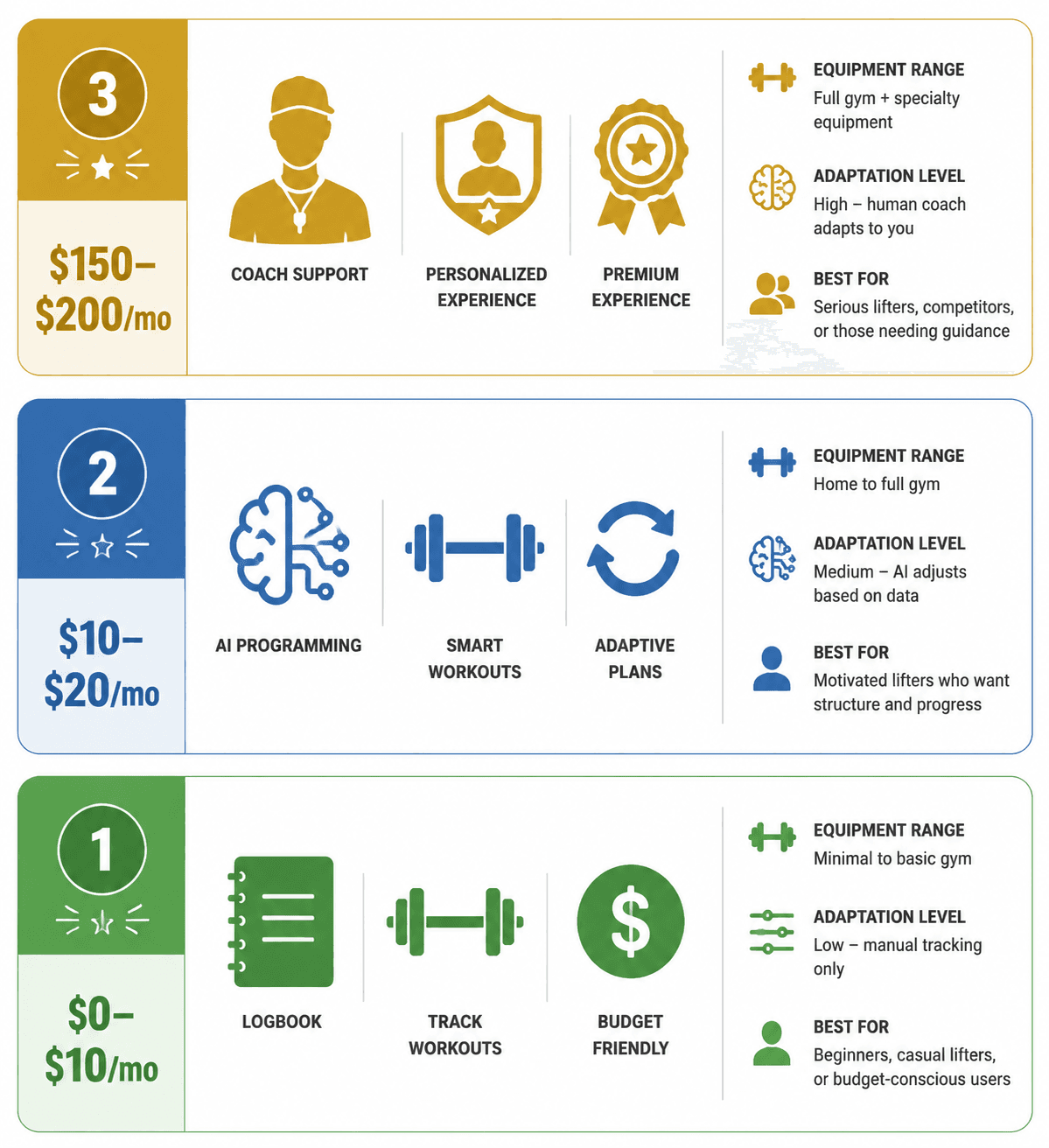
A strength training app only starts to become comparable after you know what job it is supposed to do. One person needs a free place to follow beginner workouts and record sets. Another needs an app to decide whether today’s dumbbell press should move from 35s to 40s. Someone else needs a coach to look at missed sessions, questionable form, and the fact that the plan keeps restarting every six weeks.
That is why a single ranked list gets messy fast. Garage Gym Reviews reported an average workout app cost of $34 per month, while strength-focused options in its comparison ran from free tools such as Nike Training Club and Caliber’s free tier to platforms around $200 per month such as Future and Caliber Premium.[1] Those products are not higher- and lower-priced versions of the same thing. They are different categories.
| Tier | Typical monthly cost | What it mainly does | Best fit | Where it tends to fail |
|---|---|---|---|---|
| Free or cheap logbooks and workout libraries | $0-$10 | Tracks workouts, provides exercises or preset routines | Beginners, DIY lifters, people testing consistency | Limited adaptation and progression judgment |
| AI-programmed strength apps | $10-$20 | Builds and adjusts plans using training inputs | Lifters who know the basics but do not want to program | Weak if equipment filters, substitutions, or progression rules are vague |
| Human-coached platforms | $150-$200 | Adds coach oversight, accountability, and feedback | People whose bottleneck is adherence, form review, or decision fatigue | Too expensive if all you need is a decent plan |
The crowded feeling around these apps is real. Fitness apps generated $3.4 billion in revenue in 2025, up 24.5% year over year, and subscriptions accounted for 65% of that revenue, according to Business of Apps’ narrower fitness app segment data.[2] That subscription pressure matters more to an individual lifter than the market story itself: if you are likely to quit after a few weeks, an annual plan can turn a small mistake into an annoying one.
Start With the Tier, Not the Brand
The useful first question is not “What is the best strength training app?” It is “How much decision-making do I need the app to take off my plate?”
If you already have a program, a logbook may be enough. Strong and Hevy sit in that digital logbook category in FindYourEdge’s 2026 strength app framework, while Fitbod, TR[Ai]NER, SHRED, and Alpha Progression are treated as AI programmers, and Future and Caliber Premium sit in the human-coached tier.[3] That classification is more useful than asking whether one app has a cleaner home screen than another.
The three categories also explain why two people can have opposite experiences with the same app. A beginner may love a free workout library because it removes the blank-page problem. An intermediate lifter may hate the same app because it does not tell them how to progress once the first easy gains are gone. A busy professional may find a $150 monthly coaching platform worth it because the coach is the only part of the system they do not ignore.
For a deeper split between DIY tracking, AI coaching, and human coaching, the comparison in AI Coaching vs Human Coaching vs DIY Tracking is the cleaner side road. Here, the job is to narrow the buying decision.
Free and Cheap Apps: Good Runway, Limited Steering
A free app is not automatically a weak app. Nike Training Club offers more than 300 workouts, and Caliber has a free tier that reviewers treat as genuinely useful for people who need structure without paying right away.[1][4] For someone who has never lifted consistently, that can be enough for the first phase: choose sessions, learn movement names, track what happened, and stop rebuilding the plan every Monday.
This tier works best when the problem is starting. It is less reliable when the problem becomes progression. Strength training depends on progressive overload: over time, the work has to increase through load, reps, sets, range of motion, density, or exercise difficulty. Garage Gym Reviews scores apps on progressive overload implementation, which is the right feature to isolate because it separates a training tool from a list of workouts.[1]
A beginner can often make progress for three to six months with a simple routine, honest logging, and repeated practice. The catch is that the app may not know why a lift stalled. It may not know whether the issue is fatigue, too much volume, poor exercise selection, inconsistent effort, or a dumbbell set that jumps by more weight than the user can handle. At that point, the user is no longer asking for access to workouts. They are asking for judgment.
Free or cheap apps fit best when:
- You are new enough that repeating basic patterns matters more than optimizing weekly volume.
- You can tolerate limited personalization while you find out whether you will train consistently.
- You already have a program from a coach, book, template, or trusted source and mainly need logging.
- You are not ready to commit to a subscription and want to avoid paying for motivation you have not tested yet.
The upgrade point is usually practical, not philosophical. If you keep asking what weight to use next week, how to swap an exercise your home setup cannot support, or whether to deload after several bad sessions, a free library is probably no longer carrying enough of the load. The beginner-specific feature filter in Workout Apps for Beginners: 4 Features That Actually Tell You If an App Will Work is useful before paying for anything more complicated.
AI-Programmed Apps: The Middle Tier That Deserves the Most Scrutiny
The $10-$20 monthly tier is where many home lifters should spend the most time comparing. These apps promise to turn workout history, available equipment, recovery inputs, and goals into a plan that changes over time. If that promise is handled well, it is a strong value: you are not paying for a human coach, but you are paying for the part many lifters avoid or guess at.
The word “adaptive” needs inspection. A useful AI-programmed strength app should do more than reshuffle exercises when you skip a day. It should have visible rules for progression, workable substitutions, and a way to keep the training week coherent when your equipment or recovery changes. Fitbod, for example, is described by Garage Gym Reviews as offering more than 1,400 exercises and equipment filtering across more than 300 pieces of gear.[1] That breadth matters only if the substitutions still train the same pattern at a sensible difficulty.
For home training, equipment filtering is not a convenience feature. It is the difference between doing the session and abandoning it. A plan that asks for a cable stack, leg press, or squat rack in a living room has failed before the first set. Nike Training Club is noted as bodyweight-friendly, while StrongLifts 5x5 requires a barbell and rack.[1] Neither fact makes one app better for everyone. It makes each app honest for a different room.
A lifter with adjustable dumbbells and bands needs different substitutions than someone with a full garage rack. The app should let that person remove equipment they do not own, keep alternatives realistic, and avoid turning every lower-body day into a random collection of lunges. For a more equipment-first filter, use Best Strength Training Apps for Home Gyms with Limited Equipment (2026) or the broader Best Fitness Apps for Your Home Gym Equipment Level.
Where AI Apps Fit Best
The strongest candidate for this tier is not the absolute beginner who still needs to learn how a hinge feels. It is the person with enough lifting experience to recognize effort, use acceptable form, and log honestly, but not enough programming confidence to decide when volume should rise or when an exercise swap changes the training effect.
That often means the three-to-six-month lifter who has exhausted novelty gains, the home dumbbell user who keeps repeating the same weights, or the intermediate lifter who knows they should progress but keeps changing routines before the data means anything. For them, a good AI app can reduce the number of decisions between opening the app and doing the work.
| Your situation | What the AI app must handle | What to avoid |
|---|---|---|
| Bodyweight only | Exercise difficulty progressions, tempo, unilateral work, clear substitutions | Programs that assume load increases are always available |
| Dumbbells and bands | Small load jumps, rep-range progression, movement-pattern substitutions | Plans that treat dumbbells like a full gym |
| Barbell or full rack | Load progression, deload logic, weekly volume control | Apps that randomize workouts without preserving the main lifts |
| Inconsistent schedule | Session reshuffling without destroying the week’s training balance | Simple calendar shifting that ignores fatigue and missed work |
The testing question is simple: after three workouts, can you tell why the app changed something? If the app raises load after completed sets, gives a reasonable alternative when equipment is missing, or adjusts volume after repeated misses, the adaptation is at least visible. If it only generates a fresh workout and calls that personalization, it may be closer to a workout library with a nicer interface.
Some comparison sources in this category come from companies that publish their own fitness products. FindYourEdge and Zing Coach can still be useful for feature analysis, but their rankings deserve a little distance when they overlap with commercial interests.[3] Independent review sites are not perfect either, especially when affiliate links are involved, but cross-checking categories, prices, and feature claims helps keep the decision grounded.
Human-Coached Apps: Expensive, Sometimes Correct
The $150-$200 tier should not be treated as a premium version of an AI programmer. It is a different purchase. Future and Caliber Premium are examples of platforms with real trainer oversight in this price range.[1] The added value is not just a plan; it is accountability, review, and another person noticing when the plan is not being followed or cannot be followed.
That can be worth paying for when the bottleneck is human. If you keep skipping sessions unless someone checks in, if form uncertainty makes you avoid heavier sets, or if decision fatigue causes constant program hopping, a cheaper app may keep proving the same point. The plan was never the only missing piece.
It is still a serious monthly bill. At $150 per month, a user is looking at $900 over six months; at $200 per month, the same period reaches $1,200. Those numbers do not come from an app review score. They come from the bank account. A coaching platform should be chosen because its human layer solves the problem that made cheaper tools fail, not because it appears higher on a best-app list.
Do Not Ignore Billing and Drop-Off
Subscription design is part of the product experience. Business of Apps reports that most fitness app users drop within 90 days, which makes annual billing a poor first move for many new users.[2] A discounted yearly price can be rational after the app has survived ordinary life: missed workouts, travel, low motivation, equipment limits, and the first boring block of repeated exercises.
A month-to-month test is especially sensible if you are changing tiers. Moving from free tracking to AI programming changes the app’s responsibility. Moving from AI programming to human coaching changes the relationship entirely. The annual cost comparison in Fitness Apps for iPhone: What Free vs Paid Tiers Actually Cost Over a Year is better suited to the spreadsheet version of this decision.
Retention statistics do not predict your personal behavior, but they do warn against overconfidence. If you have abandoned three apps before, the next app needs to remove the specific friction that broke the previous attempts. More exercises, a prettier dashboard, or a bigger discount may not touch the real issue. That pattern is covered more directly in Why Your Workout App Failed (and What to Look for Instead).
A Practical Selection Rule
Choose a free or cheap logbook or workout library if you need structure, exercise exposure, and basic tracking, and you can tolerate limited adaptation. This is the right place to begin if you are still proving consistency or already have a program from somewhere else. The tradeoff between free and paid beginner tools is covered in Free vs. Paid Workout Apps for Beginners, and the muscle-building limits of free apps are treated separately in Can You Actually Build Muscle With Free Fitness Apps?.
Choose an AI-programmed app if you know the basics, own enough equipment for repeatable training, and want the app to handle progression, substitutions, and programming decisions. This is the most promising value tier for many home lifters, but only when the adaptation is specific enough to inspect.
Pay for human coaching only when accountability, form feedback, or decision fatigue is the part that keeps breaking the plan. If the real problem is that you do not know what to do next, an AI programmer may be enough. If the real problem is that you know what to do and still do not do it, the human layer may finally be the feature that matters.
References
- Expert-Tested: The Best Workout Apps (2026), Garage Gym Reviews.
- Fitness App Revenue and Usage Statistics (2026), Business of Apps.
- Best Strength Training Apps in 2026: Tested on Apple Watch, Hevy vs Strong vs Fitbod and More, FindYourEdge.
- Forbes Health.
Comments
Join the discussion with an anonymous comment.